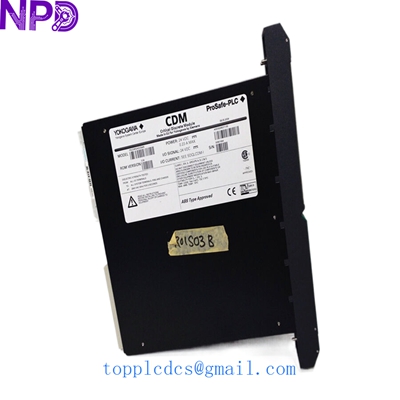

Description
- Model: Yokogawa PSCDM024DCBAN 16800-5415
- Brand: Yokogawa (Japan)
- Series: Centum CS 3000 / Centum VP
- Core Function: DC-to-DC Power Supply Module for I/O nodes
- Product Type: Power Supply Card
- Key Specs: 24 V DC Input | High-efficiency conversion | Fault signaling
- Input Voltage: 24 V DC (Acceptable range 20.4 to 28.8 V DC)
- Input Current: Approx. 5.5 A at nominal load
- Output Voltages: System-side logic and bus voltages
- Power Consumption: 120 W maximum
- Mounting: I/O unit power supply slot
- Status LEDs: Green (Ready), Red (Fault)
- Protection: Overvoltage, overcurrent, and thermal shutdown
- Communication: I/O bus status reporting
- Isolation: Input-to-output isolation tested at 500 V AC
- Operating Humidity: 10% to 90% RH (Non-condensing)
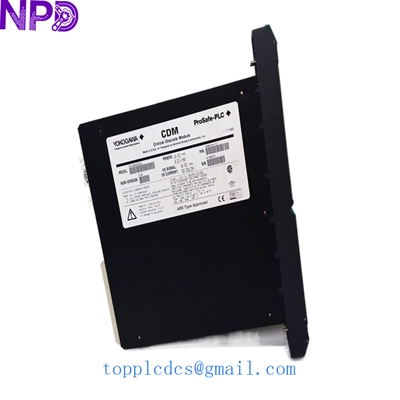
YOKOGAWA PSCDM024DCBAN 16800-5415
Application Scenarios & Pain Points
In many offshore platforms or remote pumping stations, AC power isn’t always reliable or available. These sites run on 24V battery banks and DC UPS systems. The PSCDM024DCBAN is the critical link that takes that raw 24V DC and cleans it up for the sensitive electronics in the Yokogawa I/O nests.
The biggest headache for engineers here is “dirty DC.” If your site batteries are aging or the charging circuit is noisy, it puts massive stress on the input filters of this module. When this card fails, it usually doesn’t just “stop”—it can sometimes pass noise onto the I/O bus, leading to “ghost” alarms or flickering analog signals that are a nightmare to troubleshoot.
Typical Application Scenarios:
- Offshore Oil & Gas Platforms Powered by 24V DC solar/battery arrays, ensuring the DCS remains operational during primary power loss.
- Remote Pipeline Monitoring Used in SCADA nodes where DC power is the primary source, providing high-reliability power to flow-computing modules.
- Critical Safety Systems (SIS) Integrating with ProSafe-RS hardware in environments requiring redundant DC feeds for maximum availability.
The “Ghost in the Machine” Case Study:
Background: A gas compression station in the Middle East started reporting intermittent “I/O Communication Error” alarms on a specific node. The errors would happen for 10 seconds and then disappear.
Problem: The site team replaced the communication modules and the I/O cards, but the problem persisted. They were about to fly in a specialist from the OEM.
Solution: We suggested they check the power supply first. Even though the “Ready” light was green, our experience told us the internal filtering might be failing. They ordered a PSCDM024DCBAN (16800-5415) from our stock.
Result: Upon swapping the module, the “ghost” alarms vanished. The old module’s capacitors had dried out in the desert heat, causing high-frequency ripple that was confusing the digital bus.
- Avoided Cost: $15,000 in specialist travel and 4 more days of troubleshooting.
- Key takeaway: If your DCS acts “weird” but doesn’t “die,” look at the power card first.
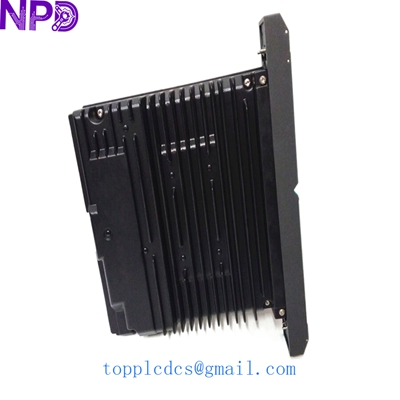
YOKOGAWA PSCDM024DCBAN 16800-5415
Compatible Replacement Models
| Original Model | Replacement Model | Compatibility | Key Difference | Workload |
| PSCDM024DCBAN | PW481-11 | ⚠️ Software Compatible | Newer VP series style; fits same slot but might need system definition update. | 2-4 Hours |
| PSCDM024DCBAN | 16800-5410 | ✅ Direct Replacement | Older revision; fully interchangeable. | 0 Hours |
Engineer’s Note: Yokogawa parts often have the long alphanumeric code and a five-plus-four numeric code (like 16800-5415). As long as the base model PSCDM024DCBAN matches, the suffix usually denotes revision levels that are backward compatible.
Troubleshooting Quick Reference
| Symptom | Possible Cause | Part Relevance | Quick Check | Handling |
| All I/O cards in nest are ‘O/S’ (Out of Service) | DC Output Failure | ✅ High | Measure 24V at the input terminals first. | If input is 24V but nest is dead, replace PSCDM. |
| Red ‘Fault’ LED is flickering | Overload / Short circuit | ⚠️ Medium | Pull all I/O cards and see if the LED goes Green. | If Green with no load, one of your I/O cards is shorted. |
| System reports ‘Power Supply Fan Failure’ | Internal sensor trip | ✅ High | Check if the module is hot to the touch or if vents are blocked. | Clean vents; if error remains, internal sensor is shot. |
Technical Pitfalls to Avoid:
- ❗ Terminal Tightness: Since this is a DC module pulling ~5.5A, a loose terminal screw will create heat and eventually melt the plastic housing. Torque matters.
- ❗ Redundancy Check: If you are running a redundant nest, make sure the “Secondary” supply is actually alive before you pull the “Primary.” I’ve seen whole plants trip because an engineer pulled the only working supply, thinking the other one was online.
- ❗ Jumper Settings: Some Yokogawa board types use address pins on the backplane. Ensure the alignment pins on the 16800-5415 are straight before insertion.
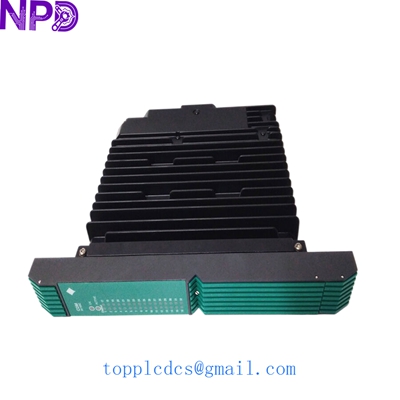
YOKOGAWA PSCDM024DCBAN 16800-5415
SOP Quality & Testing Process
We treat industrial power supplies with extreme care. Every PSCDM024DCBAN follows this protocol:
- Source Traceability: Verified as original Yokogawa stock; no “third-party clones” allowed.
- Full Load Test: We use an adjustable electronic load (Chroma) to pull the full 120W from the module for 8 hours. We monitor for voltage sag.
- Oscilloscope Ripple Test: We verify that the output DC ripple is within Yokogawa’s original factory tolerances (typically <100mV p-p).
- Static Discharge (ESD) Packaging: Once passed, the unit is immediately placed in a silver-shielding ESD bag and sealed with a “QC Passed” tamper-evident label dated March 2026.
Related Inventory (Available Now)
- Yokogawa PSCDM024DCBAN | 16800-5415 (5 Units)
- Yokogawa AIP111 | Interface Card
- Yokogawa ADV151-P00 | Digital Input
- Yokogawa ADV551-P00 | Digital Output
- Yokogawa AAI143-H00 | Analog Input
- Yokogawa AAI543-H00 | Analog Output
- Yokogawa CP451-10 | Processor
- Yokogawa VI702 | Vnet/IP Card
- Yokogawa SB401-10 | Bus Slave
- Yokogawa PW482-10 | Power Supply