
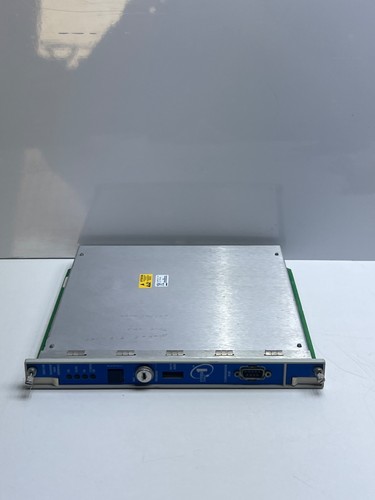
The 3500/22M (138607-01) is the core communication and data acquisition interface for the Bently Nevada 3500 Machinery Protection System. Often referred to as the Transient Data Interface (TDI), this module acts as the primary link between the 3500 rack and the external monitoring software (typically System 1).
Key Functions
- Static and Transient Data: Collects both steady-state (e.g., vibration levels) and transient (e.g., startup/coast-down waveforms) data.
- Rack Configuration: Serves as the central point for managing the configuration settings of all other modules in the rack.
- Protocol Gateway: Translates internal backplane data into industry-standard protocols like Modbus for DCS/SCADA integration.
Product Specifications
| Feature | Details |
| Model Number | 3500/22M |
| Part Number | 138607-01 |
| Device Type | Transient Data Interface (TDI) |
| Communication | Ethernet (10/100Base-T), RS-232/485 |
| Mounting | Dedicated Slot 1 (adjacent to power supplies) |
| Operating Temp | -30°C to +65°C (-22°F to +149°F) |
Application Fields
The TDI is critical for rotating machinery health, particularly in:
- Gas and Steam Turbines: Analyzing high-resolution vibration data during critical speed transitions.
- Centrifugal Compressors: Correlating process changes with mechanical vibration signatures.
- Condition Monitoring: Providing the “raw waveform” data required for advanced orbital analysis and diagnostic troubleshooting.
Usage and Maintenance
- Physical Installation: The TDI must be installed in the first slot of the 3500 rack to communicate with the rack backplane.
- Connectivity: Connect the Ethernet port to your plant’s control network. Ensure the IP address, subnet, and gateway are configured correctly via the 3500 Rack Configuration Software.
- Firmware/Revision: Ensure the revision (e.g., -01AB) matches your rack’s firmware requirements. Using mismatched revisions can lead to communication errors or inability to utilize newer software features in System 1.
- Diagnostic Monitoring: Monitor the front panel LEDs. The “COMM” LED should indicate a successful link to the host software, while the “OK” LED indicates that the module’s self-diagnostics have passed.
Frequently Asked Questions
- Q: Can the 3500/22M replace a standard Interface Module?
A: Yes, it is a functional upgrade that replaces the older standard interface modules while adding the ability to collect and buffer high-resolution transient data.
- Q: Why is transient data important?
A: Transient data captures the “behavior” of a machine during startup and shutdown. This is the most common time for mechanical failures (e.g., rubbing, resonance, or thermal bow) to occur.
- Q: How do I troubleshoot a “Rack Comm” fault?
A: Verify the rack backplane connection, check that the TDI is fully seated, and ensure the configuration loaded into the TDI matches the modules present in the rack slots.


