
Description
Product Description
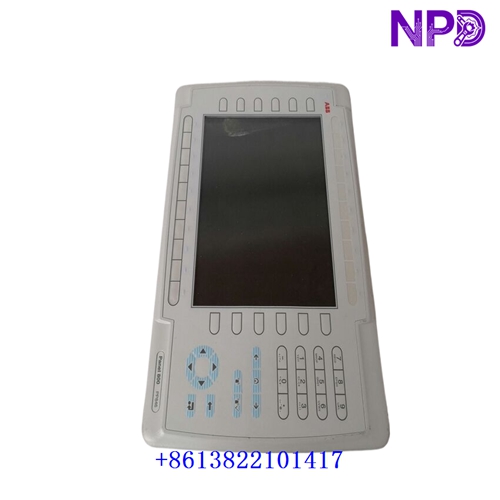
The ABB PP846 3BSE042238R1 is a Panel 800 industrial operator panel designed to provide a local human-machine interface (HMI) for monitoring and operating industrial automation and process control systems. It combines a color TFT display with physical function keys, allowing operators to view process information, access configured screens, acknowledge alarms, and enter operating commands.
The PP846 is equipped with a 10.4-inch color TFT display with 800 × 600 pixel resolution. Its physical keypad supports direct operation in applications where dedicated hardware keys are preferred alongside graphical process visualization.
The panel provides serial communication, Ethernet, USB, and CompactFlash interfaces for system communication, configuration, and data handling. It is configured using ABB Panel Builder 800 software. Before installation, verify the exact hardware revision, project compatibility, communication settings, and available configuration files.
This part number appears in ABB Panel 800 documentation as PP846; a later ABB System 800xA catalog also associates 3BSE042238R1 with the PP846A designation. Confirm the nameplate and revision before ordering a replacement.
PP846 3BSE042238R1
Product Datasheet
| Parameter | Description |
|---|---|
| Brand | ABB |
| Model | PP846 |
| Order Number | 3BSE042238R1 |
| Product Type | Industrial Operator Panel / HMI |
| Product Series | Panel 800 |
| Display Size | 10.4-inch TFT color display |
| Display Resolution | 800 × 600 pixels |
| Display Colors | 64K colors |
| Operator Interface | Display with physical function keys |
| Communication Interfaces | RS232C, RS422/RS485, Ethernet |
| Additional Interfaces | USB Host, USB Device, CompactFlash Type I/II |
| Application Memory | 12 MB, including fonts |
| Configuration Software | ABB Panel Builder 800 |
| Front Protection | IP66 |
| Rear Protection | IP20 |
| Operating Temperature | 0 to +50 °C, vertical installation; 0 to +40 °C, horizontal installation |
| Storage Temperature | -20 to +70 °C |
| Relative Humidity | 5–85%, non-condensing |
| Product Condition | Confirm actual stock condition before purchase |
| Country of Origin | Verify from product label and shipping documentation |
Technical Features & Specifications
Display and Operator Interface
The 10.4-inch TFT-LCD provides a graphical interface for configured process screens, equipment status, alarms, and operating parameters. The physical function keys provide direct access to assigned functions and screen operations. The display specification for this order number is 800 × 600 pixels with 64K colors.
Communication Interfaces
The PP846 provides multiple communication connections:
- RS232C through a 9-pin D-sub connector.
- RS422/RS485 through a 25-pin D-sub connector.
- Ethernet through a shielded RJ45 connector.
- USB Host Type A and USB Device Type B.
- CompactFlash Type I and Type II slot.
The actual communication protocol and controller connection depend on the configured application and system architecture. Confirm port assignments, cable pinouts, baud rate, addressing, and protocol settings against the existing project documentation.
Configuration and Application Memory
ABB Panel Builder 800 is required to configure the panel. The application memory is specified as 12 MB, including fonts. Before replacing an installed unit, preserve the original project, configuration files, communication parameters, and any available backup media.
Environmental and Enclosure Protection
The front panel has an IP66 sealing rating, while the rear enclosure is rated IP20. The cabinet cutout, rear clearance, ventilation, and cable routing should therefore be considered during installation. The rear side must be protected from dust, moisture, and accidental contact in accordance with the installation environment.
Application Scenarios
- Local operator interface for industrial process control systems.
- Machine status and alarm monitoring.
- Operator access to configured process screens and equipment parameters.
- Control cabinet HMI replacement and maintenance.
- Industrial production lines requiring physical function keys.
- Power generation and process industry control-room or equipment-panel applications, subject to system configuration.
First-Time Installation Checklist
- Verify that the nameplate identifies PP846 and order number 3BSE042238R1.
- Compare the hardware revision and connector layout with the existing panel.
- Confirm the cabinet cutout, mounting depth, and rear clearance.
- Verify the power supply requirements from the applicable product manual and unit label.
- Check Ethernet and serial cable types, pin assignments, shielding, and grounding.
- Confirm the required Panel Builder 800 software version and project compatibility.
- Back up the existing HMI application and communication settings before replacement.
- Load the approved project and verify screen navigation, alarms, and operator-key functions.
- Test communication with the connected controller before returning the equipment to service.
Daily Maintenance
- Keep the front display and keypad clean using an approved, non-abrasive cleaning method.
- Check for damaged keys, display discoloration, flickering, or backlight degradation.
- Inspect connectors and cables for looseness, corrosion, or physical damage.
- Check cabinet temperature, ventilation, and moisture protection.
- Review communication alarms and intermittent connection events.
- Maintain current backups of the HMI application and configuration files.
Troubleshooting & Frequently Asked Questions
Q1: The panel powers on but does not communicate with the controller. What should be checked?
Check the selected communication port, cable pinout, protocol configuration, baud rate, node address, and controller-side communication settings. Confirm that the loaded HMI project matches the connected control system.
Q2: The display is blank or difficult to read. What should be checked?
Check the supply connection, panel status, display condition, and backlight. If the unit powers up but the display remains blank, further inspection or repair may be required.
Q3: Can an existing PP846 application be transferred to a replacement panel?
Application transfer depends on the available project backup, software version, panel hardware revision, and configuration compatibility. Verify the project using ABB Panel Builder 800 before commissioning.
Q4: Is PP846 interchangeable with PP836 or PP826?
Not automatically. These panels differ in display size and resolution, and may require different cabinet cutouts and project adjustments. Confirm the application and hardware compatibility before substitution.
Q5: Is PP846 the same as PP846A?
ABB documentation uses both PP846 and PP846A designations in association with this product family. For procurement and replacement, use the complete order number 3BSE042238R1 and verify the nameplate and hardware revision.
Q6: What should be checked before purchasing a used unit?
Request clear photographs of the front, rear label, connectors, and serial number. Confirm display operation, keypad response, communication ports, and whether the original application can be loaded.
Safety Precautions
- Isolate the panel from its power source before wiring or removing connectors.
- Confirm the correct supply voltage and connection polarity from the applicable manual and product label.
- Do not expose the rear enclosure to liquids or conductive dust.
- Use shielded communication cables and appropriate grounding practices.
- Do not connect or disconnect communication cables while energized unless the system documentation explicitly permits it.
- Test the replacement panel and its configured functions before returning the controlled equipment to operation.
- Follow site lockout/tagout procedures and the applicable ABB installation instructions.
Recommended Related Models & Components
The following are related Panel 800 products and configuration accessories. They are not automatically interchangeable with PP846.
- ABB PP820A – Panel 800 function key panel.
- ABB PP826A – 5.7-inch color function key panel.
- ABB PP836A – 6.5-inch color function key panel.
- ABB PP846A – 10.4-inch color function key panel designation used in later documentation.
- ABB PP845 – 10.4-inch Panel 800 operator panel family.
- ABB PP865 – 15-inch Panel 800 operator panel family.
- ABB RX846 – Protective key cover for PP846.
- ABB RX836 – Protective key cover for PP836.
- ABB RX826 – Protective key cover for PP826.
- ABB Panel Builder 800 – HMI configuration software.
- ABB 3BSE042250R1 – Panel Builder 800 Version 5 software package.
- ABB AC 800M – Controller family used in ABB automation architectures.
- ABB PM866 – AC 800M controller module.
- ABB PM867 – AC 800M controller module.
- ABB System 800xA – Distributed control system platform.