
Description
Product Description
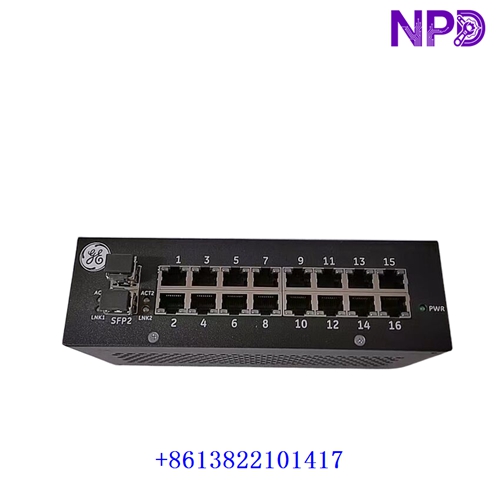
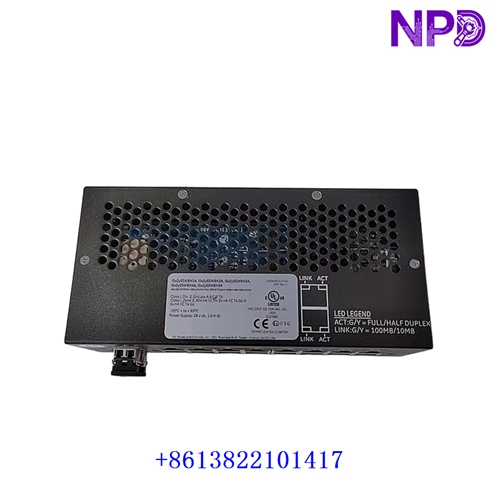
The GE IS420ESWBH2A is an unmanaged industrial Ethernet switch designed for the IONet communication network in GE Mark VIe and Mark VIeS turbine control systems. It provides 16 copper Ethernet ports with 10/100Base-TX RJ-45 interfaces and two 100Base-FX multimode fiber-optic uplink ports with LC connectors. The switch supports IEEE 802.3, 802.3u, and 802.3x standards, with automatic speed and duplex negotiation, HP-MDIX auto-sensing, packet buffering, and flow control. Two independent DC power inputs are diode-OR connected to support redundant power supply arrangements. Status LEDs provide local indication of power, link activity, speed, and duplex. Its DIN-rail mounting design allows installation in industrial control cabinets. The IS420ESWBH2A is intended for GE IONet applications and should not be treated as a general-purpose managed Ethernet switch. When replacing an existing unit, verify the fiber type, connector arrangement, network topology, and approved GE control-system configuration.
IS420ESWBH2A
Product Datasheet
| Parameter | Specification |
|---|---|
| Brand | GE / General Electric |
| Model | IS420ESWBH2A |
| Series | Mark VIe / Mark VIeS |
| Product Name | Industrial Ethernet IONet Switch |
| Product Type | Unmanaged industrial Ethernet switch |
| Network Application | GE IONet |
| Copper Ports | 16 × 10/100Base-TX RJ-45 |
| Fiber Ports | 2 × 100Base-FX multimode fiber |
| Fiber Connectors | LC type |
| Ethernet Standards | IEEE 802.3, 802.3u, 802.3x |
| Negotiation | Automatic speed and full/half-duplex negotiation |
| Additional Features | HP-MDIX auto-sensing, packet buffering, flow control |
| MAC Address Capacity | 4,000 addresses |
| Packet Buffer | Minimum 256 KB |
| Power Input | 24 / 28 V DC nominal; 22.5–28.6 V DC operating range |
| Maximum Current | 1 A |
| Power Redundancy | Dual independent inputs, diode-OR connected |
| Cooling | Natural convection |
| Mounting | DIN rail; compatible mounting clip ordered separately |
| Dimensions | 188 × 86 × 56 mm (H × W × D) |
| Operating Temperature | -40 to +70°C |
| Storage Temperature | -40 to +85°C |
| Relative Humidity | 5–95%, non-condensing |
| Country of Origin | Not independently verified |
| Product Status | Confirm actual condition with seller |
| Discontinued | Not verified |
First-Time Operation Inspection Checklist
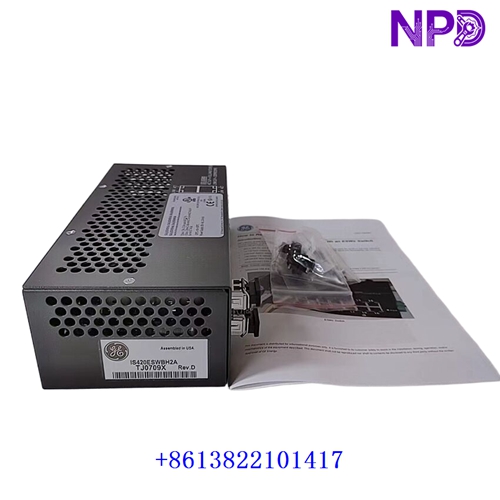
- 🔎 Part-number verification: Confirm IS420ESWBH2A on the nameplate and inspect the hardware condition.
- 🔌 Power connection: Verify the DC supply voltage, polarity, and independent input connections.
- 🔄 Redundant power: Confirm both power sources are correctly wired if redundant supply operation is required.
- 🌐 Copper connections: Inspect all RJ-45 ports and use suitable industrial Cat 5e Ethernet cables.
- 🔦 Fiber connections: Confirm both optical uplinks use compatible 100Base-FX multimode fiber and LC connectors.
- 🧩 Network configuration: Check that the switch is installed in the intended Mark VIe IONet topology.
- 💡 LED inspection: Verify power, link, activity, speed, and duplex indicators during startup.
- 🧪 Communication testing: Confirm communication between controllers, I/O modules, and connected network devices before enabling the process.
- 📋 Documentation: Record the switch part number, port assignments, fiber connections, and power-source details.
Daily Maintenance
- 🔍 Inspect the switch enclosure, mounting clip, and terminal connections for physical damage.
- 🌐 Check RJ-45 cables and connectors for looseness, damaged locking tabs, or intermittent links.
- 🔦 Inspect fiber-optic cables for tight bends, contamination, and damaged connectors.
- 💡 Monitor link and activity LEDs for unexpected communication interruptions.
- ⚡ Check both DC power inputs and investigate abnormal power-status indications.
- 🌡️ Maintain cabinet temperature and ventilation within the specified operating range.
- 🧹 Keep the switch free from conductive dust, moisture, and excessive contamination.
- 📝 Record network interruptions, power alarms, and maintenance activities.
Troubleshooting and Frequently Asked Questions
Q1: What is the function of the IS420ESWBH2A?
It distributes Ethernet communication across a GE Mark VIe IONet network, connecting compatible control-system equipment through copper and fiber-optic interfaces.
Q2: How many network ports does this model provide?
It provides 16 copper 10/100Base-TX RJ-45 ports and two 100Base-FX multimode fiber-optic uplink ports.
Q3: Is the IS420ESWBH2A a managed Ethernet switch?
No. It is an unmanaged industrial Ethernet switch. It does not provide the normal managed-switch configuration functions found in enterprise network equipment.
Q4: Can it replace the IS420ESWBH1A?
Not necessarily. The IS420ESWBH1A has one multimode fiber uplink, while the IS420ESWBH2A has two. Check the installed network’s fiber requirements and port assignments before substitution.
Q5: What should be checked if a network link is unavailable?
Inspect the DC supply, power LEDs, RJ-45 connections, fiber connectors, cable continuity, and link indicators. Also confirm that the connected equipment and network topology are compatible with the Mark VIe IONet design.
Q6: Can single-mode fiber be connected directly to this model?
The IS420ESWBH2A is the multimode fiber version. Do not substitute single-mode fiber or optical transceivers without verifying the approved interface and optical specifications.
Q7: Does the switch support redundant power?
Yes. It has two independent DC power inputs connected through diode-OR circuitry, allowing a redundant supply arrangement.
Q8: Can an ordinary commercial Ethernet switch replace it?
Not as an assumed direct replacement. GE specifies approved industrial switches for Mark VIe IONet networks. An unsupported switch can interfere with I/O communication and control-system operation.
Safety Precautions
- ⚠️ Isolate the DC power sources before removing or rewiring the switch.
- ⚡ Verify supply polarity and voltage before connecting the power terminals.
- 🔒 Do not disconnect network connections during critical turbine operation without an approved maintenance procedure.
- 🔦 Never look directly into an active fiber-optic connector.
- 🧤 Use ESD precautions when handling electronic equipment and connectors.
- 🌡️ Install the switch in an environment within its specified temperature and humidity limits.
- 🧩 Use the appropriate GE-qualified DIN-rail mounting clip.
- 📘 Follow the GE Mark VIe system installation and IONet network documentation.
Recommended GE Related Models
The following models belong to the GE ESWA/ESWB industrial Ethernet switch family. Their port counts and fiber interfaces differ, so they are not all direct replacements for IS420ESWBH2A.
- GE IS420ESWBH1A
- GE IS420ESWBH3A
- GE IS420ESWBH4A
- GE IS420ESWBH5A
- GE IS420ESWAH1A
- GE IS420ESWAH2A
- GE IS420ESWAH3A
- GE IS420ESWAH4A
- GE IS420ESWAH5A
- GE IS421ESWBH1A
- GE IS421ESWBH2A
- GE IS421ESWBH3A
- GE IS421ESWAH1A
- GE IS421ESWAH2A
- GE IS421ESWAH3A