Description
⚙️ Product Overview
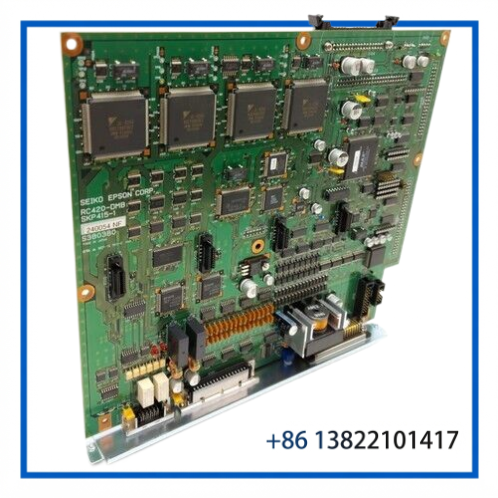
The SEIKO EPSON SKP415-1 is an RC420-DMB Main Control Board designed for the Epson RC420 robot controller. It is also identified as a Drive Control Board / Interface I/O Board within the RC420 controller architecture.
The board serves as a controller-level electronic assembly rather than a complete robot controller. It is intended for maintaining existing Epson robotic systems where the original RC420 control hardware remains in service.
🔧 Key Features
- SEIKO EPSON industrial robot control board
- SKP415-1 / RC420-DMB configuration
- Designed for Epson RC420 robot controllers
- Main control and drive-control functions within the controller architecture
- Interface/I/O board functionality
- PCB-level replacement for legacy robot control equipment
- Suitable for controller maintenance and spare-parts inventory
- Useful for extending the service life of existing Epson robotic installations
- Exact compatibility should be confirmed by part number and controller configuration
📋 Technical Datasheet
| Parameter | Specification |
|---|---|
| Brand | SEIKO EPSON |
| Model | SKP415-1 |
| Part Number / Designation | RC420-DMB |
| Product Series | Epson RC420 Robot Controller |
| Product Name | Main Control Board |
| Product Type | Drive Control / Interface I/O Board |
| Controller Platform | Epson RC420 |
| Primary Function | Robot Control and Drive Interface |
| Board Configuration | SKP415-1 RC420-DMB |
| Product Status | Legacy / Discontinued Industrial Robot Spare |
🤖 RC420 Controller Function
The SKP415-1 operates as a board-level component inside the RC420 robot controller. It should therefore be evaluated together with the controller’s other electronic assemblies, drive circuitry, I/O interfaces, wiring, and robot configuration.
A typical architecture can be represented as:
Epson Robot → RC420 Controller → SKP415-1 DMB → Drive / I/O Electronics → Robot Motion System
The board is particularly relevant when maintaining an existing RC420 controller where replacing the complete controller would be impractical.
🔌 System Integration
Before installing an SKP415-1, verify the complete controller configuration rather than relying only on physical appearance.
Important checks include:
- SKP415-1 part number
- RC420-DMB identification
- Existing RC420 controller model
- Board revision and labels
- Connector locations and pin configuration
- Associated drive/control boards
- Robot model and axis configuration
- Existing controller wiring
- Controller diagnostic status
The SKP415-1 should not automatically be substituted with other Epson SKP-series boards simply because they have a similar PCB format.
🏭 Typical Applications
The board is intended for legacy Epson robot systems used in applications such as:
- Industrial assembly
- Pick-and-place automation
- Material handling
- Machine tending
- Component positioning
- Automated production cells
- Precision manufacturing
- Legacy Epson RC420 robotic installations
🛠️ Installation & Commissioning
Before replacing the board, completely isolate the robot controller and follow appropriate electrical and ESD procedures.
- Record the original board part number and revision.
- Confirm the replacement is SKP415-1 RC420-DMB.
- Inspect the replacement PCB and connectors.
- Check the RC420 backplane and mating connectors.
- Use ESD-safe handling during installation.
- Install the board in the original controller position.
- Reconnect all cables according to the original configuration.
- Restore power according to the controller service procedure.
- Check controller diagnostics and board status.
- Test robot operation at reduced speed before returning to production.
🔍 Troubleshooting
RC420 controller does not start correctly:
Check board seating, controller power, backplane connections, and all associated control boards.
Drive-related alarm appears:
Inspect the drive electronics, motor wiring, feedback circuits, and associated controller interfaces before determining that the SKP415-1 is defective.
I/O functions are unavailable:
Check interface wiring, connectors, external I/O devices, and the related controller configuration.
Intermittent operation occurs:
Inspect PCB contacts, connectors, solder joints, cable assemblies, contamination, and signs of thermal or vibration stress.
Fault remains after board replacement:
Compare the original and replacement board revisions and verify that the RC420 system configuration is compatible with the replacement board.
🧰 Maintenance
For legacy RC420 controllers, recommended maintenance includes:
- Periodic PCB visual inspection
- Connector and backplane inspection
- Removal of excessive dust and contamination
- Verification of cabinet cooling and ventilation
- Inspection of robot control and drive wiring
- Review of controller diagnostic alarms
- Periodic functional testing
- Maintaining a tested replacement board in spare inventory
Store replacement boards in antistatic packaging in a clean, dry environment.
♻️ Replacement Considerations
The SKP415-1 RC420-DMB is a legacy Epson control board, making accurate part-number matching particularly important.
Before purchasing or installing a replacement, verify:
SKP415-1 → RC420-DMB → RC420 Controller → Board Revision → Drive/I/O Configuration → Robot Model
Do not assume that another SKP-series PCB is a direct replacement without confirming its electrical and functional compatibility.
❓ FAQ
What is the SEIKO EPSON SKP415-1?
It is an RC420-DMB Main Control Board used in Epson RC420 robot controllers.
What does RC420-DMB mean?
RC420-DMB identifies the Drive/Main control board assembly associated with the Epson RC420 controller.
Is the SKP415-1 a complete robot controller?
No. It is a PCB assembly installed inside the RC420 controller.
What is the main application of this board?
It is used for controller-level robot control, drive interfacing, and I/O-related functions within an Epson RC420 system.
Is SKP415-1 still a current-generation board?
It is a legacy/discontinued component, making it particularly relevant for maintenance and replacement of existing RC420 installations.
Can another Epson SKP board replace it?
Not automatically. The complete part number, board revision, controller architecture, and robot configuration must be checked.
What should be checked before installation?
Verify the SKP415-1 identification, RC420 controller compatibility, connectors, board revision, wiring, and associated control hardware.
Does replacing the board require testing?
Yes. Controller diagnostics, I/O operation, drive status, robot movement, and safety functions should be checked before production use.
How should the PCB be handled?
Use ESD protection and antistatic packaging to reduce the risk of damage to electronic components.
Is it useful as a spare part?
Yes. The SKP415-1 is a valuable maintenance spare for facilities operating legacy Epson RC420 robot controllers.
📦 10 Related SEIKO EPSON Models / Parts
- SEIKO EPSON SKP373-1 RC420 Drive Main Board
- SEIKO EPSON SKP415-1 RC420-DMB
- SEIKO EPSON SKP416 Circuit Control Board
- SEIKO EPSON SKP417 Circuit Control Board
- SEIKO EPSON SKP376-1 Circuit Control Board
- SEIKO EPSON SKP329-2 I/O Board
- SEIKO EPSON SKP372 Control / Interface Board
- SEIKO EPSON SKP373 Drive Main Board
- SEIKO EPSON SKP374 Drive / Power Board
- SEIKO EPSON SKP375 Power / Control Board
✅ Product Summary
The SEIKO EPSON SKP415-1 is an RC420-DMB Main Control Board for the Epson RC420 robot controller. It is associated with drive-control and interface/I/O functions within the legacy RC420 robotic control architecture.
For replacement applications, match the complete SKP415-1 RC420-DMB identification and verify the controller, board revision, wiring, and robot configuration before installation.