
Description
Product Description
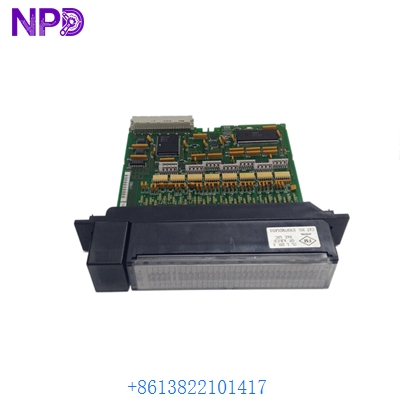
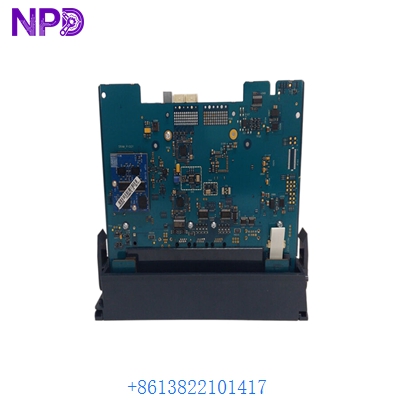
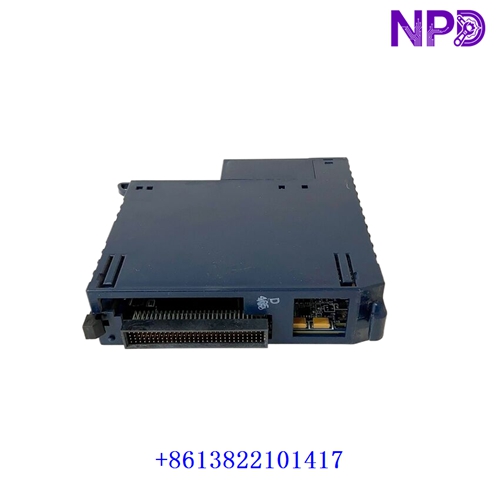
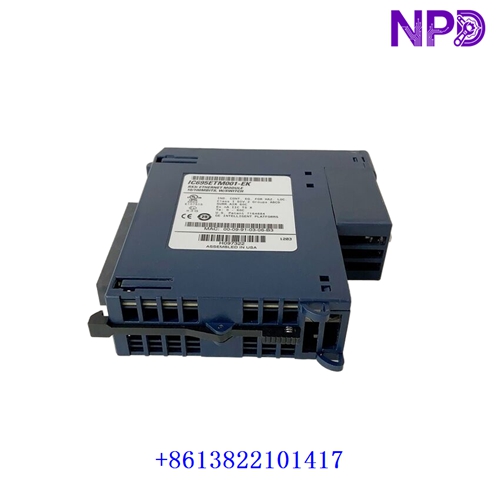
The GE Fanuc IC695ETM001-EK is an Ethernet Interface Module designed for the PACSystems RX3i programmable automation controller. It connects an RX3i CPU to an industrial Ethernet network, enabling communication with other PACSystems controllers, GE Series 90 and VersaMax PLCs, programming computers, HMI systems, and supervisory control equipment.
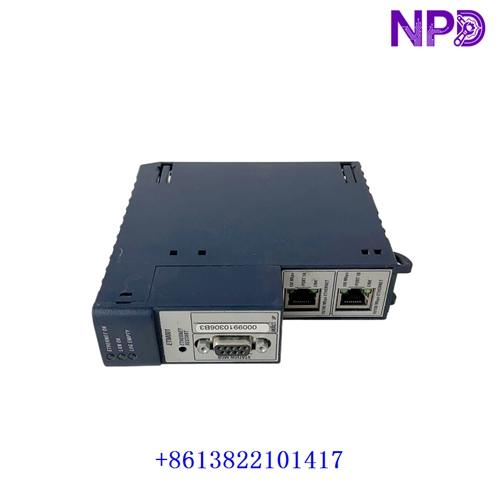
The module provides two 10Base-T/100Base-TX Ethernet ports with an integrated Ethernet switch. This allows connected Ethernet devices to be daisy-chained without requiring a separate switch for every connection. It also includes an RS-232 Station Manager port for configuration, diagnostics, and supervisory access.
The IC695ETM001-EK supports GE’s SRTP and Ethernet Global Data (EGD) communication services over TCP/IP. These functions allow PLC data exchange, monitoring, programming, and communication with compatible industrial control devices.
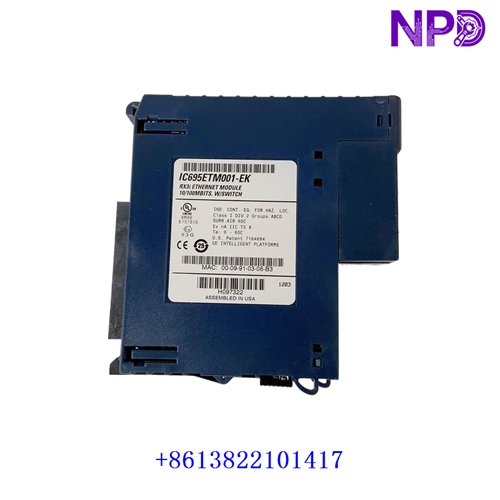
The -EK suffix identifies a specific hardware and firmware release. GE release documentation lists IC695ETM001-EK with firmware version 6.10, dated September 2011. When replacing an existing module, verify the catalog suffix, firmware compatibility, network configuration, and application requirements.
IC695ETM001-EK
Product Datasheet
| Parameter | Specification |
|---|---|
| Brand | GE Fanuc |
| Model | IC695ETM001-EK |
| Product Series | PACSystems RX3i |
| Product Type | Ethernet Interface Module |
| Main Function | PLC Ethernet communication |
| Processor Speed | 200 MHz |
| Ethernet Ports | 2 × RJ-45 |
| Ethernet Standard | 10Base-T / 100Base-TX |
| Ethernet Speed | 10/100 Mbps, auto-sensing |
| Embedded Switch | Yes |
| IP Address Support | 1 IP address |
| Serial Interface | RS-232 Station Manager |
| Serial Connector | 9-pin female D-sub |
| Serial Communication Speed | 1,200–115,200 bps |
| Supported Communication Services | SRTP, Ethernet Global Data (EGD), TCP/IP |
| LAN Standards | IEEE 802.2 and IEEE 802.3 |
| Firmware Release | Version 6.10 |
| Firmware Release Date | September 2011 |
| Mounting | PACSystems RX3i rack, single slot |
| Power Supply | RX3i backplane power |
| Dimensions | Confirm from the original product drawing |
| Weight | Approximately 0.45 kg; verify actual unit |
| Country of Origin | Confirm from product label |
| Product Status | Legacy industrial automation component |
| Condition | Confirm actual supplied unit |
Technical Features & Specifications
1. Dual Ethernet Communication Ports
The IC695ETM001-EK provides two shielded RJ-45 Ethernet ports supporting 10Base-T and 100Base-TX connections. Both ports support automatic speed detection, allowing the module to communicate with compatible 10 Mbps and 100 Mbps network equipment.
The two ports connect through an integrated Ethernet switch, supporting daisy-chain network arrangements. This can reduce external switching hardware in suitable PLC network designs.
2. Integrated Ethernet Switch
The built-in switch allows Ethernet nodes to be connected through the module’s two ports. It supports practical network arrangements for PLCs, HMIs, engineering workstations, and other compatible devices.
The integrated switch does not provide an additional independent Ethernet interface or a second IP address. The -EK version is a 10/100 Mbps module, not a Gigabit Ethernet interface.
3. SRTP and Ethernet Global Data
The module supports GE’s SRTP communication service and Ethernet Global Data (EGD).
- SRTP: Supports TCP/IP-based communication with compatible GE PLCs and programming or supervisory equipment.
- EGD: Supports configured periodic data exchange between compatible controllers and network devices.
- TCP/IP: Provides the underlying Ethernet communication framework for supported services.
The actual data exchange configuration depends on the CPU model, firmware, network setup, and application programming.
4. RS-232 Station Manager Interface
A dedicated 9-pin female D-sub connector provides the RS-232 Station Manager interface. It supports serial communication from 1,200 to 115,200 bps.
Station Manager provides access to module-level supervisory and diagnostic functions. It is useful for checking Ethernet status, communication conditions, and network configuration during commissioning and maintenance.
5. LED Status Indicators
The front panel includes indicators for Ethernet and LAN status, log status, and individual port link and activity conditions.
These indicators help technicians identify network connection problems, communication activity, and module status without relying exclusively on PLC programming software.
6. Firmware Version 6.10
GE release documentation identifies the -EK catalog version with firmware 6.10. This release addressed communication-loss issues affecting remote devices, including a reported Ethernet OK LED blink code of 2-5.
Firmware compatibility should be checked before upgrading or replacing an existing ETM001. Do not assume that every hardware revision supports the same firmware versions or upgrade procedures.
Application Scenarios & Pain Points
- PLC-to-PLC communication: Connects compatible PACSystems RX3i controllers for data exchange and coordinated machine control.
- HMI and SCADA integration: Provides Ethernet communication between the RX3i controller and compatible supervisory systems.
- Industrial manufacturing: Supports communication between PLCs, production equipment, and engineering workstations.
- Process automation: Enables Ethernet-based data exchange between control systems and compatible industrial devices.
- Legacy GE PLC maintenance: Provides a spare communication module for existing RX3i installations.
- Distributed automation networks: Uses its integrated switch for suitable daisy-chain Ethernet connections.
First-Time Installation Checklist
- Verify the complete catalog number IC695ETM001-EK on the module label.
- Confirm that the RX3i rack and CPU support the installed Ethernet interface.
- Check the module’s hardware and firmware revision against the existing system documentation.
- Inspect the module connector and rack slot for contamination or physical damage.
- Install the module according to the RX3i system installation procedure.
- Connect shielded Ethernet cables to the appropriate RJ-45 ports.
- Assign or confirm the module’s IP address and subnet configuration.
- Verify that the connected network devices use compatible Ethernet settings.
- Configure SRTP or EGD communication according to the application requirements.
- Check Ethernet OK, LAN OK, and port link indicators.
- Test PLC-to-PLC communication and verify the expected data exchange.
- Back up the final hardware configuration and communication settings.
Daily Maintenance
- Check Ethernet OK and LAN OK indicators during routine inspections.
- Inspect both RJ-45 ports and Ethernet cables for loose connections or physical damage.
- Monitor communication faults and unexpected PLC data interruptions.
- Check network switch and cable conditions if intermittent communication occurs.
- Review Station Manager diagnostics when network problems are reported.
- Maintain an updated record of IP addresses and EGD configuration.
- Back up PLC hardware and network configuration before maintenance.
- Keep the control cabinet clean and maintain suitable operating conditions.
Troubleshooting & Frequently Asked Questions
Q1: What is the main function of the IC695ETM001-EK?
A: It is an Ethernet Interface Module for the GE Fanuc PACSystems RX3i PLC platform. It provides Ethernet communication, SRTP and EGD services, and a serial Station Manager interface.
Q2: How many Ethernet ports does this module have?
A: It has two 10/100 Mbps RJ-45 Ethernet ports connected through an integrated Ethernet switch.
Q3: Does the IC695ETM001-EK support Gigabit Ethernet?
A: No. This revision supports 10Base-T and 100Base-TX Ethernet. It should not be confused with later IC695ETM001 hardware revisions that support Gigabit Ethernet.
Q4: What is the function of the RS-232 port?
A: The RS-232 Station Manager port provides serial access to supervisory and diagnostic functions. Its supported communication speed is 1,200–115,200 bps.
Q5: What firmware version is associated with the -EK revision?
A: GE release documentation lists firmware version 6.10 for IC695ETM001-EK, dated September 2011.
Q6: Can the IC695ETM001-EK communicate with Series 90 PLCs?
A: The RX3i Ethernet Interface supports communication with compatible Series 90 and VersaMax controllers through supported Ethernet services. Confirm the CPU firmware, protocol configuration, and application requirements before integration.
Q7: What should be checked if Ethernet communication is interrupted?
A: Inspect the Ethernet cable, RJ-45 connectors, link indicators, IP address, subnet settings, and connected network equipment. Review Station Manager diagnostics and the module’s status information to identify the source of the problem.
Q8: Can the -EK version be replaced with an IC695ETM001-KAAA?
A: Do not assume direct interchangeability without checking the system requirements. The -KAAA revision belongs to a later hardware platform with different Ethernet capabilities, including three Gigabit-capable ports and two IP addresses. Verify firmware, configuration, and application compatibility before replacement.
Safety Precautions
- Installation and maintenance should be performed by qualified automation personnel.
- Follow the approved RX3i rack isolation and module replacement procedures.
- Observe ESD precautions when handling the circuit board.
- Do not force the module into an incompatible rack slot.
- Verify Ethernet wiring and network settings before connecting the module.
- Avoid connecting or disconnecting communication cables in a way that could disrupt critical control functions.
- Back up controller and network configurations before making changes.
- Confirm firmware compatibility before performing any upgrade.
- Follow the applicable GE Fanuc PACSystems RX3i installation and maintenance documentation.
Recommended Related Models & Components
The following components belong to the GE Fanuc PACSystems RX3i family or support related PLC system functions. They are useful for maintenance planning but are not all direct replacements for the IC695ETM001-EK.
- IC695CPU310 – PACSystems RX3i CPU module
- IC695CPU315 – PACSystems RX3i CPU module
- IC695CPU320 – PACSystems RX3i CPU module
- IC695CPU330 – PACSystems RX3i CPU module
- IC695CPE305 – PACSystems RX3i CPU module
- IC695CPE310 – PACSystems RX3i CPU module
- IC695CPE330 – PACSystems RX3i CPU module
- IC695PSD040 – RX3i power supply module
- IC695PSA040 – RX3i power supply module
- IC695CHS012 – RX3i 12-slot backplane
- IC695CHS016 – RX3i 16-slot backplane
- IC695ALG600 – Analog input module
- IC695ALG608 – Analog input module
- IC695ALG616 – Analog output module
- IC695MDL645 – Discrete input module
Confirm the CPU, power supply, backplane, and I/O module revisions against the installed PACSystems RX3i configuration before ordering.