
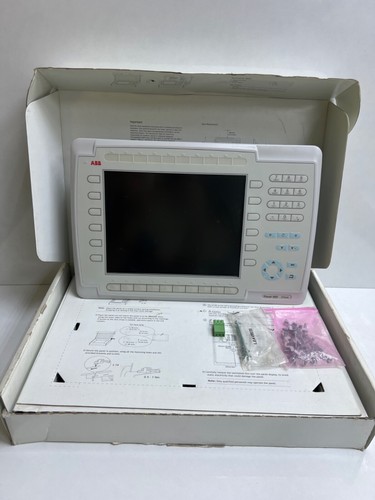
The ABB PP846 (3BSE042238R1) is a high-resolution, high-performance operator panel from the ABB Panel 800 series. Designed for seamless integration with ABB’s control systems, such as System 800xA, this HMI (Human-Machine Interface) provides operators with a clear, intuitive, and responsive visualization of industrial processes. Featuring a robust widescreen display and powerful processing capabilities, the PP846 is optimized for demanding visualization tasks in factory automation and power generation.
Technical Specifications
| Parameter | Detail |
| Product Model | PP846 / 3BSE042238R1 |
| Revision | Rev: B |
| Manufacturer | ABB |
| Display Type | TFT Color Touchscreen |
| Screen Size | 10.4 inch (Widescreen) |
| Communication | Ethernet, USB, Serial (RS232/485) |
| Operating Voltage | 24V DC |
| Ingress Protection | IP66 (Front) |
| Dimensions (Approx.) | 280mm x 200mm x 60mm |
| Weight | 1.8 kg |
| Country of Origin | Sweden / Germany |
Application Fields
- Manufacturing Automation: Real-time monitoring and control of assembly lines and robotic workcells.
- Building Automation: Centralized control for HVAC, security, and energy management systems.
- Water and Wastewater: Visualization for pump stations and treatment plant telemetry.
- Marine & Offshore: Bridge and engine room monitoring systems requiring high-reliability interfaces.
Usage Instructions
- Mounting: Utilize the provided mounting clips to secure the panel into a control cabinet cutout. Ensure the gasket is properly seated to maintain the IP66 environmental seal.
- Wiring: Connect 24V DC power to the labeled terminal block. Use high-quality shielded Ethernet cables for network communication to minimize interference.
- Configuration: Use the designated HMI design software to create and download the project file. Ensure the HMI network address matches your PLC/DCS configuration.
- Maintenance: Regularly wipe the touchscreen with a soft, non-abrasive, anti-static cloth. Avoid using harsh chemical solvents that may damage the touch surface coating.
- Backups: Perform regular backups of your project files via the integrated USB port to prevent data loss in the event of a hardware failure.
Frequently Asked Questions (Q&A)
- Q: Can the PP846 be used as a standalone controller?
- A: No, it is primarily a visualization and operator interface device designed to communicate with PLCs or DCS controllers via Ethernet or serial protocols.
- Q: How do I handle touchscreen calibration issues?
- A: Most calibration issues can be resolved through the system settings menu accessible during startup. Ensure no physical pressure is being applied to the screen edges.
- Q: Is the Revision B (RP:B) compatible with older system files?
- A: Generally, yes, but it is recommended to verify firmware compatibility with your specific version of the ABB HMI development software.
Recommended Stock Products
- 3BSE042238R1 (PP846)
- 3BSE042236R1 (PP845)
- 3BSE042240R1 (PP847)
- 3BSE069272R1 (CP6607)
- 3BSE069274R1 (CP6610)
- 3BSE008508R1 (DI810)
- 3BSE013204R1 (DI820)
- 3BSE013220R1 (DO810)
- 3BSE018294R1 (TU810)
- 3BSE019974R1 (CI801)


