
📌 Product Introduction
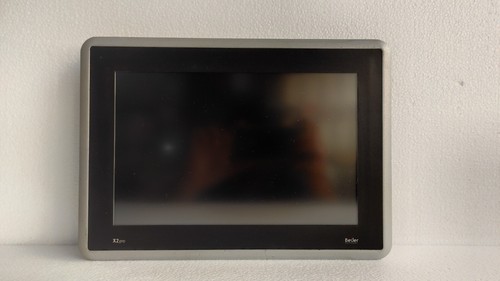
The BEIJER X2PRO 12-B2 is a 12-inch industrial HMI display/controller from the Beijer X2 Pro family. Part number 640000205 identifies the X2 Pro 12-B2 model. Product records identify it as a display operating panel, with Sweden listed as the country of origin.
The X2 Pro platform is designed for industrial machine operation, visualization, control, and communication. The X2 Pro 12-B2 is suitable for applications where operators need a larger touchscreen interface connected to PLC, automation, or other control equipment.
The referenced unit is marked REV 3. When replacing an existing panel, the complete part number and revision should be checked because hardware revision and installed application software can affect compatibility.
📊 Product Datasheet
| Parameter | Specification |
|---|---|
| Brand | BEIJER |
| Model | X2PRO 12-B2 |
| Series | X2 Pro |
| Product Name | 12-inch Display Controller / HMI Panel |
| Part Number | 640000205 |
| Revision | REV 3 |
| Display Size | 12 inch |
| Product Type | HMI Display / Operating Panel |
| Application | Industrial Automation / Machine Control |
| Country of Origin | Sweden |
Public product records confirm the X2 Pro 12-B2 / 640000205 identification and classify it as a display operating panel.
A trade record also identifies the 640000205 X2 Pro 12-B2 as a 12-inch touchscreen HMI equipped with an ARM Cortex-A9 programmable processor and 24 VDC supply.
⚠️ Exact display resolution, memory, communication interfaces, dimensions, weight, power consumption, and environmental ratings should be verified against the specific hardware revision and manufacturer’s technical documentation before installation.
⚙️ Main Features
🖥️ 12-inch industrial HMI display
👆 Touchscreen operator interface
🧠 Integrated programmable controller platform
⚡ 24 VDC industrial power supply
🔗 Designed for PLC and automation-system communication
🏭 Suitable for machine and process visualization
⚓ Applicable to industrial and marine automation installations
🔧 Suitable for maintenance and replacement of existing X2 Pro installations
The X2 Pro product family includes 4-inch, 7-inch, 10-inch, 12-inch, 15-inch, and 21-inch models, with 640000205 specifically corresponding to the X2 Pro 12-B2.
🛠️ Operating Procedure & How to Use
The X2PRO 12-B2 should be installed as part of an HMI/control system rather than treated as a simple standalone display.
- Confirm the model X2PRO 12-B2 and part number 640000205.
- Verify the hardware revision against the existing panel.
- Check the panel cutout and mounting arrangement.
- Inspect the touchscreen, housing, connectors, and rear terminals.
- Connect the 24 VDC power supply with correct polarity.
- Connect Ethernet or other required communication interfaces.
- Load or restore the correct HMI application if required.
- Power up the panel.
- Allow the operating environment/application to initialize.
- Check touchscreen response.
- Verify communication with the PLC or controller.
- Check alarms, status indications, and operator controls.
- Test the machine interface before returning the equipment to normal operation.
🔌 Startup Sequence
⚠️ The actual sequence should follow the machine OEM procedure.
- Put the controlled machine in a safe condition.
- Confirm the HMI is correctly mounted.
- Check 24 VDC supply polarity and voltage.
- Verify communication cabling.
- Confirm the correct application/configuration is available.
- Energize the HMI/control-system power.
- Wait for the X2PRO 12-B2 to complete startup.
- Check the touchscreen and display.
- Confirm PLC/controller communication.
- Review active alarms and diagnostic messages.
- Test essential operator functions.
- Start the machine only after the complete control system is confirmed ready.
⏹️ Shutdown Sequence
- Stop the machine using the normal control procedure.
- Confirm that the controlled equipment has reached a safe state.
- Exit or close the HMI application if required.
- Allow any required data/configuration operation to complete.
- Isolate the 24 VDC supply if maintenance is required.
- Wait for the HMI to shut down completely.
- Disconnect communication or power wiring only after electrical isolation.
Avoid removing power during configuration or data-storage operations unless the system procedure specifically permits it.
📖 Product Usage Notes
For a replacement X2PRO 12-B2, hardware compatibility is only one part of the installation. The HMI application, communication settings, PLC address configuration, user interface project, and software environment may also need to be restored.
Before removing an existing unit, record:
🔍 Part number and revision
🔍 Existing application/software version
🔍 Ethernet/network settings
🔍 PLC communication parameters
🔍 HMI project configuration
🔍 Cable and connector positions
🔍 User-access settings
This is particularly important for older automation installations where the original application may not be available on the replacement panel.
The X2 Pro family is intended for industrial automation applications, and the 640000205 model is specifically identified as the X2 Pro 12-B2.
❓ Common Questions & Answers
Q: What is the BEIJER 640000205?
A: It is the part number for the X2PRO 12-B2, a 12-inch Beijer industrial HMI/display controller.
Q: What does X2PRO 12-B2 mean?
A: It identifies the 12-inch model within Beijer’s X2 Pro HMI family.
Q: What is the display size?
A: The model is identified as a 12-inch X2 Pro HMI.
Q: What power supply does it use?
A: Available product/trade information identifies a 24 VDC supply for the X2 Pro 12-B2.
Q: Is it an HMI or a PLC?
A: It is primarily an industrial HMI/display controller. The X2 Pro platform also incorporates programmable-controller functionality, so it can perform more than basic screen visualization.
Q: Can I replace another Beijer X2 Pro panel with this model?
A: Not automatically. Screen size, part number, hardware revision, application software, communication interfaces, and cabinet cutout should all be checked.
Q: Is REV 3 important?
A: Yes. The revision identifies a particular hardware revision. For a maintenance replacement, it is advisable to compare the revision on the existing unit and replacement.
Q: What is the country of origin?
A: Available product records identify Sweden as the country of origin.
Q: Can the unit communicate with a PLC?
A: Yes. The X2 Pro platform is designed for industrial automation communication and machine-control applications. The exact available interfaces should be checked against the specific hardware revision.
Q: Does replacing the HMI automatically restore the machine program?
A: No. The replacement hardware may require the correct HMI application, communication parameters, and project configuration to be restored.
Q: What should I verify before purchasing?
A: Confirm X2PRO 12-B2, 640000205, REV 3, display size, power requirements, communication interfaces, mechanical dimensions, and application compatibility.
🔎 Recommended BEIJER X2 Pro Models
- BEIJER X2PRO 4-B2 — 4-inch X2 Pro HMI
- BEIJER X2PRO 7-B2 — 7-inch X2 Pro HMI
- BEIJER X2PRO 7 with 2 Ethernet — X2 Pro HMI
- BEIJER X2PRO 10-B2 — 10-inch X2 Pro HMI
- BEIJER X2PRO 12-B2 — 12-inch X2 Pro HMI
- BEIJER X2PRO 15-B2 — 15-inch X2 Pro HMI
- BEIJER X2PRO 21-B2 — 21-inch X2 Pro HMI
- BEIJER X2BASE 7 v2 — X2 Base HMI
- BEIJER X2BASE 10 v2 — X2 Base HMI
- BEIJER X2BASE 15 v2 HP — X2 Base HMI
The X2 Pro product listing confirms the 640000205 material number for the X2 Pro 12-B2 and shows the surrounding X2 Pro model range.


