
Description
🔍 Product Overview
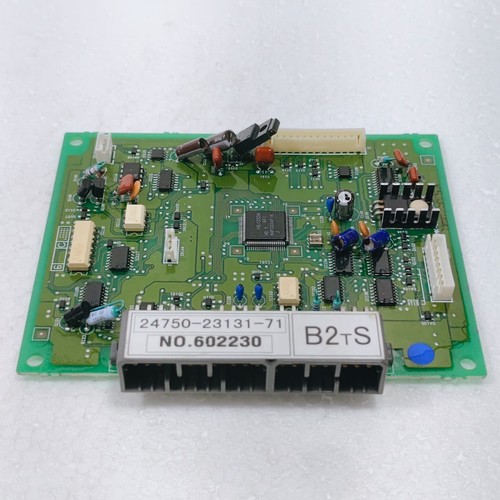
The Toyota 24750-23131-71 is an industrial-grade main CPU control board designed for Toyota electric forklifts and material handling equipment. This centralized processing module acts as the primary vehicle control unit (VCU), managing critical logic operations including motor speed control, hydraulic lift actuation, electric steering assist, and real-time safety interlocks. Built to handle extreme mechanical vibrations, voltage fluctuations, and thermal variations common in warehousing and industrial environments, this board ensures smooth, reliable, and safe equipment operation.
⚙️ Technical Parameters & Specifications
- Part Number: 24750-23131-71
- Device Type: Main CPU Control Board / Vehicle Controller
- Equipment Compatibility: Toyota Electric Forklift Series (7-FBE and related models)
- Operating Voltage: Typically configured for 36V or 48V DC battery systems
- Dimensions: 195 mm x 140 mm x 45 mm
- Weight: 0.68 kg
- Country of Origin: Japan
🚀 Application Areas
- Electric Forklift Power Systems: Driving high-power logic for traction motor inverters and acceleration tracking.
- Hydraulic Subsystem Logic: Regulating pump motor speeds for proportional lifting, lowering, and tilting controls.
- SAS (System of Active Stability) Integration: Processing electronic mast angles and rear axle locking commands to prevent lateral tip-overs.
- Operator Presence Sensing (OPS): Enforcing safety interlocks by automatically disabling travel and hydraulic functions when the operator leaves the seat.
📖 Product Usage Instructions
The 24750-23131-71 CPU board must be installed inside the forklift’s main sealed electrical compartment to protect it from moisture, dust, and battery gas exposure. Disconnect the main battery plug before handling or wiring the module to prevent destructive short circuits. Mount the board securely using its designated vibration-dampening standoffs. Ensure all multi-pin harness connectors are fully clicked into place and that the external heat sink pathways are clean to allow adequate passive thermal dissipation.
🌐 Communication Configuration Steps
- IP Address / Fieldbus Setup: As an embedded automotive/industrial vehicle controller, this board handles localized operations via a dedicated Controller Area Network (CAN bus) architecture rather than Ethernet IP addresses. Network parameters are pre-flashed inside the Toyota system firmware.
- Station Number / Node Identity: Set the identity of peripheral nodes (e.g., matching traction controller, display dashboard, or steering angle sensors) via the integrated diagnostic menu on the forklift’s dashboard display or using a Toyota handheld service tool.
- Baud Rate / Sync Speed: The onboard CAN transceivers automatically communicate at standard internal vehicle network speeds (typically 250 kbps or 500 kbps), ensuring immediate, low-latency transmission of safety-critical error codes and throttle inputs.
⚡ Power-Up & Commissioning Flow
- Harness and Polarities Check: Double-check that the multi-pin plug alignments match the vehicle schematic perfectly and ensure no terminal pins are bent.
- Battery Connection: Plug in the main forklift battery socket and ensure the emergency stop button is pulled out.
- Keyswitch Turn-on: Turn the ignition keyswitch to the “ON” position. Watch the forklift dashboard screen to ensure the system initializes without immediate diagnostic trouble codes (DTCs).
- Static Logic Test: Sit on the seat to activate the seat switch interlock. Test the direction switch and accelerator pedal lightly to verify that the CPU board successfully sends torque commands to the traction system.
✅ Initial Operation Checklist
- Are all locking tabs on the wiring harnesses firmly engaged to prevent loose connections over bumps?
- Has the frame grounding trace been checked for zero resistance against the forklift’s primary chassis?
- Does the dashboard display correctly report the battery status and show zero active error codes?
- Do the hydraulic lift valves actuate smoothly when the control levers are operated?
❓ Common Questions (Q&A)
Q: What does it mean if the forklift dashboard displays an error code like “E1” or “F1” right after installation?
A: These specific error codes indicate a startup fault condition. This is usually caused by a disconnected sensor harness (such as the accelerator potentiometer or steering sensor), a mismatch between the board version and vehicle model, or an active safety interlock failure.
Q: Can I swap this control board between a 36V and a 48V forklift directly?
A: While the hardware architecture might look identical, the internal parameters, low-voltage thresholds, and motor maps inside the CPU flash memory are highly specific to the vehicle’s battery configuration and weight capacity rating. Always confirm configuration compatibility before operation.
Q: Is it necessary to program or calibrate the board after installation?
A: The board serves as a plug-and-play unit if ordered with factory-matching firmware. However, minor calibrations for the accelerator pedal zero-point, steering center position, and hydraulic levers are highly recommended during the initial commissioning flow to ensure precise maneuvering controls.