Description
ABB | 3BNP015164R1 | I/O Connection Unit
🔹 Product Description
The ABB 3BNP015164R1, also identified as 3BSC980002R209 / DSTDN020V1, is an industrial I/O connection unit designed for use in ABB automation and control systems.
This unit provides an electrical connection interface between compatible I/O hardware and associated field wiring or system components. It supports organized signal interconnection within industrial control cabinets and helps maintain reliable connections between automation modules and their associated equipment.
The unit is intended for industrial automation applications where dependable I/O connectivity, proper wiring organization, and stable system integration are required.
Before installation, verify the complete part number, hardware revision, terminal arrangement, and compatibility with the target ABB system.
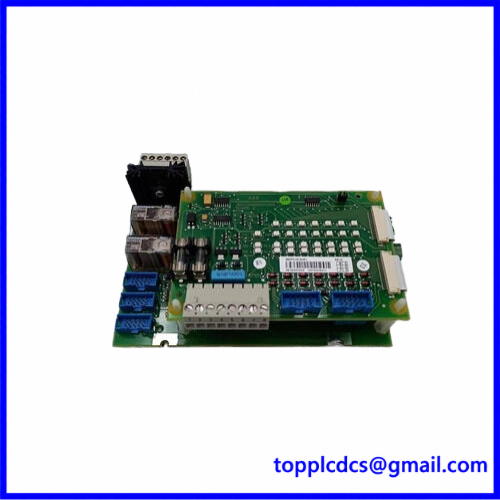
3BNP015164R1
⚙️ Product Parameters
- Brand: ABB
- Model: 3BNP015164R1
- Alternative Part Numbers: 3BSC980002R209
- Product Code: DSTDN020V1
- Series: ABB Industrial Automation I/O System
- Product Name: I/O Connection Unit
- Place of Manufacture: Not confirmed
- Product Status: Legacy industrial automation spare part; current availability requires confirmation
- Dimensions: Not specified; confirm using the physical unit
- Weight: Not specified; depends on the hardware configuration
- Country of Origin: Not confirmed
- Power Requirements: Determined by the connected I/O system; verify equipment specifications
- Product Type: I/O Electrical Connection Hardware
- Installation: Industrial control cabinet or compatible automation assembly
- Function: I/O signal interconnection
🔧 Daily Maintenance and Care
- Visual Inspection
Inspect the connection unit for cracks, discoloration, corrosion, loose terminals, and signs of overheating.
- Terminal Maintenance
Check terminal tightness and connector seating according to the manufacturer’s installation specifications.
- Dust Prevention
Keep the unit clean and free from conductive dust, oil, moisture, and other contaminants.
- Wiring Inspection
Regularly inspect connected cables for insulation damage, loose connections, and incorrect wiring.
- Environmental Control
Maintain suitable cabinet temperature and humidity. Ensure adequate ventilation to protect connected electronic equipment.
- Preventive Maintenance
Record inspection results, wiring changes, and any abnormal operating conditions.
🛠️ Troubleshooting and Common Problems
Problem 1: I/O Signals Are Not Detected
Possible causes:
- Loose terminal connections.
- Incorrect wiring.
- Improper connection to the associated I/O module.
- Incompatible hardware configuration.
Solutions:
- Inspect terminal connections.
- Verify the wiring diagram.
- Confirm the connected module and hardware revision.
- Check the system diagnostic indicators.
Problem 2: Intermittent Signal Transmission
Possible causes:
- Oxidized contacts.
- Loose connectors.
- Damaged cables.
- Mechanical vibration.
Solutions:
- Inspect and secure the connections.
- Check cable continuity.
- Replace damaged wiring.
- Verify cabinet mounting stability.
Problem 3: Abnormal Heating
Possible causes:
- Poor electrical contact.
- Incorrect wiring.
- Excessive electrical loading.
- Damaged connection points.
Solutions:
- Isolate the equipment.
- Inspect the terminals and wiring.
- Verify electrical ratings.
- Arrange qualified technical inspection.
Problem 4: Communication or I/O System Fault
Possible causes:
- Incorrect system configuration.
- Faults in associated I/O modules.
- Connection problems.
- Incorrect module installation.
Solutions:
- Check the controller diagnostics.
- Inspect the complete I/O connection path.
- Verify the hardware configuration.
- Replace defective components only after confirming the fault location.
Problem 5: Physical Connector Damage
Possible causes:
- Improper installation.
- Excessive insertion force.
- Cable tension.
- Long-term mechanical wear.
Solutions:
- Stop using damaged connection points.
- Inspect the mating connector.
- Replace defective hardware with a verified compatible unit.
⚠️ Safety Precautions
- Disconnect the power supply before wiring, removing, or replacing the connection unit.
- Follow ESD protection procedures when handling associated electronic modules.
- Verify terminal assignments before connecting field wiring.
- Never exceed the electrical ratings of the connected equipment.
- Do not insert or remove components under power unless the system explicitly supports hot swapping.
- Use insulated tools and appropriate personal protective equipment.
- Installation and commissioning must be performed by qualified industrial automation technicians.
📦 Recommended ABB Models – 15 Related Products
- ABB 3BSE013177R1 – REVE LDGRB-01 Control Board
- ABB 3BSE018526R1 – DSAI 133N Analog Input Board
- ABB 3BSE008516R1 – Industrial Automation Module
- ABB 3BSE008522R1 – I/O Interface Module
- ABB 3BSE013230R1 – Control System Module
- ABB 3BSE018293R1 – Industrial Control Module
- ABB 3BSE021452R1 – I/O Module
- ABB 3BSE022366R1 – Automation Control Module
- ABB 3BSE025349R1 – Industrial I/O Hardware
- ABB 3BSE030220R1 – Interface Module
- ABB 3BSE031155R1 – Control System Module
- ABB 3BSE041882R1 – S800 I/O Module
- ABB 3BSE042236R1 – Communication Interface Module
- ABB 3BSE047863R1 – Automation Interface Module
- ABB 3BSE050091R1 – Industrial Control Module
Note: These are related ABB automation spare-part models, not confirmed direct replacements for the 3BNP015164R1. Always verify electrical specifications, connector assignments, and system compatibility before purchasing or installation.