Description
Product Description
The Makino UP-MF12-B is a dedicated display and operator control panel associated with the Makino MGH III machine control system. It provides the operator/programmer interface for machine operation, program development, selection of machining or cutting conditions, and access to machine control functions. The panel is intended for use as part of the machine’s integrated control system, supporting operator interaction during unattended and semi-unattended production. Before installation, verify the machine model, control-system configuration, connector arrangement, and panel revision to ensure compatibility with the existing equipment.
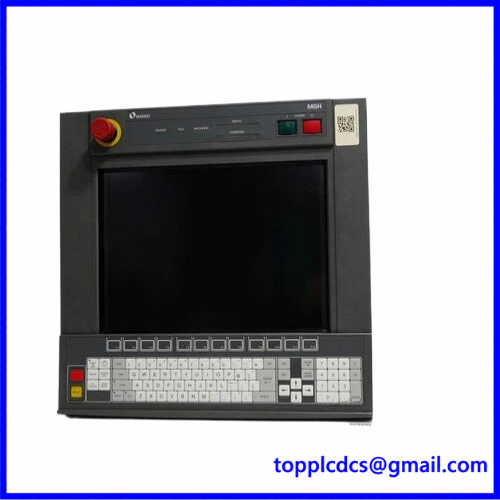
UP-MF12-B
Key Product Parameters
- Brand: Makino
- Model: UP-MF12-B
- Associated System: MGH III
- Product Name: Display Control Panel
- Product Type: CNC Machine Operator Interface
- Main Function: Operator and programmer control interface
- Application: Makino industrial machine tools and associated control systems
- Operator Functions: Program development, machining condition selection, and machine control
- Interface Type: Dedicated machine control panel
- Electrical Connection: Verify connector and pin assignments from the machine documentation
- Power Requirements: Not independently confirmed; check the equipment nameplate and wiring diagram
- Dimensions: Not independently confirmed
- Weight: Approximately 13.6 lb (6.17 kg) reported by a supplier; verify the actual unit
- Country of Origin: Verify the individual product nameplate
- Product Status: Confirm actual condition with the seller
Installation and Operating Procedures
- Preparation
- Confirm the UP-MF12-B model number and inspect the product label.
- Identify the Makino machine model, serial number, and MGH III control configuration.
- Obtain the machine electrical drawings and original panel installation documentation.
- Compare the replacement panel’s connectors, mounting arrangement, and revision with the existing unit.
- Installation
- Shut down the machine and isolate the relevant electrical supplies.
- Follow the manufacturer’s lockout/tagout procedure.
- Remove the existing panel carefully, documenting connector positions and cable routing.
- Install the UP-MF12-B using the specified mounting hardware.
- Reconnect cables according to the original wiring diagram. Do not assume connector compatibility based on appearance alone.
- Power-On
- Inspect all connections and mounting points before energizing the machine.
- Restore power according to the machine manufacturer’s startup procedure.
- Check the display, keypad, indicators, and operator controls.
- Investigate abnormal alarms or communication errors before continuing.
- Configuration
- Verify that the panel is recognized by the machine control system.
- Check the required machine parameters and operator-interface settings.
- Confirm that the displayed machine status and operating information are correct.
- Use only approved Makino service procedures for configuration or software changes.
- Normal Operation
- Use the panel for the machine functions supported by the installed control system.
- Verify program selection, machining condition settings, and operator commands.
- Monitor alarms and status indications during operation.
- Confirm all machine functions through controlled tests before production use.
- Shutdown
- Stop the machining process using the normal machine shutdown procedure.
- Save or back up relevant programs and machine data as required.
- Switch off the machine and isolate power before panel removal or maintenance.
Daily Maintenance
- Inspect the display surface and control buttons for physical damage.
- Keep the panel clean and free from oil, coolant, and conductive dust.
- Check mounting screws and panel connections for looseness.
- Inspect cables and connectors for wear, corrosion, or damaged insulation.
- Monitor the display for flickering, missing information, or abnormal indicators.
- Check the machine alarm history for recurring operator-panel communication faults.
- Protect the panel from excessive vibration, moisture, and temperature changes.
- Record maintenance activities and any panel replacements.
Troubleshooting
- Panel Does Not Power On
- Check the machine’s control power supply and protective devices.
- Inspect the panel power connection and wiring.
- Verify the required supply voltage using the machine documentation.
- Display Is Blank or Unstable
- Inspect the display cable and connector seating.
- Check for abnormal supply voltage or grounding issues.
- Review machine control-system diagnostics.
- Buttons or Controls Do Not Respond
- Check the panel connector and communication path.
- Verify that the relevant control function is enabled in the machine configuration.
- Inspect the keypad and individual control components.
- Communication or Interface Error
- Confirm that the panel is intended for the installed MGH III configuration.
- Check cable routing, connector condition, and control-system status.
- Verify panel revision and machine software compatibility.
- Incorrect Displayed Information
- Check the machine configuration and operating mode.
- Verify that the control system is communicating correctly with the panel.
- Follow Makino service procedures before changing machine parameters.
Safety Precautions
- Installation and maintenance must be performed by qualified CNC service personnel.
- Always isolate electrical power before disconnecting or replacing the panel.
- Do not connect the panel to an unverified power source or communication interface.
- Do not modify connector wiring or pin assignments without approved documentation.
- Back up machine parameters and programs before carrying out control-system service.
- Confirm all operator controls and display functions before returning the machine to production.
- Do not assume that other UP-MF12 revisions are direct replacements without verification.
Product Keywords
Makino UP-MF12-B, Makino MGH III, Makino display control panel, Makino CNC operator panel, CNC machine control interface, Makino machine tool spare parts, CNC display panel replacement, industrial operator interface, Makino control system, CNC maintenance parts.
For industrial automation and CNC spare parts, visit: https://www.newplcdcs.com
15 Related / Recommended Makino References
The following are related Makino machine platforms and control-panel references for sourcing research. They are not confirmed direct replacements for UP-MF12-B.
- Makino MGH III – Machine Control System
- Makino MGH Series – Machine Control Platform
- Makino UP-MF12 Series – Display and Operator Panel Family
- Makino CNC Operator Control Panels – Operator Interface Components
- Makino CNC Display Panels – Machine Display Components
- Makino CNC Keypad Assemblies – Operator Input Components
- Makino Machine Control Boards – Control Electronics
- Makino CNC Interface Boards – Panel Communication Components
- Makino CNC Power Supply Assemblies – Control Power Components
- Makino CNC Main Control Units – Machine Control Assemblies
- Makino CNC Operator Stations – Machine Operation Interfaces
- Makino CNC Emergency Stop Assemblies – Safety Control Components
- Makino CNC Machine Status Displays – Operator Information Components
- Makino CNC Electrical Control Assemblies – Machine Electrical Components
- Makino CNC Panel Cable Assemblies – Panel Connection Components