
Description
Product Overview
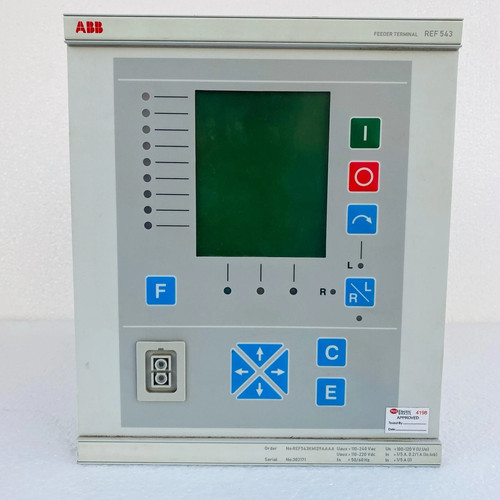
The ABB REF543KM129AAAA belongs to the high-performance REF 543 series of feeder terminals. It is designed for the protection, control, measuring, and supervision of utility substations and industrial power systems. This versatile device provides comprehensive feeder protection, including overcurrent, earth fault, and various automation functions, ensuring grid reliability and efficient fault management.
Technical Specifications
- Device Type: Digital Feeder Protection Relay
- Mounting: Flush Mounted
- Dimensions: Approximately 265 mm x 224 mm x 250 mm
- Weight: ~5.5 kg
- Original Origin: Finland
- Communication: Built-in SPA/IEC communication interfaces
- Auxiliary Voltage: 80–265 V AC/DC
Application Areas
🛡️ Distribution Substation Protection ⚡ Industrial Medium-Voltage Power Networks 🏭 Transformer Protection and Control 📡 Remote SCADA Monitoring Systems 🔌 Network Automation and Reclosing Schemes
Operational Guidelines
Power-Up / Power-Down Sequence
- Startup: Before powering on, ensure all secondary circuit current transformer (CT) connections are short-circuited if the relay is not connected to the live bus. Apply the rated auxiliary power (80–265 V). The device will perform an internal self-test; ensure no “Internal Fault” LEDs remain illuminated.
- Shutdown: If maintenance is required, ensure the primary circuit breaker is in the “Open” position. Isolate the auxiliary DC supply first, then secure the CT and voltage transformer (VT) circuits to prevent open-circuit hazards.
Step-by-Step Standard Operation
- Status Check: Observe the front panel LEDs. Green indicates “Ready,” while yellow or red may indicate active alarms or warnings.
- Navigation: Use the local HMI (Human-Machine Interface) keypad to scroll through the menu structure to monitor real-time phase currents and voltages.
- Parameter Modification: Changes to settings (e.g., protection thresholds) should be performed via the rear communication port using ABB’s dedicated configuration software (such as SMS or CAP series).
- Trip Verification: If a fault occurs, use the event logger on the display to identify the trip cause before resetting the device via the ‘Reset’ button.
Frequently Asked Questions
Q: What does the “Internal Fault” LED indicate? A: This LED signifies a hardware or self-diagnostic error within the REF543 unit. If it remains lit after a power cycle, the unit may require professional calibration or hardware replacement.
Q: Can I access the relay settings remotely? A: Yes, the REF543 series supports remote access through its communication ports (SPA/IEC bus). Ensure your communication gateway is correctly configured to match the relay’s baud rate and address.
Q: How do I clear trip indications? A: You can clear the trip LEDs by pressing the ‘Reset’ button on the front panel, provided the primary fault has been cleared and the system is back to a normal state.
Q: Is it safe to remove the module while powered? A: No. Always disconnect the auxiliary supply and short-circuit the CT secondary circuits before removing the unit from its housing to prevent dangerous high-voltage build-up.