Description
Product Description
The GE RXE2N0F7G132A RXi-XP Industrial PC is an industrial computing platform designed for demanding automation and machine control environments. It belongs to the GE RXi-XP industrial computing product family and provides a computing foundation for industrial applications requiring reliable processing, system integration, and equipment communication.
The 2-slot configuration provides expansion capability for compatible hardware modules, allowing the system to be configured according to application requirements. It can be used in industrial automation installations, machine-level control architectures, data acquisition systems, and industrial monitoring applications.
The RXi-XP platform is designed to support industrial computing tasks where stable operation, connectivity, and integration with automation equipment are important. Before deployment, verify the processor configuration, memory capacity, operating system, expansion module compatibility, and available communication interfaces.
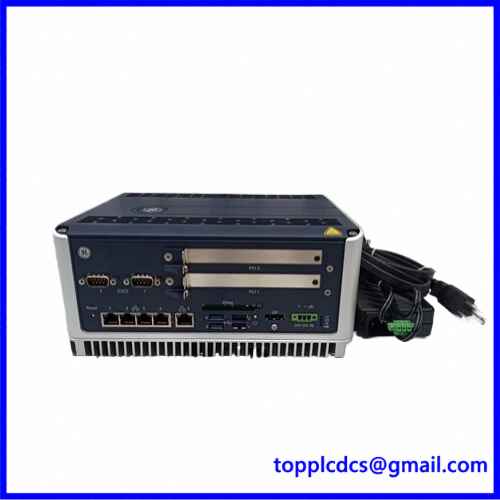
RXE2N0F7G132A
Product Parameters
- Brand: GE (General Electric)
- Model: RXE2N0F7G132A
- Series: RXi-XP Industrial Computing Platform
- Product Name: Industrial PC 2-Slot
- Product Type: Industrial Computer / Embedded Computing Platform
- Configuration: 2-Slot
- Application: Industrial Automation and Machine Control
- Place of Manufacture: GE manufacturing facility; exact site unverified
- Product Status: Industrial spare part; actual condition subject to inspection
- Dimensions: Not officially verified
- Weight: Not officially verified
- Country of Origin: To be confirmed from product nameplate
- Power Requirements: Refer to the specific hardware configuration and equipment rating label
- Discontinued Status: Current lifecycle status requires confirmation
Main Applications
🖥️ Industrial Computing
Provides computing resources for industrial automation and machine-level applications.
⚙️ Machine Control Integration
Supports computing and communication functions within compatible industrial control architectures.
🏭 Factory Automation
Can be deployed in industrial equipment monitoring, production systems, and automation installations.
📊 Data Acquisition and Monitoring
Supports industrial data processing and integration with compatible monitoring applications.
🔌 Modular Expansion
The 2-slot configuration provides expansion capacity for supported hardware modules.
Installation and Commissioning
- Verify the complete model number and hardware configuration before installation.
- Mount the industrial PC in an approved cabinet or equipment enclosure.
- Check power input specifications and grounding requirements.
- Inspect expansion slots and confirm module compatibility.
- Connect supported Ethernet and peripheral interfaces.
- Install or verify the approved operating system and application software.
- Configure network addresses and communication settings.
- Perform startup diagnostics and verify communication with connected equipment.
- Test application performance before releasing the system for normal operation.
Daily Maintenance and Care
- Inspect cooling openings, fans, and ventilation paths for dust accumulation.
- Maintain the operating temperature within the manufacturer’s specified limits.
- Check power connectors and grounding connections regularly.
- Monitor system startup, CPU operation, and diagnostic messages.
- Inspect Ethernet cables and expansion module connections.
- Check storage device health and maintain regular data backups.
- Keep the operating system and application software under approved revision control.
- Record hardware configuration changes and maintenance activities.
- Store backup units in dry, temperature-controlled, ESD-protected conditions.
Troubleshooting and Frequently Asked Questions
Q1: What is the GE RXE2N0F7G132A used for?
A: It is an RXi-XP industrial computing platform intended for compatible industrial automation and machine-level computing applications.
Q2: What does the 2-slot configuration mean?
A: It identifies a hardware configuration with two expansion positions. Supported module types must be confirmed from the applicable hardware documentation.
Q3: Why does the industrial PC fail to start?
A: Possible causes include incorrect power input, loose connections, hardware faults, memory problems, or storage device failure.
Q4: Why is the system experiencing communication interruptions?
A: Check Ethernet connections, network configuration, IP settings, communication drivers, and connected equipment.
Q5: Can additional expansion modules be installed?
A: Only modules supported by the RXi-XP hardware configuration should be installed. Verify electrical, mechanical, firmware, and software compatibility.
Q6: What should be checked before replacing an existing unit?
A: Confirm the full part number, slot configuration, processor, memory, operating system, interfaces, and application software requirements.
Q7: Is this industrial PC suitable for continuous operation?
A: It is designed for industrial computing applications. Continuous operation depends on correct installation, environmental conditions, cooling, and maintenance.
Safety Precautions
⚠️ Disconnect the power supply before installing or removing hardware components.
⚠️ Follow ESD protection procedures when handling circuit boards and expansion modules.
⚠️ Verify power input specifications before connecting the unit.
⚠️ Ensure adequate cabinet ventilation and thermal management.
⚠️ Use only compatible expansion modules and approved peripheral devices.
⚠️ Back up application programs and configuration data before hardware replacement.
⚠️ Installation and commissioning should be performed by qualified industrial automation technicians.
Recommended GE Models
- GE RXE2N0F7G132A – RXi-XP Industrial PC 2-Slot
- GE RXi-XP – Industrial Computing Platform
- GE RXi2 – Industrial PC Platform
- GE IC695CPE305 – PACSystems RX3i CPU
- GE IC695CPE310 – PACSystems RX3i CPU
- GE IC695CPE330 – PACSystems RX3i CPU
- GE IC695CPE400 – PACSystems RX3i CPU
- GE IC695NIU001 – RX3i Network Interface Unit
- GE IC695ETM001 – RX3i Ethernet Module
- GE IC695PNC001 – RX3i PROFINET Controller
- GE IC695ACC400 – RX3i Power Supply Module
- GE IC695CHS012 – RX3i 12-Slot Backplane
- GE IC695CHS016 – RX3i 16-Slot Backplane
- GE IC698CPE010 – PACSystems RX7i CPU
- GE IC698CPE020 – PACSystems RX7i CPU
Note: These are related GE industrial computing and automation products, not confirmed direct replacements for the RXE2N0F7G132A. Verify the exact hardware configuration and system compatibility before purchasing or installing.