Description
Product Description
The GECMA CHALLENGER 18i-FMO is a 19-inch industrial field display module designed for hazardous-area applications in oil and gas facilities, offshore platforms, chemical plants, and industrial process control environments. Manufactured by GECMA Components GmbH, the display provides SXGA resolution of 1280 × 1024 pixels and supports 16 million colors for clear visualization of process information, operating parameters, alarms, and control system data. Its TFT display technology, chemically treated anti-reflective glass front, and anodized aluminum front panel are designed for demanding industrial environments. The front panel provides IP66 / NEMA 4X protection, while the intrinsically safe display architecture supports installation in appropriately certified hazardous areas. The CHALLENGER 18i-FMO is designed for integration with compatible GECMA field monitor systems and associated power supply and data transmission equipment. It is suitable for industrial HMI visualization, remote process monitoring, and control room applications where hazardous-area display protection is required.
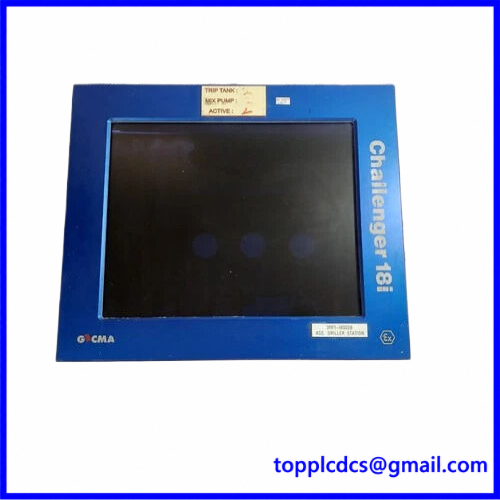
CHALLENGER 18i-FMO
Product Datasheet – 10 Key Parameters
- Brand: GECMA
- Model: CHALLENGER 18i-FMO
- Series: CHALLENGER 18i Field Monitor
- Product Name: 19-Inch Hazardous Area TFT Display Module
- Manufacturer: GECMA Components GmbH
- Product Status: Legacy industrial equipment; listing condition Used
- Dimensions: 505.9 × 427.7 × 80 mm (W × H × D)
- Weight: Approximately 16 kg
- Country of Origin: Germany
- Power Requirements: Compatible 18-PSU external power supply system; verify exact supply configuration
Additional Technical Specifications
- Display Technology: TFT LCD
- Screen Size: 19 inches
- Resolution: 1280 × 1024 pixels (SXGA)
- Color Depth: 16 million colors
- Contrast Ratio: Approximately 250:1
- Viewing Angle: Approximately 160°
- Brightness: Up to 250 cd/m²
- Front Protection: IP66 / NEMA 4X
- Front Panel: Anodized aluminum
- Front Glass: Anti-reflective chemical coating
- Operating Temperature: -10°C to +60°C
- Hazardous Area Certification: ATEX II 2G EEx ib IIC T4
- UL/cUL: Class I, Zone 1, AEx ib IIC T4; Class I, Division 2, Groups A, B, C, D, T4
- Display Interface: Compatible GECMA field monitor system
- Power Supply: 18-PSU
- Mounting: Industrial panel mounting
- Application: Hazardous-area HMI visualization
Operating Procedures and Usage Instructions
1. Installation and Preparation
- Verify the CHALLENGER 18i-FMO model and hardware revision.
- Inspect the display glass, aluminum front panel, connectors, and enclosure.
- Confirm compatibility with the GECMA DC049 controller platform.
- Verify the external 18-PSU power supply configuration.
- Check the data transmission cable and connector arrangement.
- Confirm the cable length and system configuration.
- Inspect panel mounting seals and fastening hardware.
- Verify the hazardous-area certification requirements for the installation location.
- Ensure that the installation complies with the equipment’s intrinsic safety documentation.
2. Power-On Sequence
- Confirm that the display and associated controller are correctly installed.
- Check the external power supply and data cable connections.
- Verify the required electrical isolation and hazardous-area installation conditions.
- Energize the compatible power supply system.
- Start the associated controller or host system according to its operating procedure.
- Allow the display to initialize.
- Check the screen for normal image output.
- Verify resolution and display communication.
- Confirm that no abnormal display or power alarms are present.
- Release the display for normal operation after completing functional checks.
3. Normal Operating Procedure
- Confirm that the display is receiving a valid video signal.
- Check the displayed process information and HMI interface.
- Verify that screen resolution and image positioning are correct.
- Monitor process values, equipment status, and alarm indications.
- Use the associated controller or approved input device to navigate the HMI.
- Check screen readability under normal operating lighting.
- Monitor the display for flickering, image loss, or abnormal brightness.
- Report communication failures or abnormal display conditions.
- Maintain the front glass and enclosure in clean condition.
- Record any recurring display faults for maintenance.
4. Shutdown Sequence
- Exit active HMI operations using the approved control system procedure.
- Save any required operating information.
- Stop the associated controller or host system if required.
- Switch off the display power supply using the approved shutdown sequence.
- Verify that the screen has powered down.
- Isolate the equipment before disconnecting cables.
- Maintain alternative monitoring arrangements if the display is used for critical process supervision.
5. Parameter Setting and Modification
The CHALLENGER 18i-FMO is primarily a display device. Most application parameters are configured through the connected controller or host computer.
- Set the host video output to the supported SXGA resolution of 1280 × 1024.
- Verify the compatible display interface and transmission cable.
- Check brightness and contrast through the supported system settings.
- Adjust image positioning where the connected controller allows it.
- Verify the correct external power supply configuration.
- Check controller communication and data transmission.
- Confirm that the HMI application is correctly assigned to the display.
- Save host-side configuration changes.
- Test the complete display system after modification.
6. Maintenance and Safety Precautions
- Never open the display enclosure in a hazardous area unless the approved safety procedure permits it.
- Do not substitute the specified power supply with an unapproved unit.
- Maintain the integrity of the IP66 front sealing system.
- Use suitable non-abrasive cleaning materials on the display glass.
- Inspect data cables and power connections regularly.
- Do not modify intrinsic safety circuits or certified wiring arrangements.
- Check hazardous-area certification before replacement.
- Use qualified personnel for installation and servicing.
- Confirm that replacement equipment maintains the required explosion protection approvals.
Recommended 15 Other GECMA Models and Variants
- GECMA CHALLENGER 15i-FMO – 15-Inch Field Monitor
- GECMA CHALLENGER 18i-FMO – 19-Inch Field Monitor
- GECMA CHALLENGER 15i-FMO-HB – High-Brightness Display
- GECMA CHALLENGER 18i-FMO-HB – High-Brightness Display
- GECMA CHALLENGER 15i-FMO-TS – Touchscreen Field Monitor
- GECMA CHALLENGER 18i-FMO-TS – Touchscreen Field Monitor
- GECMA CHALLENGER 18i-FMO-HB-TS – High-Brightness Touchscreen
- GECMA CHALLENGER 15i – Hazardous-Area Display System
- GECMA CHALLENGER 18i – Hazardous-Area Display System
- GECMA 18-PSU – Display Power Supply
- GECMA DC049 – Display Controller Platform
- GECMA CHALLENGER 18i Controller – Display Control Equipment
- GECMA FMO-18i – Field Monitor Display
- GECMA FMO-HB-18i – High-Brightness Field Monitor
- GECMA CHALLENGER Display Interface – Communication Interface Equipment
Product Compatibility Note: The CHALLENGER 18i-FMO is part of a certified hazardous-area display system. Verify the DC049 controller, 18-PSU power supply, data cable length, hardware revision, and certification requirements before replacement. A standard industrial monitor is not automatically a suitable substitute.