Description
Product Description
The HIMA HIMatrix F3 DIO 8/8 01 is a safety-related remote digital input/output module designed to expand the I/O capacity of HIMA HIMatrix and HIMax safety control systems. It provides 8 digital inputs, 8 DO+ digital outputs, 2 additional DO- outputs, and 2 pulsed outputs. The module communicates with its associated safety controller through SafeEthernet over dual RJ45 Ethernet interfaces. It supports safety-related signal acquisition and output control in industrial applications requiring reliable safety monitoring and interlocking. This unit is a remote I/O device and does not execute user programs independently; system compatibility, firmware revision, and engineering software must be checked before installation.
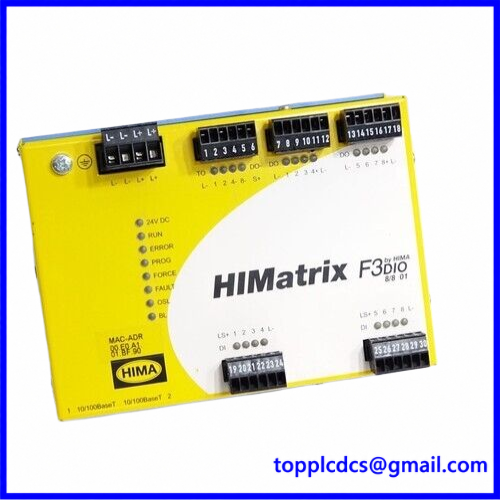
F3 DIO 8/8 01
Key Product Parameters
- Brand: HIMA
- Model: F3 DIO 8/8 01
- Product Series: HIMatrix
- Product Type: Safety-Related Digital I/O Remote Module
- Digital Inputs: 8 channels
- Digital Outputs: 8 DO+ channels and 2 DO- channels
- Pulsed Outputs: 2
- Communication Interfaces: 2 × RJ45 Ethernet ports
- Communication Protocol: HIMA SafeEthernet
- Ethernet Speed: 10/100 Mbps
- Operating Voltage: 24 V DC (-15% to +20%)
- Idle Current: Approximately 0.4 A at 24 V DC
- Maximum Current Input: 8 A, depending on connected output loads
- Operating Temperature: 0°C to +60°C
- Protection Rating: IP20
- Dimensions: Approximately 152 × 114 × 66 mm, excluding plugs
- Weight: Approximately 1 kg
- Mounting: 35 mm DIN rail
- Safety Certification: Up to SIL 3, Category 4, and PL e for applicable certified configurations
- Product Status: Verify actual condition, accessories, and nameplate before purchase
Installation and Operating Procedures
- Preparation
- Verify the complete model designation, hardware revision, and product label.
- Confirm compatibility with the installed HIMatrix or HIMax controller.
- Check the controller firmware and whether SILworX or ELOP II Factory is required.
- Review the system drawings, safety requirements, and approved wiring diagrams.
- Installation
- Isolate the 24 V DC supply and follow the site’s lockout/tagout procedure.
- Mount the module securely on a 35 mm DIN rail.
- Connect the protective earth and the specified 24 V DC power supply.
- Wire digital inputs and outputs according to the manufacturer’s terminal assignments.
- Use the correct L- and S+ reference connections for the relevant output groups.
- Power-On
- Inspect wiring, polarity, grounding, and terminal connections.
- Verify that the power supply meets the specified voltage requirements.
- Energize the module and check its status and communication indicators.
- Investigate any FAULT indication before placing the system into service.
- Configuration
- Connect the engineering workstation through the designated Ethernet interface.
- Configure the module in the appropriate HIMA engineering environment.
- Assign input and output channels according to the approved application design.
- Verify SafeEthernet communication, device addressing, and controller configuration.
- Normal Operation
- Monitor input and output channel status indicators.
- Verify that field signals correspond to the configured logic.
- Test safety functions using approved commissioning procedures.
- Record configuration and test results in the maintenance documentation.
- Shutdown
- Place the controlled process in its defined safe state.
- Disable the relevant outputs through the approved system procedure.
- Isolate the power supply before removing wiring or replacing the module.
Daily Maintenance
- Check module status indicators and communication LEDs.
- Inspect Ethernet cables, field wiring, and terminal plugs for damage or looseness.
- Monitor the 24 V DC supply for voltage fluctuations.
- Keep the enclosure clean, dry, and free from conductive dust.
- Check cabinet ventilation and ambient temperature.
- Review controller diagnostics and event logs for communication or I/O faults.
- Back up approved configuration files and maintain revision records.
- Perform periodic proof testing according to the plant’s safety lifecycle and maintenance schedule.
Troubleshooting
- Module Does Not Power On
- Check the 24 V DC supply, polarity, protective fuse, and wiring.
- Verify that the power supply can support the connected output load.
- SafeEthernet Communication Failure
- Inspect both RJ45 connections and Ethernet cable condition.
- Verify IP address, subnet settings, and controller configuration.
- Confirm firmware compatibility and the correct engineering tool version.
- Digital Input Signal Not Detected
- Check field sensor voltage and input polarity.
- Verify the L- reference connection and terminal assignment.
- Inspect the sensor, field wiring, and input channel diagnostics.
- Digital Output Does Not Switch
- Confirm the configured output assignment and controller command.
- Check the output load, wiring, and applicable L- or S+ reference.
- Verify channel-specific current limits and fault diagnostics.
- Module Reports a Fault
- Review the controller and engineering software diagnostic messages.
- Check power quality, wiring faults, and communication status.
- Follow the approved safety-system recovery procedure before returning the module to service.
Safety Precautions
- Installation, configuration, and maintenance must be performed by qualified personnel familiar with functional safety systems.
- Never modify safety logic or channel assignments without an approved engineering change.
- Do not exceed the specified channel current limits or power supply ratings.
- Follow the de-energized-to-trip principle and the approved field wiring design.
- Do not assume that similarly named HIMA modules are direct replacements.
- Verify hardware revision, firmware, controller compatibility, and safety certification for the intended application.
- Never bypass safety interlocks or force outputs during normal production.
- Conduct commissioning and proof testing in accordance with the plant’s safety procedures.
Product Keywords
HIMA F3 DIO 8/8 01, HIMA HIMatrix, HIMA safety controller, safety digital I/O module, 8-channel digital input, safety digital output, SafeEthernet remote I/O, industrial safety automation, SIL 3 safety system, HIMax remote I/O, functional safety spare parts, industrial control system replacement.
For industrial automation products and spare parts, visit: https://www.newplcdcs.com
15 Related / Recommended HIMA Models
The following are related HIMatrix and HIMA safety I/O or controller references. They are not confirmed direct replacements for the F3 DIO 8/8 01; verify the complete order code, firmware, and system compatibility before ordering.
- HIMA F3 DIO 16/8 01 – Safety Digital I/O Remote Module
- HIMA F3 AIO 8/4 01 – Safety Analog I/O Remote Module
- HIMA F1 DI 16 01 – Digital Input Remote Module
- HIMA F2 DO 4 01 – Digital Output Remote Module
- HIMA F2 DO 8 01 – Digital Output Remote Module
- HIMA F2 DO 16 01 – Digital Output Remote Module
- HIMA F2 DO 16 02 – Digital Output Remote Module
- HIMA F3 DIO 8/8 014 – HIMatrix Digital I/O Variant
- HIMA F3 DIO 16/8 01 – Safety Digital I/O Remote Module
- HIMA F60 – Modular Safety Controller
- HIMA F60 CPU 01 – Safety Controller CPU Module
- HIMA F60 DI 32 01 – Digital Input Module
- HIMA F60 DO 16 01 – Digital Output Module
- HIMA F60 AI 8 01 – Analog Input Module
- HIMA F60 AO 8 01 – Analog Output Module