Description
Product Description
The HIMA F3102 HIMatrix Safety Controller is a compact, safety-related programmable controller designed for industrial applications that require dependable monitoring and control of safety-critical signals. It provides integrated digital input and output channels, onboard diagnostics, Ethernet communication, and support for HIMA safety engineering environments. The controller is suitable for applications such as emergency shutdown logic, machine protection, process interlocking, and distributed safety systems. Before installation or replacement, verify the exact hardware variant, firmware version, terminal arrangement, and engineering software compatibility against the existing system configuration.
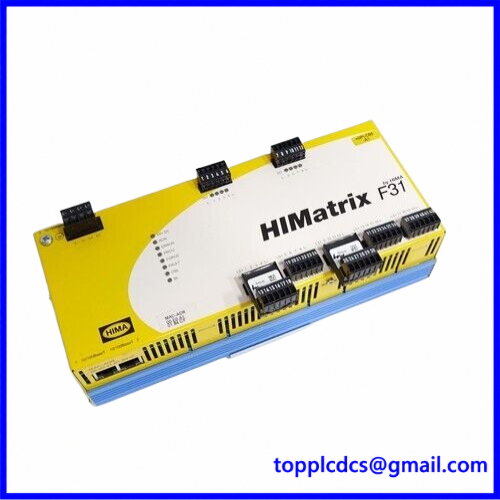
F3102
Key Technical Specifications
- Brand: HIMA
- Model: F3102
- Product Series: HIMatrix
- Product Type: Safety-Related Controller / Safety PLC
- Digital Inputs: 20 channels
- Digital Outputs: 8 channels
- Input Signal Type: 24 V DC digital signals
- Input Isolation: Non-galvanically isolated inputs
- Digital Output Voltage: 24 V DC nominal
- Output Current: Channels 1–3 and 5–7: up to 0.5 A each at 60°C; channels 4 and 8: up to 1 A each at 60°C, or 2 A at up to 50°C
- Maximum Total Output Current: 7 A
- Power Supply: 24 V DC
- Supply Voltage Range: 24 V DC, -15% to +20%
- Ethernet Interfaces: 4 × RJ45, 10/100Base-T with integrated switch
- User Program Memory: Variant-dependent, up to 2,047 kB
- Operating Temperature: 0°C to +60°C for the standard version
- Storage Temperature: -40°C to +85°C
- Protection Rating: IP20
- Mounting: 35 mm DIN rail
- Dimensions: Approximately 257 × 114 × 66 mm, excluding connector-related variations
- Weight: Approximately 1.2 kg
- Safety Capability: Up to SIL 3, Category 4, and PL e, subject to the applicable certification, system architecture, and safety validation
Installation and Operating Procedure
- Confirm that the controller’s full model designation and hardware variant match the approved system documentation.
- Isolate the 24 V DC supply and follow the site’s lockout/tagout procedure before installation.
- Mount the controller securely on a compatible 35 mm DIN rail.
- Connect the protective grounding and 24 V DC power supply according to the HIMA wiring documentation.
- Wire digital inputs and outputs to their designated terminals, observing signal polarity, common connections, and channel ratings.
- Connect Ethernet cables to the designated network ports and verify the intended network topology.
- Use the appropriate HIMA engineering environment, such as SILworX or ELOP II Factory, according to the controller variant.
- Check the hardware configuration, firmware compatibility, application program, and communication settings.
- Perform input/output checks, diagnostic verification, and approved safety-function tests before returning the system to service.
Daily Maintenance
- Check the controller’s status indicators and diagnostic messages during routine inspections.
- Confirm that the 24 V DC supply remains within the specified operating range.
- Inspect terminal connections for looseness, corrosion, or overheating.
- Check Ethernet connectors and cables for physical damage or intermittent communication.
- Keep the enclosure and surrounding area free from excessive dust, moisture, and conductive contamination.
- Verify that cabinet ventilation and ambient temperature remain within the permitted limits.
- Record diagnostic events, controller restarts, and configuration changes.
- Perform periodic proof testing according to the approved safety lifecycle documentation.
Troubleshooting and FAQ
Q1: The controller does not start. What should be checked?
Check the 24 V DC supply, polarity, protective fuse, grounding, terminal connections, and controller status indicators. Compare the measured supply voltage with the specified operating range.
Q2: Why are digital input signals not detected?
Verify input wiring, signal voltage, common reference connections, sensor condition, and channel configuration. Check whether the input signal meets the required high-level threshold.
Q3: Why does a digital output switch off?
Check for output overload, short circuits, incorrect wiring, and excessive total output current. Remove the fault and review the controller diagnostics before further testing.
Q4: Why is Ethernet communication unavailable?
Inspect the RJ45 connections, cable condition, network configuration, IP settings, and communication status. Confirm that the controller and engineering workstation are configured for the same network environment.
Q5: Can the F3102 replace another HIMatrix controller?
Not automatically. Replacement suitability depends on the exact hardware variant, I/O allocation, terminal wiring, firmware, application program, communication configuration, and safety certification requirements.
Q6: Which engineering software is required?
The applicable software depends on the specific controller variant. Confirm whether the installed unit is configured for SILworX or ELOP II Factory before modifying or downloading an application.
Safety Precautions
- Installation, commissioning, programming, and maintenance must be performed by qualified personnel familiar with functional safety systems.
- Never bypass safety interlocks or force safety outputs during normal operation.
- Do not remove or insert wiring while the equipment is energized unless the approved procedure specifically permits it.
- Verify input and output wiring against the official terminal assignment before energizing the controller.
- Confirm that the complete safety function meets the required SIL, performance level, and application standards; the controller’s certification alone does not certify the entire installation.
- Back up the existing application and configuration before replacing or updating the controller.
- Use only approved replacement hardware and follow the applicable HIMA safety manual and proof-test requirements.
Related HIMA Products and Models
The following HIMA products and model families may be relevant when maintaining or expanding a HIMatrix safety system. They are not guaranteed direct replacements or interchangeable units.
- HIMA HIMatrix F30 Series Safety Controllers
- HIMA HIMatrix F31 Series Safety Controllers
- HIMA HIMatrix F35 Series Safety Controllers
- HIMA HIMatrix F60 Safety Controller
- HIMA F31 02 Safety-Related Controller
- HIMA F35 01 Safety Controller
- HIMA F35 02 Safety Controller
- HIMA F35 03 Safety Controller
- HIMA F3 DIO 20/8 Digital I/O Module
- HIMA F3 DIO 16/8 Digital I/O Module
- HIMA F3 AIO 8/4 Analog I/O Module
- HIMA F1 DI 16 Digital Input Module
- HIMA HIMax X-CPU Controller Family
- HIMA HIMax X-DO Digital Output Module Family
- HIMA HIMax X-DI Digital Input Module Family
For model selection, replacement, and system integration, verify the complete order number, hardware revision, firmware, software environment, and certification requirements.
Product Support
For industrial automation spare parts, safety controllers, and control system components, visit: