Description
Honeywell | 51304913-200 | HDDT I/O Circuit Board
Product Description
The Honeywell 51304913-200 REV B is an HDDT I/O circuit board designed for Honeywell Application Module X (AXM) and related legacy control system hardware.
The HDDT I/O board provides an interface between the Hard Disk Drive Tray (HDDT) and the system backplane. It supports the SCSI interface connection used by the hard disk drive subsystem and optional peripheral devices, including DAT tape drives and CD-ROM equipment.
The board includes a J1 connection for the SCSI interface cable or an external SCSI terminator, depending on the system configuration.
The 51304913-200 is identified as a CE-compliant version, while 51304913-100 is the corresponding non-CE version in the Honeywell AXM documentation.
This circuit board is suitable for legacy system maintenance, HDDT interface replacement, and industrial control system spare-parts inventory.
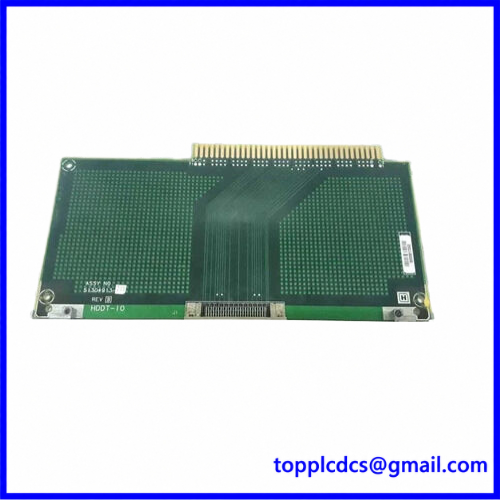
51304913-200
⚙️ Product Parameters
Brand: Honeywell
Model: 51304913-200
Additional Part Number: 51304912-100 REV A
Series: Honeywell Application Module X (AXM)
Product Name: HDDT I/O Circuit Board
Board Identification: HDDT-I/O
Hardware Revision: REV B
Connector: J1 SCSI Interface
Application: Hard Disk Drive Tray Interface
Product Status: New – Open Box
Dimensions: Not officially specified; refer to the actual board
Weight: Not officially specified; subject to physical inspection
Country of Origin: United States (seller-listed)
Power Requirements: Supplied through the compatible system backplane; verify system specifications
Discontinued Status: Legacy product; current production status not confirmed
🔧 Daily Maintenance and Care
- Inspect the PCB for cracks, damaged components, discoloration, and signs of overheating.
- Check the J1 SCSI connector for bent pins, oxidation, and loose connections.
- Inspect the board’s backplane contacts for contamination or physical damage.
- Keep the installation area clean and free from dust and moisture.
- Check the SCSI cable for insulation damage and connector wear.
- Verify that the correct SCSI termination arrangement is installed.
- Monitor hard disk drive communication and peripheral device recognition.
- Check system diagnostic messages for HDDT or SCSI interface errors.
- Maintain adequate cabinet ventilation and operating temperature.
- Store spare boards in anti-static packaging in a dry environment.
🛠️ Troubleshooting and Common Problems
Q1: What is the main function of the Honeywell 51304913-200?
A: It is an HDDT I/O interface board that provides the SCSI connection between the Hard Disk Drive Tray subsystem and optional peripheral devices.
Q2: What does HDDT mean?
A: HDDT stands for Hard Disk Drive Tray, the storage assembly used in compatible Honeywell AXM systems.
Q3: What is the function of the J1 connector?
A: J1 provides the SCSI interface connection for optional DAT tape or CD-ROM devices. When these devices are not installed, the appropriate external SCSI terminator is required.
Q4: What is the difference between 51304913-200 and 51304913-100?
A: Honeywell AXM documentation identifies the 51304913-200 as the CE-compliant HDDT I/O board and the 51304913-100 as the non-CE version.
Q5: Why is the hard disk drive or peripheral device not recognized?
A: Possible causes include a loose SCSI cable, incorrect termination, damaged J1 connectors, backplane contact problems, or a faulty HDDT I/O board.
Q6: Why does the system report SCSI communication errors?
A: Check the SCSI cable connections, termination arrangement, connected peripheral devices, and HDDT interface board.
Q7: Can the board be replaced while the system is running?
A: No. The Honeywell AXM service procedure requires node power to be turned off before replacing the HDDT I/O board.
Q8: What precautions are necessary before replacement?
A: Perform the required software shutdown procedures, disconnect power, follow ESD precautions, and verify the replacement board’s revision and compatibility.
⚠️ Safety Precautions
- Shut down the AXM coprocessor using the approved software procedure before removing power.
- Turn off node power before removing or installing the circuit board.
- Never insert or remove the board while the system is energized.
- Use an ESD wrist strap and anti-static work surface.
- Handle the PCB by its edges to avoid damaging electronic components.
- Verify the SCSI cable and termination configuration before restarting the system.
- Ensure the board is fully seated in the correct backplane position.
- Follow Honeywell service documentation during replacement and commissioning.
- Board replacement should be performed by qualified industrial control system technicians.
📦 Recommended Honeywell Models – 15 Related Products
- Honeywell 51304913-100 – HDDT I/O Board, Non-CE Version
- Honeywell 51304918-100 – SCSI Cable
- Honeywell 51304921-100 – Hard Drive DC Power Cable
- Honeywell 51304924-100 – WSI2 I/O Board, Non-CE
- Honeywell 51304924-200 – WSI2 I/O Board, CE Version
- Honeywell 51304947-100 – WSI2R I/O Board
- Honeywell 51304949-100 – SCSI Cable
- Honeywell 51305070-200 – DAT/CD-ROM SCSI Interface Cable
- Honeywell 51304907-200 – SPC II I/O Board
- Honeywell 51191982-100 – SCSI Terminator
- Honeywell 51402176-100 – Hard Disk Drive Tray Assembly
- Honeywell 51304769-201 – DAT Drive DC Power Cable
- Honeywell 51192054-102 – DAT/CD-ROM SCSI Interface Cable
- Honeywell 51305069-100 – Configuration Cable
- Honeywell 51304467-100 – Power Adapter Board
Note: These products are related to Honeywell AXM, HDDT, SCSI, and legacy control system hardware. They are not all direct replacements for the 51304913-200. Verify part numbers, revisions, and system compatibility before ordering.