
Description
🔍 Product Overview
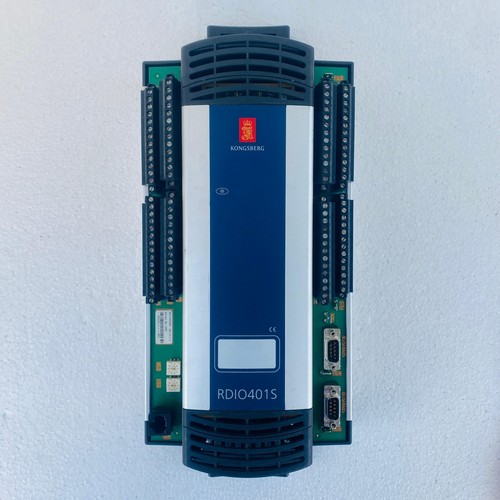
The Kongsberg RDIO401S is a high-reliability, multi-channel remote digital expansion module designed for demanding marine and industrial automation networks. This module serves as a versatile interface drop, combining digital input monitoring, digital output control, and robust electromechanical relay channels in a single compact enclosure. Developed by Kongsberg Maritime for distributed control architectures, it features galvanic channel isolation and fast signal processing to ensure dependable monitoring and remote actuation of heavy-duty marine machinery, machinery valves, and safety systems.
⚙️ Technical Parameters & Specifications
- Model Number: RDIO401S
- Device Type: Remote Digital Input/Output and Relay Expansion Module
- Channel Configuration: Integrated high-density digital inputs, solid-state outputs, and dry-contact relays
- Dimensions: 165 mm x 120 mm x 65 mm
- Weight: 0.82 kg
- Country of Origin: Norway
🚀 Application Areas
- Integrated Automation Systems (IAS): Managing safety interlocks, pump control loops, and generator start/stop lines.
- Remote Machinery Actuation: Driving heavy solenoid valves, indicator lamps, and acoustic alarm horns via the onboard relay outputs.
- Valve Position Feedback: Concentrating limit switch signals from remote hydraulic or pneumatic valves across the vessel.
- Distributed I/O Station Panels: Providing localized physical terminations inside engine control room consoles or deck cabinets.
📖 Product Usage Instructions
The RDIO401S is engineered for vertical mounting on standard TS35 DIN rails inside an IP-rated terminal enclosure. Maintain a minimum ventilation gap of 20 mm around the top and bottom of the casing to prevent localized thermal buildup. Route high-voltage AC relay switching wires and low-voltage DC input cables through separate wire ducts to eliminate inductive cross-talk. Before servicing or replacing terminal plugs, isolate all power sources (including external loop voltages running through the relay contacts) to prevent localized arcing or component damage.
🌐 Communication Configuration Steps
- IP Address / Network Setup: Connect the unit to a configuration terminal using the proprietary Kongsberg system software. Assign a unique static IP address and matching subnet mask corresponding to the architecture of the vessel’s dedicated automation control network.
- Station Number / Node Identity: Establish the module’s node rank on the dual fieldbus ring by setting the local hardware address switches or mapping the designated Station ID within the software configuration database.
- Baud Rate / Link Negotiation: The integrated transceiver interfaces support auto-negotiation, automatically locking onto the backbone communication speed (typically 10/100 Mbps for industrial Ethernet or up to 1 Mbps for CAN bus rings) to ensure low-latency signal distribution.
⚡ Power-Up & Commissioning Flow
- Terminal Integrity Check: Verify that all plug-in wiring blocks are fully inserted and that the digital loop wiring matches the system diagram.
- Auxiliary Power Verification: Confirm that the primary and secondary auxiliary power feeds supply a stable 24V DC nominal input directly to the module’s power terminals.
- Boot Phase Monitoring: Energize the cabinet circuit breaker. The front face panel power LED should remain solid green, and the network status LEDs will flash as the module establishes its dual-redundant communication handshake.
- I/O Loop Actuation Test: Force a digital output channel active from the main automation workstation and confirm that the corresponding relay contact closes mechanically and changes the status LED on the module face plate.
✅ Initial Operation Checklist
- Is the internal chassis grounding foot securing a firm, clean connection to an unpainted, earthed DIN rail?
- Have the address rotary switches or software identifiers been verified against the master project blueprints?
- Are the primary and secondary communication lines active to ensure full network path tolerance?
- Do the input status LEDs react immediately when a field dry contact is manually jumpered for test purposes?
❓ Common Questions (Q&A)
Q: What does a rapid red flashing error indicator on the module center denote?
A: A fast red blink usually indicates a total network communication timeout. The unit is powered up and stable locally, but it has stopped receiving data frames from the master controller. Inspect the network switches, fiber rings, or terminal addressing layouts.
Q: Can I mix different voltages across the individual relay output channels?
A: Yes. Because the onboard relays feature independent dry contacts with high galvanic isolation, you can safely switch a combination of 24V DC auxiliary loops and 110V/230V AC warning circuits on adjacent relay ports, provided you do not exceed the channel’s maximum current ratings.
Q: What happens to the outputs if the module loses connection with the main PLC?
A: The RDIO401S features a configurable fail-safe function. In the event of a continuous communication loss, individual digital and relay outputs can be pre-programmed to freeze in their last known state, drop to zero (de-energize), or switch to a specific safety state to shield auxiliary machinery from damage.