Description
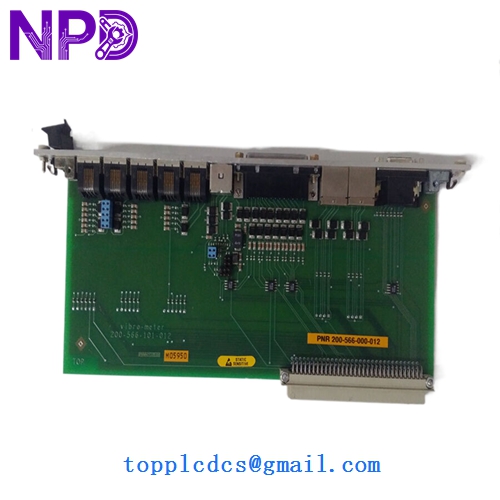
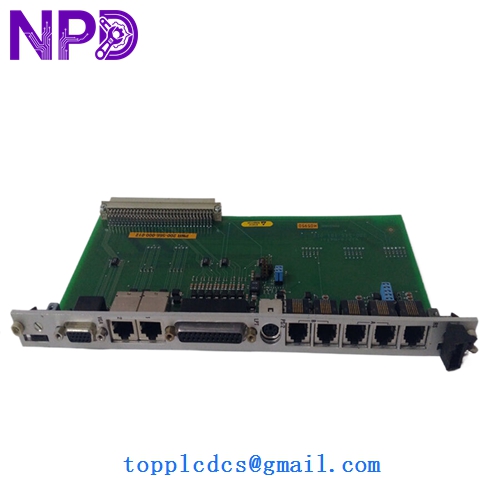
- Model: 200-566-000-012 (Standard version) / 200-566-101-012 (Commonly associated revision)
- Brand: Vibro-Meter (a Meggitt Brand)
- Series: VM600 Machinery Protection System
- Core Function: Central processing card for vibration, speed, and dynamic pressure monitoring
- Condition: Brand New Surplus (Original New), zero runtime, factory calibrated
- Product Type: MPC4 Machinery Protection Card
- Key Specs: 4 Dynamic Channels | 2 Speed Channels | SIL 2 Compliant
- Channels: 4 Inputs (Vibration, dynamic pressure, etc.) + 2 Tachometer inputs
- Processing: On-board DSP for FFT and real-time alarm monitoring
- Output: 4 Configurable Analog Outputs (0-20mA or 4-20mA)
- Relays: Integrated alarm and danger relay logic
- Communication: VMEbus for VM600 rack integration
- Safety Rating: SIL 2 (IEC 61508)
- Resolution: 16-bit A/D conversion
- Frequency Range: 0.1 Hz to 20 kHz (Application dependent)
- Power Consumption: +5V and ±12V (Sourced from VM600 backplane)
- Software: Configurable via Vibro-Meter MPS software
Installation & Configuration Guide
Phase 1: Pre-Installation (Preparation: 20 minutes)
⚠️ Critical Insurance Policy: The MPC4 card is the “brain” of your turbine protection. Before swapping, verify that the VM600 rack’s IOC4T (I/O card) is compatible with this specific hardware revision. Ensure the plant’s bypass/trip-lock is engaged so that the removal of this card doesn’t trigger a nuisance trip of the machinery.
Tools & Prep:
- Anti-static (ESD) kit—Meggitt cards are extremely sensitive to static discharge.
- Laptop with VM600 configuration software.
- Flashlight and magnifying glass to inspect backplane pins.
Phase 2: Removing the Faulty MPC4 (Removal: 15 minutes)
- Backup Configuration: If the old card is still communicating, download the configuration file.
- Unlock: Release the two front-panel captive screws.
- Extraction: Use the injector/ejector handles. Pull them outward simultaneously to unseat the card from the VME backplane.
- Visual Check: Inspect the card being removed for “burnt toast” smells or discolored components, which might indicate a deeper power supply issue in the rack.
Phase 3: Installing the New Module (Installation: 25 minutes)
- Jumper Sync: Check the side-mounted jumpers on the 200-566-000-012. They must be set identically to the card you are replacing (e.g., VME bus addresses).
- Insertion: Align the MPC4 with the card guides. Slide it in smoothly. Use the handles to firmly “seat” the card into the backplane. Do not use excessive force.
- Locking: Tighten the captive screws to ensure the card’s faceplate makes proper contact with the rack’s EMI gasket.
Phase 4: Commissioning & Validation (Testing: 40 minutes)
- Boot Sequence: Power on. Watch the “Diag” and “Status” LEDs. A steady green Status LED indicates the card has passed its internal POST (Power-On Self-Test).
- Upload Config: Upload your saved configuration file to the new card.
- Signal Verification: Check the live vibration readings. Compare them against a portable vibration analyzer or the redundant channel.
- Trip Test (Optional/Cold): If the machinery is down, simulate a “Danger” level signal to ensure the MPC4 correctly triggers the relay on the IOC4T card.
Customer Cases & Industry Applications
Case 1: Gas Turbine Protection in the Middle East A power plant in Dubai faced an “MPC4 Card Fail” alarm on a Frame 9E gas turbine. Without the 200-566-000-012, the turbine could not be legally or safely operated. The lead time from the OEM was 16 weeks. We air-shipped a New Surplus card the same day. The turbine was back online in 4 days, preventing a massive shortfall in the local grid during peak summer demand.
Case 2: Hydro-Electric Plant Refurbishment During a major overhaul, a hydro plant in Canada decided to replace their aging MPC4 cards with newer revisions (200-566-101-012) to ensure SIL 2 compliance. By sourcing these from www.newplcdcs.com, they saved 30% compared to direct factory pricing while receiving the same “Original New” quality and a full 12-month warranty.
Frequently Asked Questions (FAQ)
Q: What is the difference between 200-566-000-012 and 200-566-101-012? A: Typically, the “101” variant is a later revision or may include factory-installed coating (conformal coating) for harsh environments. In most VM600 racks, they are functionally interchangeable, but we always recommend checking your specific “Hardware configuration” in the software to ensure the revision is supported.
Q: Can I “Hot-Swap” the MPC4? A: Vibro-Meter states that VM600 cards are hot-swappable, but in my experience, it’s risky. A slight misalignment during hot-insertion can cause a transient on the VME bus. If the machinery is critical, always put the protection system into “Bypass” mode before pulling the card.
Q: Does it come with the configuration software? A: No, the software is a separate licensed product from Vibro-Meter/Meggitt. We provide the hardware. If you need the software, we suggest contacting your local Vibro-Meter representative, though we can provide the technical manuals to help with the setup.
Q: Why buy “New Surplus” for a safety-critical SIL 2 card? A: Because “New Surplus” is exactly that—New. It hasn’t been subjected to the heat and vibration of 10 years in a turbine hall. A “Refurbished” card may have been repaired, but its base components are still aged. For SIL 2 applications, you want zero-hour components to ensure the MTBF (Mean Time Between Failures) remains at factory specifications.