
Description
Product Overview
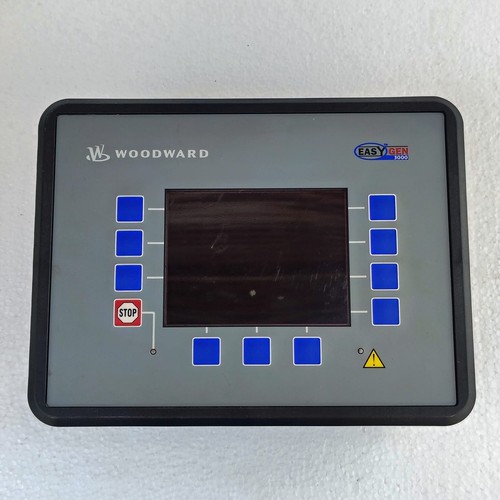
The Woodward 8440-2050 is a sophisticated digital controller designed for reliable engine management and generator set control. It provides comprehensive monitoring, protection, and control features, ensuring optimal performance in critical power generation applications. Engineered for robustness, it handles complex synchronization and load-sharing tasks with precision.
Technical Specifications
- Dimensions: 230 mm x 175 mm x 50 mm (approximate panel mount)
- Weight: 0.85 kg
- Country of Origin: United States
- Supply Voltage: 8–35 VDC
- Communication Ports: RS-485, CAN bus
- Display: Integrated high-resolution LCD
Application Areas
⚙️ Standby Power Systems 🏭 Industrial Manufacturing Plants 🏥 Data Centers and Hospitals 🏗️ Oil and Gas Facilities 🚢 Marine Auxiliary Power
Operational Guidelines
Power-Up / Power-Down Sequence
- Startup: Ensure all external wiring is secure. Apply auxiliary DC power (8–35V) to the unit. The display will initialize; verify no “Alarm” or “Trip” indicators are active before closing the main generator breaker.
- Shutdown: Open the generator circuit breaker first to remove the load. Allow the engine to run at idle for the programmed cooling period. Finally, switch off the power supply to the controller once the engine has completely stopped.
Step-by-Step Standard Operation
- Safety Check: Inspect the engine and generator for any visible fluid leaks or loose connections.
- Initialization: Power on the unit and observe the HMI for system ready status.
- Parameter Verification: Check that voltage and frequency readings match the nominal system requirements.
- Mode Selection: Use the front panel buttons to select ‘Auto’ for remote dispatch or ‘Manual’ for onsite control.
- Synchronization: If in manual mode, monitor the synchroscope on the display and engage the breaker when the needle reaches the 12 o’clock position.
Frequently Asked Questions
Q: What should I do if a “Common Alarm” flashes? A: Navigate to the “Alarms” menu on the LCD display. The unit will log the specific sensor or parameter that triggered the alarm. Resolve the underlying mechanical or electrical issue before attempting to clear the alarm from the history.
Q: Can the 8440-2050 communicate with non-Woodward PLC systems? A: Yes, the controller supports industry-standard Modbus protocols via RS-485, allowing for seamless integration into broader SCADA or PLC architectures.
Q: How do I update the firmware? A: Firmware updates are performed via the dedicated service port using Woodward ToolKit software on a Windows-based PC. Ensure a stable power source during the update process to prevent corruption.
Q: Is the unit field-repairable? A: Internal board-level repairs are not recommended. If the unit exhibits hardware failure, contact an authorized service center for a replacement or factory-certified repair.