
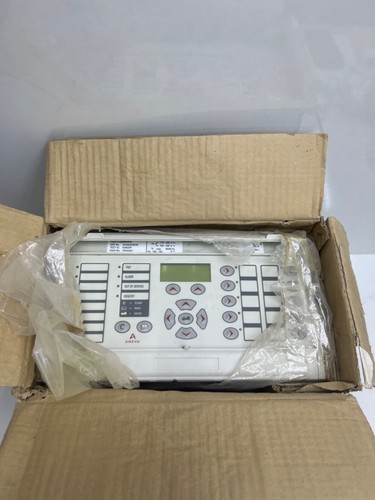
The Schneider Electric MiCOM P442, specifically configuration P44231AB6M0400K, is a high-performance distance protection relay designed for the protection of transmission and sub-transmission lines. As part of the world-renowned MiCOM P40 series, this relay offers advanced fault location, high-speed tripping, and robust communication protocols to ensure the reliability and safety of high-voltage electrical networks.
Product Specifications
| Feature | Specification Details |
| Product Name | MiCOM P442 Distance Protection Relay |
| Configuration Code | P44231AB6M0400K |
| Manufacturer | Schneider Electric (formerly Alstom/AREVA) |
| Primary Function | Distance protection for transmission lines |
| Key Features | Mho/Quadrilateral characteristics, fault location, power swing detection |
| Communication | Dual Ethernet ports, DNP3, IEC 60870-5-103, IEC 61850 |
| Application | Transmission and Sub-transmission systems |
Application Fields
The P442 relay is optimized for demanding utility and industrial high-voltage applications:
- Transmission Line Protection: Providing multi-zone distance protection for overhead lines and underground cables.
- Smart Substations: Fully compatible with IEC 61850 standards for digital substation integration and automated control.
- Grid Stability: Monitoring power swings and preventing unnecessary tripping during transient grid conditions.
- Fault Analysis: Utilizing advanced oscillography and event recording to provide detailed post-fault analysis for system operators.
Product Usage Instructions
- Safety Procedures: Before working on the relay, ensure all CT (Current Transformer) secondary circuits are shorted and VT (Voltage Transformer) circuits are disconnected/isolated. Always use appropriate ESD protection.
- Installation: The P442 is designed for standard 19-inch rack mounting. Ensure adequate airflow around the unit to maintain optimal operating temperatures.
- Configuration: Use the MiCOM S1 Studio software to configure the relay settings. Define the line impedance, protection zones, and communication parameters as per your site-specific relay study.
- Testing: Perform comprehensive testing using a secondary injection test set (e.g., Omicron or Doble). Verify distance zone reach, directional sensitivity, and tripping logic before putting the line into service.
- Diagnostics: Regularly review the relay’s event logs and fault records via the front-panel display or remote communication to monitor the health and performance of the protected line.
Frequently Asked Questions (Q&A)
Q: Is the P44231AB6M0400K still supported for firmware updates?
A: Schneider Electric continues to provide support for the MiCOM P40 series, though availability of specific hardware modules may depend on the lifecycle stage. It is recommended to contact your local Schneider Electric representative for the latest firmware and connectivity packages.
Q: Can this relay be used in an IEC 61850 digital substation?
A: Yes, the P442 is designed to support IEC 61850 protocols, enabling seamless integration with other intelligent electronic devices (IEDs) and central SCADA systems.
Q: What should I do if a “Relay Fail” alarm appears on the screen?
A: A “Relay Fail” alarm typically suggests an internal self-test failure. Consult the user manual for the specific error code, check the power supply voltage, and ensure that all internal boards are seated correctly. If the error persists, the unit may require factory repair.
Q: How do I back up my settings?
A: Use MiCOM S1 Studio to connect to the relay via the front or rear communication port. Choose the “Upload” or “Read Settings” function to save the configuration file to your local PC.
Recommended Similar Products
- Schneider Electric MiCOM P444 (Advanced Distance Relay)
- Schneider Electric MiCOM P441 (Distance Protection)
- Siemens SIPROTEC 7SA87 Distance Protection Relay
- GE Multilin D60 Line Distance Relay
- ABB REL670 Line Distance Protection Relay


