
🔧 Product Overview
The GENERAL ELECTRIC G60N00HKHF8LH6DM8LP6TU4LW67 is a front-panel assembly for the GE Multilin G60 Generator Protection System in the UR Series platform.
The G60 front panel provides local access to relay information, settings, alarms, metering and control functions. Depending on the installed interface configuration, the front panel can include an LCD display, keypad, LED indication panels, RS232 service port and user-programmable pushbuttons. GE documentation identifies the front panel as one of the two primary user interfaces, with EnerVista software providing the other interface.
The exact unit is listed as used, Revision 1, with model code G60N00HKHF8LH6DM8LP6TU4LW67. Because the G60 ordering code defines multiple hardware and user-interface options, the complete model number should be matched before using this panel as a replacement.
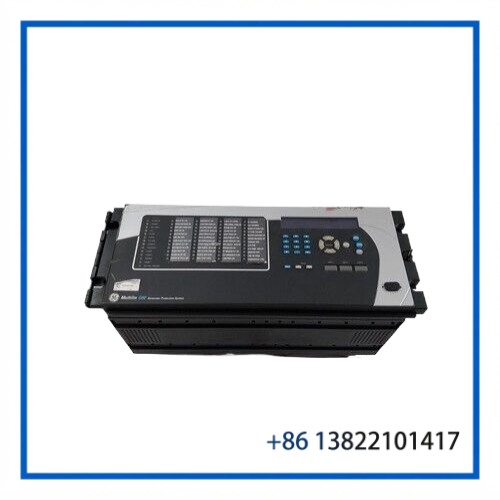
⚙️ Key Features
- General Electric / GE Multilin UR Series
- G60 Generator Protection System front panel
- Model: G60N00HKHF8LH6DM8LP6TU4LW67
- Revision: 1
- Local relay monitoring and operator interface
- Display and keypad interface
- LED status indication
- RS232 front service port
- User-programmable control buttons depending on configuration
- Designed for G60 generator protection applications
- Used condition according to the available listing
- Suitable as a maintenance or replacement assembly
📋 Product Datasheet
| Parameter | Specification |
|---|---|
| Brand | General Electric |
| Product Family | GE Multilin |
| Series | UR Series |
| Model | MULTILIN G60 |
| Full Model Code | G60N00HKHF8LH6DM8LP6TU4LW67 |
| Product Type | Front Panel |
| Revision | 1 |
| Application | Generator Protection |
| User Interface | G60 UR Series Front Panel |
| Display | Local relay display |
| Keypad | Included as part of front-panel interface |
| Service Port | RS232 |
| LED Indication | Front-panel LED panels |
| Programmable Controls | Configuration dependent |
| Country of Origin | United States |
| Weight | Approx. 16.030 kg |
| Condition | Used |
⚡ Operating Function
The front panel acts as the local human-machine interface for the G60 protection relay.
Operators can use the display and keypad to review measured values, alarms, relay status, self-test information and configuration information. The front interface also provides access to programmable control functions where the selected G60 configuration includes user-programmable pushbuttons.
The G60 documentation describes standard and enhanced faceplate arrangements. The graphical front-panel option can additionally provide a color display, navigation keys, USB connectivity and programmable pushbuttons. Therefore, the exact physical configuration should always be checked against the complete model code and the actual replacement panel.
🛠️ Installation & Configuration
- Verify the complete model number
Confirm G60N00HKHF8LH6DM8LP6TU4LW67 before installation. Do not select a replacement only by the G60 name. - Check the physical interface
Compare the display, keypad, LED arrangement, pushbuttons and connector locations with the existing panel. - Inspect connectors
Check rear connectors, mounting points and wiring interfaces for bent pins, corrosion or mechanical damage. - Confirm relay revision
Verify the G60 hardware revision and firmware requirements before fitting the replacement. - Install with power isolated
Disconnect the relay from its control power before removing or installing the front-panel assembly. - Functional test
After installation, verify display operation, keypad response, LED indication and communication/service-port operation. - Check settings
Confirm that the relay settings and configuration remain correct after the front-panel replacement.
🔧 Maintenance Tips
Keep the front panel clean and dry. Avoid aggressive solvents on the display or keypad surface.
For equipment installed in substations or generator switchgear, inspect the panel for dust accumulation, loose mounting hardware and signs of moisture ingress during scheduled maintenance.
If the display becomes intermittent or individual keys stop responding, first check the panel connections and relay power before assuming that the complete G60 relay has failed.
For a used replacement, compare the panel markings and connectors with the original unit before installation. A similar-looking G60 front panel is not necessarily a direct replacement because the UR Series supports several interface configurations.
❓ Common Questions
What is the G60N00HKHF8LH6DM8LP6TU4LW67?
It is a GE Multilin G60 UR Series front-panel assembly used as the local operator interface for a G60 generator protection relay.
Is it a complete G60 protection relay?
No. The item is identified as a front panel. It should not be treated as a complete generator protection relay.
What does the front panel do?
It provides local access to the relay display, keypad, LEDs, service interface and, depending on configuration, programmable control buttons.
Does every G60 use the same front panel?
No. GE offered multiple G60 user-interface configurations, including standard, enhanced and graphical front panels.
Can I use another G60 front panel as a replacement?
Only after confirming the complete ordering code, hardware revision, physical arrangement and connector configuration.
What is the condition of this unit?
The available listing identifies this particular unit as Used.
What should be checked before purchase?
Check the complete MPN, revision, display type, button arrangement, rear connectors, physical condition and compatibility with the existing G60 relay.
🔄 Related GE Multilin Models
- GE Multilin G60 — Generator Protection System
- GE Multilin F60 — Feeder Protection System
- GE Multilin L60 — Line Distance Protection System
- GE Multilin T60 — Transformer Protection System
- GE Multilin M60 — Motor Protection System
- GE Multilin D60 — Line Distance Protection System
- GE Multilin C60 — Breaker Management Relay
- GE Multilin B90 — Bus Differential Protection System
- GE Multilin SR750 — Feeder Protection Relay
- GE Multilin UR Series Front Panel Assemblies
🏭 Application Summary
The GE Multilin G60 front panel is intended for local operation and maintenance of generator protection equipment. In an operating power-generation installation, having a correctly matched spare front panel can be useful when the original display, keypad, LED assembly or local interface develops a fault.
The most important point when sourcing this component is the complete G60 ordering code. GE’s UR Series uses configurable hardware and interface options, so model-family matching alone is not sufficient. For this particular unit, G60N00HKHF8LH6DM8LP6TU4LW67 and Revision 1 should be compared with the existing relay before replacement.


