
Product Description
The B&R 4PPC30.043F-21B is a Power Panel C30 industrial HMI with an integrated ARM Cortex-A8 controller and a 4.3-inch color touchscreen. Designed for compact machine-control and automation applications, it combines operator visualization, control processing, and fieldbus connectivity in one unit. The display provides 480 × 272 WQVGA resolution with analog resistive touch technology. Its communication interfaces include one 10/100 Mbit/s Ethernet port, two USB 2.0 ports, and two CAN bus interfaces. With 256 MB DDRAM, 512 MB onboard flash memory, and 8 kB FRAM for retentive variables, this panel supports B&R Automation Runtime applications and machine visualization tasks. This listing is for a New unit, Revision C0. Verify the hardware revision and software compatibility before integrating it into an existing B&R control system.
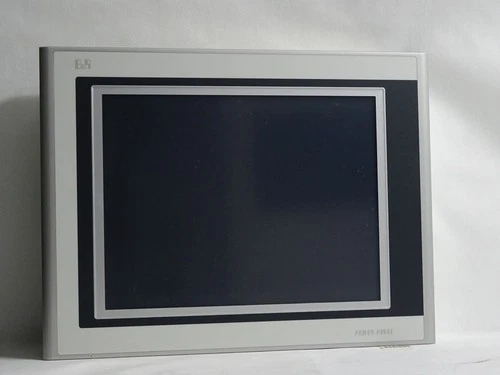
Key Technical Specifications
- Brand: B&R
- Model: 4PPC30.043F-21B
- Hardware Revision: C0
- Product Series: Power Panel C30
- Product Name: Industrial HMI Controller
- Display Size: 4.3 inches
- Display Type: TFT color LCD
- Display Resolution: 480 × 272 pixels (WQVGA)
- Touchscreen: Analog resistive, 12-bit controller
- Processor: ARM Cortex-A8
- Processor Frequency: 1 GHz
- System Memory: 256 MB DDRAM
- Onboard Flash: 512 MB
- Retentive Memory: 8 kB FRAM
- Ethernet: 1 × 10/100 Mbit/s RJ45
- USB Interfaces: 2 × USB 2.0 Type A
- Fieldbus Interfaces: 2 × CAN bus
- Nominal Supply Voltage: 24 V DC (-15% / +20%)
- Typical Power Consumption: 3.5 W
- Maximum Power Consumption: 12.5 W
- Cooling: Passive
- Front Protection: IP65
- Rear Protection: IP20
- Operating Temperature: -20 to +60°C
- Dimensions: 140 × 96 × 38.3 mm
- Weight: Approximately 0.3 kg
- Product Condition: New
- Country of Origin: Verify on the product nameplate
Installation and Operating Instructions
- Confirm the complete model number and hardware revision on the product label.
- Check the panel cutout and mounting arrangement against the B&R installation drawing.
- Disconnect the 24 V DC supply before wiring or mounting the panel.
- Install the unit using the specified retaining clips and mounting procedure.
- Connect the 24 V DC power supply with correct polarity and protective grounding.
- Connect the Ethernet cable to the designated network port and verify the network configuration.
- Connect CAN bus devices using the correct terminal assignments and bus topology.
- Check CAN bus termination settings and ensure that the network has appropriate termination at its physical ends.
- Connect USB peripherals only when supported by the application and system configuration.
- Configure the controller and visualization project using compatible B&R Automation Studio software.
- Confirm the Automation Runtime version, hardware revision, and project configuration before downloading the application.
- Test touchscreen response, Ethernet communication, CAN bus communication, and application operation before releasing the machine for production.
Daily Maintenance
- Clean the touchscreen with a soft, lint-free cloth.
- Avoid abrasive cleaners and excessive pressure on the resistive touch surface.
- Check the display for flickering, dead areas, or abnormal brightness.
- Inspect power and communication connectors for looseness or damage.
- Keep the rear ventilation area free from dust and obstructions.
- Check Ethernet and CAN bus communication status indicators.
- Review controller diagnostics and application alarms.
- Back up the Automation Studio project and relevant machine configuration files.
- Monitor cabinet temperature and supply voltage during operation.
Troubleshooting and FAQ
Q1: The Power Panel does not start.
Check the 24 V DC supply, polarity, terminal connections, and internal protection. Verify that the supply can provide sufficient current during startup.
Q2: The touchscreen does not respond correctly.
Inspect the touch surface for contamination or damage. Check the application configuration and touchscreen calibration where supported.
Q3: Ethernet communication is unavailable.
Check the RJ45 connection, network settings, IP address, subnet configuration, and communication status indicators.
Q4: CAN bus devices cannot communicate.
Verify CAN wiring, bus topology, baud rate, node configuration, and termination resistance. Confirm that the application uses the correct CAN interface.
Q5: Which Automation Runtime version is required?
B&R specifies Automation Runtime B4.09 or later for hardware revisions B1 and above, and U4.08 for hardware revisions below B1. Confirm the exact software requirements for the installed C0 unit and project.
Q6: Can this unit replace another Power Panel C30 model?
Not automatically. Different C30 suffixes can have different fieldbus interfaces, including CAN, RS232, and RS485 combinations. Compare the complete part number and communication requirements before replacement.
Safety Precautions
- Installation and wiring must be performed by qualified personnel.
- Disconnect the 24 V DC supply before connecting or removing terminals.
- Verify polarity and supply voltage before energizing the unit.
- Use suitable protective grounding and industrial EMC practices.
- Keep the rear of the panel protected from dust, moisture, and conductive contamination.
- Do not exceed the electrical ratings of USB or communication interfaces.
- Ensure correct CAN bus termination and wiring.
- Do not rely on this standard C30 configuration for safety-related control functions.
- Verify all machine safety functions independently before commissioning.
Related B&R Models and Products
The following products belong to related B&R Power Panel and automation-control families. They are reference models, not guaranteed direct replacements:
- 4PPC30.043F-22B – Power Panel C30, 4.3-inch, CAN and RS232
- 4PPC30.043F-23B – Power Panel C30, 4.3-inch, CAN and RS485
- 4PPC30.043F-24B – Power Panel C30, 4.3-inch communication variant
- 4PPC30.0702-21B – Power Panel C30, 7-inch variant
- 4PPC30.0702-22B – Power Panel C30, 7-inch communication variant
- 4PPC30.101E-21B – Power Panel C30, 10.1-inch variant
- 4PPC30.101E-22B – Power Panel C30, 10.1-inch communication variant
- 4PP065.0571-K02 – B&R Power Panel
- 4PP120.0571-K02 – B&R Power Panel
- 4PP420.0571-K02 – B&R Power Panel
- 4PP480.0571-K02 – B&R Power Panel
- 4PP500.0571-K02 – B&R Power Panel
- 5PP320.1043-K02 – B&R Power Panel
- 5PP520.1043-K02 – B&R Power Panel
- 5PP520.1505-K02 – B&R Power Panel
Always verify display dimensions, fieldbus interfaces, hardware revision, Automation Runtime compatibility, and mounting requirements before selecting a related model as a replacement.
Product Keywords
B&R 4PPC30.043F-21B, Power Panel C30, B&R HMI, 4.3 Inch HMI, Industrial Touchscreen Panel, ARM Cortex-A8 Controller, B&R Automation Runtime, 24 V DC HMI, CAN Bus Controller, Ethernet HMI, Industrial Operator Panel, B&R Automation Parts, Machine Control Interface.
For industrial automation products and replacement components, visit https://www.newplcdcs.com.


