
1. Product Description
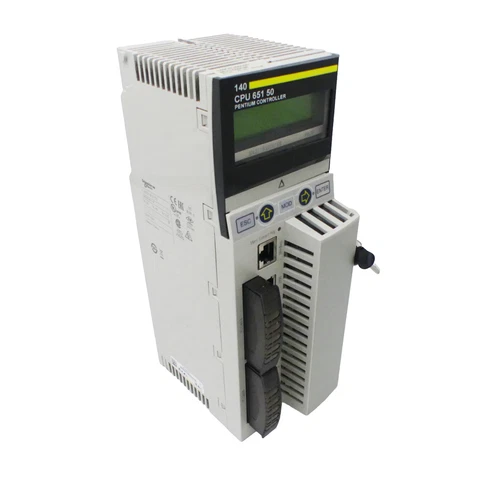
The Schneider Electric 140CPU65150 is a high-end Unity processor for the Modicon Quantum automation platform. Operating at 166 MHz with 768 KB of internal RAM, it provides centralized PLC processing, program execution, data handling, and communication management for industrial control systems. The processor includes integrated Modbus, Modbus Plus, USB, and Ethernet TCP/IP interfaces, allowing it to communicate with Quantum I/O, programming computers, supervisory systems, and supported industrial networks. Its memory can be expanded using compatible PCMCIA cards, and the Quantum platform supports local, remote, and distributed I/O architectures. The supplied unit is identified in the listing as PV:35 and SV:3.30; these version markings should be checked against the module label and the installed project requirements before commissioning.
2. Key Technical Specifications
- Brand: Schneider Electric
- Model: 140CPU65150
- Product Series: Modicon Quantum
- Product Type: Unity PLC Processor
- Processor Clock Speed: 166 MHz
- Internal RAM: 768 KB
- Program Memory: Expandable up to 7,168 KB with compatible PCMCIA memory card
- Local Rack Support: Up to 2 local racks
- Communication Interfaces: Modbus, Modbus Plus, USB, Ethernet TCP/IP
- Integrated Serial Communication: Modbus RS-232/RS-485
- Ethernet Interface: 10BASE-T/100BASE-TX
- Modbus Plus Interface: Integrated network port
- PCMCIA Expansion: 2 memory-card slots
- Maximum Optional Communication Modules: 6, subject to system configuration
- Bus Current Requirement: 2,160 mA
- Watchdog Timer: 250 ms, software adjustable
- Front Panel: LCD display, five-button keypad, status LEDs, key switch, restart pushbutton
- Listed Version Markings: PV:35 / SV:3.30
- Mounting: Modicon Quantum rack
- Product Status: Discontinued
- Country of Origin: Not independently verified
- Dimensions and Weight: Refer to the Schneider Electric mechanical drawings for the exact module data
3. Application Scenarios and Pain Points
- Process automation: Central PLC processing for industrial production lines, utilities, and process-control equipment.
- Distributed I/O systems: Coordinates local and remote I/O stations in large Quantum installations.
- Factory automation: Executes machine sequencing, interlocks, alarms, and equipment-control logic.
- Supervisory communication: Exchanges data with SCADA and HMI systems through supported Ethernet and serial communication services.
- Industrial network integration: Connects supported Modbus, Modbus Plus, and Ethernet-based devices.
- Legacy system maintenance: Provides a replacement processor for existing Quantum installations where the original hardware and application environment remain in service.
Typical maintenance concerns include processor watchdog faults, communication interruptions, memory-card errors, application-program incompatibility, battery or clock issues, and rack-bus communication problems. Replacing a processor without preserving the original project, communication settings, and hardware configuration can cause unexpected system behavior.
4. Installation and Operating Procedures
- Record the complete model number, serial number, PV and SV markings, and existing processor configuration.
- Back up the PLC application, configuration, network settings, and relevant documentation before removing the existing CPU.
- Confirm the Quantum rack type, power supply capacity, installed I/O modules, communication modules, and firmware requirements.
- Place the controlled process in a safe state and follow the approved shutdown procedure.
- Isolate the relevant power sources and apply lockout/tagout procedures before removing or inserting the processor.
- Inspect the rack connector, module contacts, mounting guides, and surrounding wiring for damage or contamination.
- Install the processor in the correct rack position and secure it according to Schneider Electric instructions.
- Connect the programming computer through the appropriate USB or supported network interface.
- Verify the project version, processor configuration, memory-card contents, communication parameters, and I/O assignments.
- Check processor status LEDs and diagnostic messages before allowing the application to control field equipment.
- Conduct controlled functional testing of communications, I/O, interlocks, alarms, and process sequences.
- Return the system to service only after the authorized commissioning team approves the test results.
5. Configuration and Integration
The 140CPU65150 belongs to the Modicon Quantum Unity processor family and is configured using the applicable Schneider Electric Unity Pro or EcoStruxure Control Expert software version.
Important configuration considerations include:
- Confirm software compatibility with the processor firmware and project version.
- Verify the local rack layout, power budget, and module addressing.
- Configure the integrated Modbus serial port for the required RS-232 or RS-485 communication arrangement.
- Configure Modbus Plus network addressing and connected devices.
- Set the Ethernet TCP/IP address, subnet, gateway, and communication parameters.
- Check PCMCIA memory-card compatibility and application-storage requirements.
- Verify remote and distributed I/O network configuration.
- Review communication-module limits and supported network combinations.
- Back up the original project and processor configuration before firmware or application changes.
The processor’s integrated interfaces do not mean that every protocol or network function is enabled automatically. Actual connectivity depends on the installed hardware, software configuration, network topology, and supported modules.
6. Daily Maintenance
- Monitor the RUN, ERR, and communication status indicators.
- Review processor diagnostics and application error messages.
- Check the rack power supply and bus loading.
- Inspect the processor and rack connectors for contamination or mechanical damage.
- Check Ethernet, Modbus, and Modbus Plus cables and connectors.
- Verify PCMCIA memory-card condition and maintain a backup of its contents.
- Monitor controller time and clock-related alarms.
- Keep the control cabinet within the specified environmental limits.
- Maintain an updated copy of the PLC project and configuration.
- Record recurring communication faults, watchdog events, and unexpected processor restarts.
7. Troubleshooting and FAQ
Q1: What does the 166 MHz specification indicate?
It is the processor clock frequency. It describes the CPU’s operating speed, not the scan time of a particular PLC application.
Q2: Does the 140CPU65150 support Ethernet communication?
Yes. It has an integrated Ethernet TCP/IP interface supporting 10BASE-T/100BASE-TX connections. Network services and communication behavior depend on the project configuration.
Q3: Can the processor communicate through Modbus Plus?
Yes. The processor includes an integrated Modbus Plus interface in addition to its Modbus serial and Ethernet interfaces.
Q4: What should be checked if the processor does not enter RUN mode?
Check the power supply, rack connections, processor status LEDs, application configuration, firmware compatibility, and diagnostic messages. Review the exact fault information before attempting a restart or program transfer.
Q5: Are PV:35 and SV:3.30 the PLC application versions?
They are the version markings stated in the supplied listing. Their precise meaning should be confirmed from the module label and Schneider Electric documentation; do not assume they identify the complete PLC application version.
Q6: Can a 140CPU65160 replace the 140CPU65150 directly?
Not without checking the application and hardware configuration. The 140CPU65160 has a different processor clock speed and memory capacity. Review firmware, project compatibility, and system requirements before considering an upgrade.
Q7: Is the 140CPU65150 still manufactured?
No. Schneider Electric identifies this model as discontinued. Its service status and regional support dates should be checked with Schneider Electric.
Q8: What is the recommended successor?
Schneider Electric identifies the Modicon M580 BMEP582040 as a recommended replacement. This is a migration option, not a plug-in replacement for the Quantum rack. System redesign, I/O migration, communication changes, and application conversion may be required.
8. Safety Precautions
- Only qualified automation technicians should install, configure, or service the processor.
- Isolate rack power and follow lockout/tagout procedures before module removal or insertion.
- Do not insert or remove the processor while energized unless the exact rack and module documentation explicitly permits the operation.
- Back up the application and configuration before making changes.
- Verify the correct processor firmware and software compatibility before downloading a project.
- Do not modify safety-related interlocks or process protection logic without an approved engineering review.
- Test emergency stops, permissives, alarms, and shutdown sequences after processor replacement.
- Confirm that all remote I/O and communication links are operating correctly before returning the process to automatic operation.
9. Related Schneider Electric Models and Modules
The following products belong to the Modicon Quantum or related Schneider Electric automation families. They are useful for system identification and spare-parts planning, but they are not all direct replacements for the 140CPU65150.
- 140CPU31110 – Modicon Quantum Processor
- 140CPU43412U – Modicon Quantum Processor
- 140CPU65160 – Modicon Quantum Unity Processor
- 140CPU65260 – Modicon Quantum Unity Processor
- 140CPU65860 – Modicon Quantum Unity Processor
- 140CPU67160 – Modicon Quantum Hot Standby Processor
- 140CPS11420 – Quantum Power Supply Module
- 140CPS12420 – Quantum Power Supply Module
- 140NOE77101 – Quantum Ethernet Network Module
- 140NOE77111 – Quantum Ethernet Network Module
- 140NOM21100 – Quantum Modbus Plus Network Option Module
- 140NOC78000 – Quantum Ethernet Communication Module
- 140CRP31200 – Quantum Ethernet Remote I/O Head Module
- 140CRA31200 – Quantum Ethernet Remote I/O Drop Adapter
- 140DDI35300 – Quantum Discrete Input Module
Confirm the exact module revision, rack compatibility, firmware, communication requirements, and application configuration before ordering or using any related product.


