
Product Description
The KEBA KeTop T155-MA0-AN0-W10E is a mobile human-machine interface designed for industrial machine operation, robot teaching, setup, and maintenance applications. It combines a 10.1-inch color touchscreen with a 21-key standard keyboard and integrated safety controls, including a dual-circuit emergency-stop button and a three-position enabling switch. This specific configuration features an externally wired three-position I-0-II key switch and is not designed for hot-plug operation. The unit runs Windows 10 IoT Enterprise and provides a portable operator interface for compatible KEBA automation systems and appropriately configured machine-control applications. Its KEBA material number is 109055.
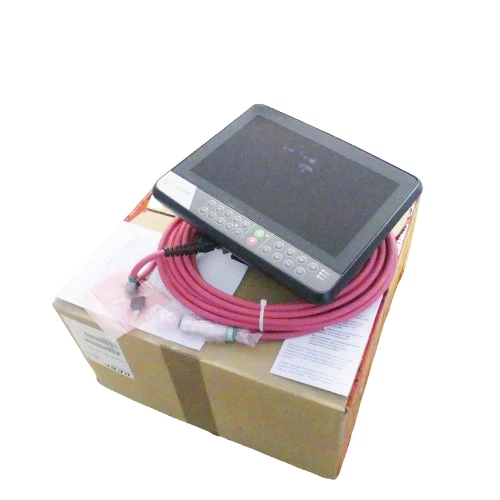
Product Datasheet
- Brand: KEBA
- Product Series: KeTop T155
- Model: T155-MA0-AN0-W10E
- KEBA Material Number: 109055
- Product Type: Mobile HMI / Industrial Teach Pendant
- Display Size: 10.1 inches
- Display Technology: TFT color display with LED backlight
- Display Resolution: WXGA, 1280 × 800 pixels
- Touchscreen: Projected capacitive touch
- Operating System: Windows 10 IoT Enterprise
- Processor: Intel Celeron N2807, dual-core, 1.58 GHz, up to 2.16 GHz
- Graphics: Intel HD Graphics
- Memory: 4 GB DDR3 RAM
- Storage: 64 GB SSD Flash and 8 GB eMMC Flash
- Keyboard: KEBA standard keyboard, 21 keys and 5 status LEDs
- USB Interface: USB 2.0
- Emergency Stop: Dual-circuit emergency-stop function
- Enabling Device: Three-position enabling switch
- Key Switch: I-0-II, externally wired, three positions
- Hot-Plug Capability: No
- Protection and Connection Details: Verify against the applicable T155 installation documentation
- Condition: New, as stated in the seller’s listing
- Country of Origin: Germany, as stated in the seller’s listing
Operating Guidelines and Usage
- Verify the complete model designation and material number 109055 before connecting the pendant.
- Confirm that the machine controller supports the KeTop T155 interface and the corresponding connection hardware.
- Inspect the cable, connector, touchscreen, keyboard, emergency-stop button, enabling switch, and key switch.
- Connect the pendant using the approved machine interface and cable arrangement.
- Confirm that the machine recognizes the HMI and that the required operator application starts correctly.
- Test the emergency-stop and enabling functions according to the machine’s safety validation procedure.
- Check the externally wired I-0-II key-switch signals and verify their assignments in the machine-control configuration.
- Use the pendant only within the operating modes and access permissions authorized by the machine manufacturer.
Power-On and Power-Off Sequence
Power-On
- Inspect the pendant and connection cable for physical damage.
- Confirm that the machine controller and connection interface are ready.
- Connect the pendant according to the approved connection procedure.
- Energize the system using the machine manufacturer’s startup sequence.
- Allow the HMI operating system and application to initialize.
- Check touchscreen response, keyboard operation, status LEDs, and communication.
- Verify the emergency-stop, enabling switch, and key-switch functions before enabling machine movement.
Power-Off
- Stop machine motion and place the machine in a safe state.
- Exit the active operating application using the approved procedure.
- Shut down the HMI if the machine configuration requires a separate shutdown.
- Disconnect the pendant only when the system permits disconnection.
- Do not assume this model supports hot-plug removal.
- Store the pendant in its designated holder or protected storage location.
Normal Operating Procedure
- Use the touchscreen and standard keyboard to access machine operation and diagnostic functions.
- Monitor the five status LEDs for operating indications defined by the application.
- Use the enabling switch only as intended by the machine’s safety design.
- Operate the emergency-stop button only according to the machine’s emergency procedure.
- Use the I-0-II key switch for authorized mode selection.
- Keep the display clean and free of oil, dust, and conductive contamination.
- Avoid pulling or twisting the connection cable during operation.
- Return the pendant to its designated storage position after use.
Parameter Settings and Modification
The T155-MA0-AN0-W10E is a mobile HMI terminal. Machine parameters and operating functions are generally provided by the connected controller application rather than being defined solely by the pendant hardware.
Before changing settings:
- Confirm the installed Windows 10 IoT Enterprise image and application version.
- Verify communication settings and controller interface configuration.
- Check the machine-specific assignment of the key switch and enabling device.
- Confirm the required operator authorization level before changing machine parameters.
- Back up the HMI application and configuration files before software maintenance.
- Use approved KEBA tools and machine-manufacturer procedures for operating-system or application updates.
- Do not alter safety-related functions without a documented risk assessment and validation.
Maintenance and Troubleshooting
Preventive Maintenance
- Clean the touchscreen with an approved non-abrasive cleaning material.
- Inspect the housing, display surface, keypad, and cable regularly.
- Check the emergency-stop button and enabling switch during scheduled safety inspections.
- Verify the external key-switch wiring and connector condition.
- Check USB and other interface connections for damage.
- Maintain backups of application data and configuration files.
- Store the pendant in a protected location when not in use.
Troubleshooting
- HMI does not start: Check the machine connection, power supply path, and controller status.
- Touchscreen does not respond: Inspect the display surface and check the HMI software configuration.
- Keyboard keys do not respond: Check for physical damage and verify application input assignments.
- Communication failure: Inspect the connection cable, interface hardware, and controller communication status.
- Emergency-stop signal not recognized: Stop operation and have qualified personnel inspect the dual-circuit safety wiring.
- Enabling switch fault: Check the switch mechanism, wiring, and controller safety diagnostics.
- Key-switch mode not recognized: Verify the external wiring and the configured I-0-II signal assignments.
Do not bypass or jumper safety circuits to restore operation. Refer safety-related faults to qualified service personnel.
Safety Precautions
- The emergency-stop and enabling devices are part of the machine’s safety system and must be validated as installed.
- Never assume that the pendant alone provides a complete safety function.
- Do not use this model as a hot-plug device; follow the machine-specific connection and disconnection procedure.
- Inspect the cable and connectors before every use.
- Do not operate the pendant if the emergency-stop button, enabling switch, or key switch is damaged.
- Keep the pendant away from excessive moisture, impact, and unauthorized modifications.
- Do not change safety-related wiring or controller parameters without approved engineering authorization.
- Follow KEBA documentation and the machine manufacturer’s operating and safety instructions.
Recommended Related KEBA Models
The following models are related KeTop T155 mobile HMI configurations. Their keyboard layouts, safety features, wiring arrangements, and hot-plug capabilities differ, so they should not be treated as automatic replacements.
- T155-M10-AN0-W10E – Standard KeTop T155 mobile HMI, material number 107686
- T155-M10-NN0-W10E – KeTop T155 with hot-plug capability, material number 109054
- T155-M10-Ad0-W10E – KeTop T155 standard keyboard configuration, material number 113412
- T155-M10-NNC-W10E – KeTop T155 with energy storage, material number 110964
- T155-M1G-AN0-W10E – KeTop T155 with additional selector-switch option, material number 109914
- T155-M1w-AN0-W10E – KeTop T155 with handwheel option, material number 111854
- T155-M10-BN0-W10E – KeTop T155 with two-circuit stop-button configuration, material number 122272
- T155-M16-AN0-W10E – KeTop T155 with additional selector-switch configuration, material number 122507
- T155-M00-ANC-W10E – KeTop T155 with energy-storage option, material number 125147
- T155-ME0-AN0-W10E – KeTop T155 with externally wired key-switch configuration, material number 125891
- T155-R00-NN0-W10E – KeTop T155 robotics keyboard configuration with hot-plug capability, material number 126501
- T155-R00-AN0-W10E – KeTop T155 robotics keyboard configuration, material number 128506
- T150-MA0-AN0-W10E – KeTop T150 mobile HMI, standard configuration
- KeTop T135 – KEBA mobile HMI family
- KeTop T135 Eco – KEBA mobile HMI family


