
⚙️ Product Description
The B&R 5AP5330.215C-C02 Panel PC 2200 is an industrial panel computer designed for machine-level visualization, operator interaction, and industrial control applications. It belongs to B&R’s Panel PC 2200 product family and is intended for installation in automation systems where an integrated display and computing platform are required. The associated identification number provided in the listing is 5QCZ0000C4C0Q0-002. The seller describes the unit as mint condition with a company logo and indicates that it has been mounted but not used. The exact CPU, memory, storage, operating system, display configuration, and interface options should be confirmed from the unit’s nameplate and hardware configuration before purchase or installation. The company logo may also be relevant when assessing suitability for deployment in a different facility.
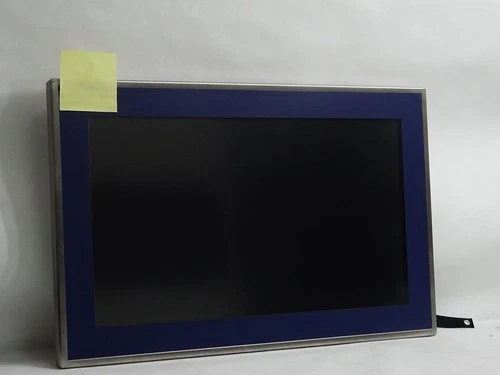
📋 Product Datasheet
| Parameter | Details |
|---|---|
| Brand | B&R Industrial Automation |
| Model | 5AP5330.215C-C02 |
| Product Family | Panel PC 2200 |
| Product Name | Industrial Panel Computer |
| Additional Identification | 5QCZ0000C4C0Q0-002 |
| Product Status | Mint condition according to seller description; previously mounted |
| Display Size | Exact configuration not independently verified |
| Display Resolution | Verify the installed display specification |
| Processor | Not independently verified |
| Memory | Not independently verified |
| Storage | Not independently verified |
| Communication Interfaces | Verify installed Ethernet, USB, and other interfaces |
| Power Requirements | Verify the nameplate and hardware revision |
| Dimensions | Not independently verified; check the mechanical drawing |
| Weight | Not independently verified |
| Place of Manufacture | Not independently verified |
| Country of Origin | Verify product label |
| Discontinued Status | Not independently verified |
| Special Identification | Company logo reported by seller |
🔧 Operating Procedures and Usage Instructions
1. Installation and Preparation
- Confirm the complete model number, hardware revision, serial number, and identification code.
- Check the mounting dimensions, installation orientation, ventilation clearance, and cabinet requirements.
- Inspect the display surface, touch functionality, connectors, housing, and mounting points.
- Verify the required power supply and grounding arrangement against the B&R documentation for the exact hardware configuration.
- Confirm that the installed system unit, display, and connection accessories are compatible.
- Check the existing operating system, application image, firmware, and software licenses before connecting the unit to a production network.
2. Power-On Sequence
- Confirm that the supply voltage and polarity match the equipment nameplate.
- Check protective grounding and all power and communication connections.
- Ensure that the connected machine is in a safe state before energizing the panel PC.
- Apply power using the approved machine procedure.
- Allow the computer to complete its startup sequence and check for operating-system, hardware, or application alarms.
3. Normal Operation
- Confirm that the operator interface starts correctly.
- Check display quality, touch response, and communication with the machine controller.
- Verify PLC connection status, data updates, alarm messages, and operator input functions.
- Test the required machine screens and operating commands under controlled conditions.
- Monitor system temperature, ventilation, and communication stability during operation.
4. Parameter Configuration and Modification
- Back up the existing system image, application files, and configuration data before making changes.
- Use the appropriate B&R engineering and configuration tools for the installed hardware and software versions.
- Confirm communication settings, network addresses, display settings, and application startup parameters.
- Check software compatibility before installing updates or changing system components.
- Record all modifications and retain a recoverable backup.
5. Shutdown Sequence
- Exit the machine application using its approved shutdown procedure.
- Save operating data and configuration changes.
- Shut down the operating system normally.
- Isolate the power supply only after the shutdown process has completed.
- Disconnect communication cables and other connections if the unit is being removed for maintenance.
🛠️ Daily Maintenance and Troubleshooting
Daily Maintenance
- Clean the display with a suitable lint-free cloth and an approved cleaning agent.
- Check for scratches, touch-screen damage, loose connectors, and abnormal display behavior.
- Keep ventilation openings free of dust and obstructions.
- Check power and communication connections for looseness or visible damage.
- Monitor startup time, system alarms, and communication status.
- Maintain backups of the operating system image, application, and configuration files.
Troubleshooting
- No power: Check the supply voltage, wiring, protective device, and power connector.
- No display: Check the display connection, backlight condition, startup status, and installed hardware configuration.
- Touch screen not responding: Check the touch interface, driver status, calibration, and software compatibility.
- Communication failure: Verify Ethernet cabling, network settings, controller availability, and application communication parameters.
- Slow startup or system errors: Review operating-system logs, storage condition, application startup settings, and available system resources.
- Unexpected shutdown: Check the power supply, cabinet temperature, ventilation, and system event logs.
⚠️ Safety Precautions
- Installation and maintenance must be performed by qualified industrial automation personnel.
- Disconnect power before removing the panel PC or working on electrical connections.
- Follow the electrical safety, grounding, and environmental requirements specified by B&R.
- Do not operate the equipment if the housing, connectors, or display are damaged.
- Avoid exposing the panel PC to moisture, conductive dust, excessive vibration, or temperatures outside its specified operating range.
- Do not modify firmware, operating-system images, or hardware configuration without a verified backup and compatibility check.
- Confirm that the unit’s company logo and existing software configuration are acceptable for the intended application.
- Do not assume that another Panel PC 2200 model is a direct replacement without checking dimensions, interfaces, hardware configuration, and software compatibility.
🔍 Product Keywords
B&R 5AP5330.215C-C02, 5QCZ0000C4C0Q0-002, B&R Panel PC 2200, B&R industrial panel computer, B&R industrial HMI, B&R operator interface, industrial visualization computer, machine control panel, automation system computer, industrial control equipment, B&R automation spare parts.
Product information: https://www.newplcdcs.com
📦 Recommended B&R Models
- B&R 5AP5330 Series Panel PC
- B&R 5AP5230 Series Panel PC
- B&R 5AP5130 Series Panel PC
- B&R 5AP933 Series Automation Panel
- B&R 5AP923 Series Automation Panel
- B&R 5AP1120 Series Automation Panel
- B&R 5AP1130 Series Automation Panel
- B&R 5AP1200 Series Automation Panel
- B&R 5PC910 Series Panel PC
- B&R PPC2100 Series Panel PC
- B&R PPC2200 Series Panel PC
- B&R PPC3100 Series Panel PC
- B&R PPC900 Series Panel PC
- B&R 5PC810 Series Panel PC
- B&R 5PC820 Series Panel PC
Recommended models are related B&R industrial panel and computer product families. They are not confirmed direct replacements for 5AP5330.215C-C02. Verify hardware, mounting, display, interfaces, and software compatibility before substitution.


