
Product Description
The CISCO WS-X6148E-GE-45AT is a 48-port Gigabit Ethernet switching module designed for the Cisco Catalyst 6500 and Catalyst 6500-E Series chassis. It provides 10/100/1000 Mbps Ethernet connectivity through 48 RJ-45 interfaces and supports enhanced Power over Ethernet (PoE) and IEEE 802.3at PoE+ functionality when equipped with the required PoE daughtercard. The module is designed for enterprise wiring closets, network access infrastructure, IP telephones, wireless access points, and other Ethernet-connected devices. It supports full-duplex and half-duplex operation, VLAN-based network segmentation, Quality of Service (QoS), and jumbo frames up to 9,216 bytes. Each group of eight ports shares an aggregate bandwidth of 1 Gbps, with six port groups across the module. The WS-X6148E-GE-45AT integrates with compatible Catalyst 6500 supervisor engines and Cisco IOS software, making it suitable for maintaining existing enterprise switching infrastructure and replacing matching legacy Ethernet modules. Before installation, verify chassis compatibility, supervisor engine support, software version, PoE daughtercard configuration, and available system power budget.
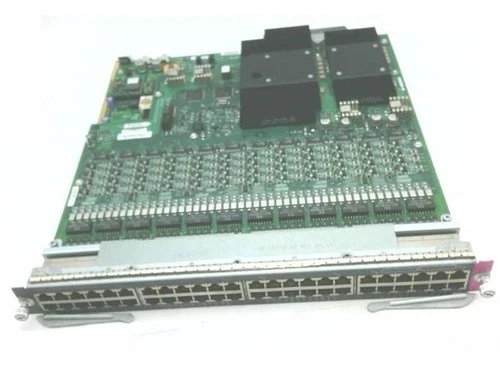
📋 Product Datasheet
| Parameter | Specification |
|---|---|
| Brand | Cisco |
| Model | WS-X6148E-GE-45AT |
| Series | Catalyst 6500 / 6500-E |
| Product Name | 48-Port Gigabit Ethernet PoE+ Module |
| Product Category | Ethernet Switching Interface Module |
| Place of Manufacture | Not confirmed; check product label |
| Product Status | New Surplus / Subject to Seller Confirmation |
| Dimensions | 4.2 × 35.6 × 40.6 cm |
| Weight | Approximately 5 kg |
| Country of Origin | Not confirmed |
| Interface | 48 × RJ-45 Gigabit Ethernet |
| Network Speed | 10/100/1000 Mbps |
| PoE Support | IEEE 802.3af and IEEE 802.3at |
| Maximum PoE Power | Up to 30 W per port with required daughtercard |
| Module Power | 105 W |
| AC Input Power | 131.25 W |
| DC Input Power | 141.13 W |
| Maximum Frame Size | 9,216 bytes |
| Cable Distance | Up to 100 m |
| Discontinued | Legacy product; confirm current Cisco lifecycle status |
⚙️ Operating Guidelines and Usage
The WS-X6148E-GE-45AT is installed inside a compatible Catalyst 6500 chassis and operates as an Ethernet access switching module.
- Confirm that the Catalyst 6500 or 6500-E chassis supports the module.
- Verify supervisor engine compatibility and the installed Cisco IOS version.
- Check whether the required WS-F6K-48-AT PoE daughtercard is installed.
- Confirm that the chassis power supply has sufficient capacity for the module and connected PoE devices.
- Power down the chassis if required by the approved maintenance procedure.
- Use an ESD wrist strap when handling the module.
- Insert the module into an available compatible slot.
- Tighten the captive installation screws.
- Connect Ethernet cables to the RJ-45 interfaces.
- Verify link status, port configuration, and PoE operation through the switch CLI.
🔌 Power-On and Power-Off Sequence
Power-On Procedure
- Inspect the chassis power supplies and supervisor engine status.
- Confirm that the module is correctly seated.
- Verify the PoE daughtercard installation where PoE+ is required.
- Restore chassis power according to the Catalyst 6500 maintenance procedure.
- Allow the supervisor engine and switching modules to complete initialization.
- Check module recognition using the
show modulecommand. - Verify port status using
show interfaces status. - Check PoE allocation using
show power inline. - Confirm that connected devices receive network connectivity and appropriate PoE power.
Power-Off Procedure
- Notify network users before planned maintenance.
- Disconnect or migrate critical network connections as required.
- Disable affected ports or PoE outputs if necessary.
- Follow the approved chassis maintenance procedure.
- Isolate chassis power when required for module removal.
- Verify that the module is safe to handle.
- Loosen the captive screws and carefully withdraw the module.
Do not remove the module from an energized chassis unless the specific chassis and module maintenance documentation explicitly permits hot removal.
🛠️ Normal Operating Procedure
- Check the module status using
show module. - Verify Ethernet port conditions using
show interfaces status. - Confirm VLAN assignments using
show vlan brief. - Check trunk configurations using
show interfaces trunk. - Verify PoE status using
show power inline. - Monitor interface errors and traffic counters using
show interfaces. - Review network logs for link failures, power faults, and abnormal device behavior.
- Confirm that connected IP phones, wireless access points, and other powered devices operate correctly.
- Record configuration changes and maintenance activities.
⚙️ Parameter Settings and Modification
The module is managed through the Cisco Catalyst supervisor engine CLI rather than through an independent configuration interface.
Basic Interface Configuration
- Enter privileged EXEC mode:
enable - Enter global configuration mode:
configure terminal - Select an Ethernet interface:
interface gigabitEthernet 5/1 - Configure the interface description:
description Network_Access_Port - Assign an access VLAN:
switchport access vlan 10 - Set the port to access mode:
switchport mode access - Enable the interface:
no shutdown - Save the configuration:
copy running-config startup-config
PoE Configuration
- Check available PoE capacity with
show power inline. - Verify the PoE daughtercard and power budget.
- Configure PoE behavior according to the connected device requirements and supported IOS commands.
- Confirm that the connected endpoint receives the expected power.
Important: The exact CLI syntax and supported features depend on the supervisor engine and Cisco IOS release. Test configuration changes on a noncritical port before deployment.
🔍 Maintenance and Troubleshooting
Module not recognized
- Check module seating and chassis slot condition.
- Verify supervisor engine compatibility.
- Review system logs and module diagnostic output.
Ethernet port has no link
- Inspect the RJ-45 cable and connected device.
- Verify interface configuration and VLAN assignment.
- Check port status and error counters.
PoE device not receiving power
- Verify the PoE daughtercard.
- Check available chassis power.
- Review
show power inlineoutput. - Inspect the connected cable and endpoint power requirements.
Intermittent network connectivity
- Check cable quality and link negotiation.
- Review interface errors and packet counters.
- Verify VLAN, spanning-tree, and port-security settings.
High module temperature
- Check chassis airflow and fan operation.
- Inspect neighboring modules and ventilation paths.
- Verify that the chassis operates within the specified environmental limits.
⚠️ Safety Precautions
- Installation must be performed by qualified network or hardware technicians.
- Use ESD protection when handling the module.
- Never force the module into the chassis slot.
- Verify the chassis power budget before enabling PoE devices.
- Use supported supervisor engines and software releases.
- Do not exceed the specified Ethernet cable distance.
- Follow Cisco hot-swapping and chassis maintenance instructions.
- Back up switch configurations before performing maintenance.
🔧 Recommended Cisco Models
The following Cisco Catalyst 6500 and related Ethernet switching modules are useful for network maintenance and spare-parts procurement:
- WS-X6148A-GE-TX
- WS-X6148A-GE-45AF
- WS-X6148-GE-TX
- WS-X6148E-GE-45AF
- WS-X6548-GE-45AF
- WS-X6548V-GE-TX
- WS-X6748-GE-TX
- WS-X6748-SFP
- WS-X6724-SFP
- WS-X6816-10G-2T
- WS-X6848-TX-2T
- WS-X6196-21AF
- WS-X6148X2-45AF
- WS-X6348-RJ45V
- WS-X6582-2PA
Compatibility Notice: These are related Cisco switching products, not guaranteed direct replacements for WS-X6148E-GE-45AT. Verify chassis compatibility, supervisor engine support, PoE capability, software requirements, and port configuration before ordering.


