
Product Description
The FANUC A02B-0333-C263 is an iPendant teach pendant designed for compatible FANUC CNC control systems. This operator interface combines a touch-screen panel with a Manual Pulse Generator (MPG), allowing machine operators to access CNC screens and perform manual axis movement and positioning operations. It provides a portable operator interface for machine setup, programming, maintenance, and production tasks. The pendant is intended for integration with supported FANUC i-Series CNC platforms, with compatibility dependent on the CNC model, software version, interface hardware, and machine builder configuration. It is suitable for compatible CNC machining centers, turning centers, and other automated machine tools.
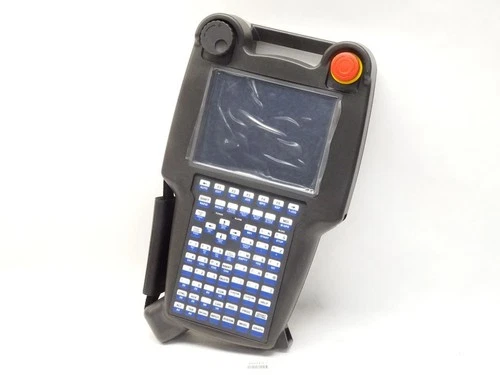
Key Product Parameters
- Brand: FANUC
- Model: A02B-0333-C263
- Series: FANUC iPendant / A02B-0333
- Product Name: Touch-Screen CNC Teach Pendant
- Product Type: Portable CNC Operator Interface
- Touch Panel: Yes
- Manual Pulse Generator (MPG): Included
- Display: Integrated operator display; exact size and resolution require confirmation
- Keyboard: FANUC operator keyboard configuration; verify actual key layout
- Emergency Stop: Verify the installed pendant configuration and machine wiring
- CNC Compatibility: Supported FANUC i-Series CNC configurations; verify exact control model and software
- Communication: Machine-specific pendant interface; confirm cable and connection specification
- Power Requirements: Supplied through the compatible FANUC pendant interface; confirm electrical ratings in the connection manual
- Dimensions: Not confirmed
- Weight: Approximately 4 lb (1.81 kg), based on reseller listing
- Country of Origin: Not confirmed; check the product label
- Product Status: New
- Discontinued Status: Confirm with FANUC for the exact revision
Installation and Operating Procedures
- Preparation
- Confirm the pendant part number A02B-0333-C263.
- Check the target CNC model, system software, PMC software, and machine-builder specifications.
- Verify the pendant cable, connector, mounting arrangement, and interface requirements.
- Inspect the touch screen, MPG dial, keys, cable, and connector for damage.
- Back up CNC parameters and machine-specific configuration before replacing an existing pendant.
- Connection and Installation
- Shut down the CNC system according to the machine manufacturer’s procedure.
- Isolate the relevant electrical supply before connecting or disconnecting the pendant.
- Connect the pendant using the approved cable and interface.
- Secure the cable to prevent pulling, twisting, or interference with machine movement.
- Confirm that the pendant is mounted or positioned so the operator can use it safely.
- Power-On Checks
- Restore power according to the machine startup procedure.
- Check whether the pendant display initializes correctly.
- Verify touch-screen response and keyboard operation.
- Confirm that the MPG is recognized by the CNC.
- Check emergency-stop and enable-device functions where fitted and configured by the machine builder.
- Configuration
- Confirm that the CNC software supports the installed iPendant configuration.
- Verify PMC ladder logic and machine-builder settings for pendant operation.
- Configure MPG axis selection, increment selection, and manual movement permissions as required.
- Check operator access levels and machine interlocks.
- Do not change safety-related parameters without authorization.
- Normal Operation
- Use the touch screen and keyboard to access supported CNC functions.
- Select the correct axis and movement increment before using the MPG.
- Confirm that the machine is in the appropriate manual operating mode.
- Move axes at a controlled rate while observing machine clearance and travel limits.
- Verify that operator commands and machine status indications correspond correctly.
- Shutdown
- Stop machine movement and return the equipment to a safe state.
- Follow the CNC shutdown procedure before disconnecting the pendant.
- Protect the touch screen and connector from dust, impact, and moisture during storage.
Daily Maintenance
- Clean the touch screen with a suitable non-abrasive screen cleaner.
- Inspect the display for cracks, dead areas, or abnormal touch response.
- Check the MPG dial for smooth movement and consistent response.
- Inspect keys, cable insulation, and connectors.
- Keep the pendant away from coolant spray, metal chips, and excessive vibration.
- Check cable routing for abrasion, pinching, or excessive bending.
- Test operator controls and safety-related functions according to the machine maintenance schedule.
- Store the pendant in its designated holder when not in use.
Troubleshooting
- Display does not turn on: Check the pendant cable, interface connection, and CNC power status.
- Touch screen does not respond: Inspect the screen for damage and verify CNC software and touch-interface support.
- MPG does not work: Check axis selection, increment settings, enable conditions, and machine-builder configuration.
- Keys do not respond: Inspect the keyboard and connector, then verify the configured pendant operating mode.
- Communication error: Check the pendant interface, cable condition, CNC software compatibility, and PMC configuration.
- Intermittent operation: Inspect connector contacts, cable strain, and electrical interference.
- Incorrect axis movement: Stop operation and verify axis selection, MPG configuration, and machine interlocks before further use.
Safety Precautions
- Installation and servicing must be performed by qualified CNC maintenance personnel.
- Follow the machine manufacturer’s safety procedures when connecting or disconnecting the pendant.
- Never use the MPG without confirming the selected axis and movement increment.
- Keep clear of moving machine components during manual positioning.
- Do not bypass emergency-stop circuits, enabling devices, or machine interlocks.
- A pendant emergency-stop function, where fitted, does not replace the machine’s complete safety system.
- Protect the pendant from impact, liquid ingress, and unauthorized modification.
- Confirm all safety functions after installation or replacement.
- Use only compatible FANUC software, interface hardware, and machine-specific configurations.
Product Keywords
FANUC A02B-0333-C263, FANUC iPendant, FANUC teach pendant, CNC touch-screen pendant, MPG manual pulse generator, FANUC CNC operator interface, FANUC 35i-B iPendant, portable CNC control panel, CNC machine tool accessories, industrial automation spare parts, FANUC pendant replacement.
For more industrial automation products and replacement components, visit www.newplcdcs.com.
15 Related / Recommended Models
The following are related FANUC iPendant models, control components, and interface references. They have different functions or feature combinations and are not automatically interchangeable.
- A02B-0333-C260 – iPendant without touch screen or MPG
- A02B-0333-C261 – iPendant with touch screen, without MPG
- A02B-0333-C262 – iPendant with MPG, without touch screen
- A02B-0333-C263 – iPendant with touch screen and MPG
- A02B-0333-B802 – FANUC 35i-B CNC control
- A02B-0323-C263 – Related 30i-series pendant reference; verify exact configuration
- A02B-0326-C263 – Related 31i-B5 pendant reference; verify exact configuration
- A02B-0327-C263 – Related 31i-B pendant reference; verify exact configuration
- A02B-0328-C263 – Related 32i-B pendant reference; verify exact configuration
- A05B-2490-C295 – FANUC iPendant touch-screen model
- A05B-2518-C004 – FANUC iPendant touch-screen model
- A02B-0333-H501 – FANUC 35i-B CNC software reference
- A02B-0333-H580 – FANUC 35i-B PMC software reference
- A02B-0333-J571 – FANUC embedded Ethernet software reference
- A02B-0333-J573 – FANUC Ethernet display software reference


