
Product Description
The GE Fanuc IC693CPU374 is a high-performance single-slot Central Processing Unit (CPU) designed for the Series 90-30 Programmable Logic Controller (PLC) platform. Featuring a 133 MHz embedded processor and 240 KB of user memory, this CPU module executes ladder logic, arithmetic operations, sequencing tasks, and industrial automation programs. Its integrated Ethernet interface provides two auto-sensing 10/100 Mbps RJ45 ports with an internal Ethernet switch, supporting SRTP and Ethernet Global Data (EGD) communication. Depending on firmware and software revisions, the CPU374 Plus also supports Modbus TCP client/server functionality. The module supports up to eight Series 90-30 baseplates, including the CPU baseplate and seven expansion or remote baseplates. It is suitable for machine control, production-line automation, material handling, packaging equipment, and industrial process monitoring. The IC693CPU374 is designed for installation in a compatible Series 90-30 CPU baseplate and requires a high-capacity power supply capable of delivering its 5 V DC load.
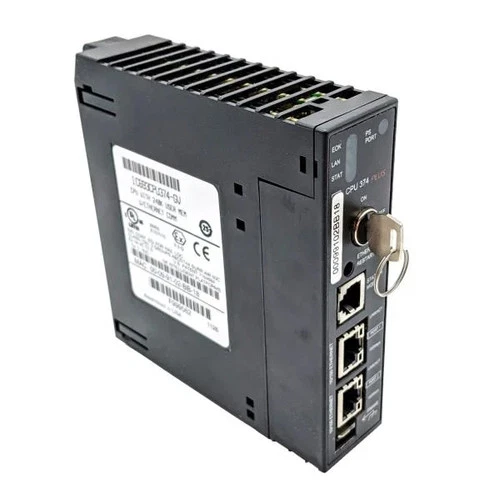
📋 Product Datasheet
| Parameter | Specification |
|---|---|
| Brand | GE Fanuc |
| Model | IC693CPU374 |
| Series | Series 90-30 |
| Product Name | CPU374 Ethernet CPU Module |
| Product Type | Single-Slot PLC Central Processing Unit |
| Processor | Embedded 586 / AMD SC520 |
| Processor Speed | 133 MHz |
| User Memory | 240 KB |
| Boolean Execution Time | 0.15 μs per instruction |
| Ethernet Interface | 2 × 10/100 Mbps RJ45 |
| Network Protocols | SRTP, EGD; Modbus TCP on supported Plus revisions |
| Power Requirements | 5 V DC |
| Power Consumption | 7.4 W |
| Discrete Inputs | 2,048 fixed references |
| Discrete Outputs | 2,048 fixed references |
| Maximum Baseplates | 8 |
| Operating Temperature | 0°C to +60°C |
| Storage Temperature | -40°C to +85°C |
| Dimensions | Approx. 180 × 50 × 130 mm; verify hardware drawing |
| Weight | Approx. 0.50 kg |
| Place of Manufacture | Not independently confirmed |
| Country of Origin | Not confirmed |
| Product Status | Discontinued |
| Programming Software | VersaPro / Proficy Machine Edition |
⚙️ Main Technical Features
- 133 MHz embedded processor.
- 240 KB user-configurable memory.
- Single-slot Series 90-30 CPU design.
- Two integrated Ethernet ports with auto-sensing.
- 10/100 Mbps Ethernet communication.
- Built-in Ethernet switching functionality.
- SRTP and Ethernet Global Data support.
- Modbus TCP functionality on supported CPU374 Plus firmware.
- Hardware floating-point mathematics.
- Supports up to eight system baseplates.
- RAM and Flash memory storage.
- Periodic subroutine and interrupt support.
- LED indicators for processor and Ethernet diagnostics.
🏭 Application Scenarios
- Industrial production-line automation.
- Packaging and material handling machinery.
- Manufacturing equipment control.
- Conveyor and sorting systems.
- Water treatment automation.
- Industrial pump and motor control.
- Process monitoring systems.
- Machine-level Ethernet communication.
- Legacy GE Fanuc PLC replacement projects.
- Distributed industrial control applications.
🔧 Operating Instructions and Usage
1. Installation Preparation
- Verify the complete part number IC693CPU374.
- Confirm compatibility with the Series 90-30 CPU baseplate.
- Check the CPU revision and firmware version.
- Verify that the power supply provides sufficient 5 V DC capacity.
- Inspect the module connectors and circuit board.
- Confirm the Ethernet network requirements.
- Check the PLC program backup and hardware configuration.
- Verify compatibility with VersaPro or Proficy Machine Edition.
- Disconnect system power before installation.
- Use ESD protection when handling the CPU.
2. Power-On Sequence
- Confirm that the CPU is correctly installed in the designated baseplate slot.
- Check the power supply connections.
- Verify that the high-capacity power supply can support the 7.4 W CPU load.
- Connect the Ethernet cables to Port 1 or Port 2 as required.
- Restore power to the PLC rack.
- Observe the CPU status indicators.
- Check the EOK and STAT indicators.
- Verify Ethernet LINK/ACT status.
- Confirm that the CPU completes initialization.
- Connect the programming workstation and verify PLC communication.
3. Normal Operating Procedure
- Start the Series 90-30 PLC system.
- Confirm that the CPU374 is operating normally.
- Check processor status indicators.
- Verify the loaded PLC program.
- Confirm Ethernet communication.
- Check the configured IP address.
- Monitor connected I/O modules.
- Verify discrete and analog reference data.
- Monitor PLC scan execution and fault tables.
- Confirm that the controlled machinery operates according to the programmed sequence.
- Record system alarms and communication faults.
4. Parameter Settings and Modification
The IC693CPU374 is configured through GE Fanuc VersaPro or Proficy Machine Edition software.
Important configuration parameters include:
- CPU model and hardware revision.
- PLC memory allocation.
- Ethernet IP address and subnet configuration.
- SRTP communication settings.
- Ethernet Global Data configuration.
- Modbus TCP configuration on supported Plus firmware.
- I/O reference assignments.
- CPU scan and execution settings.
- Expansion baseplate configuration.
- Communication channel assignments.
Configuration procedure:
- Connect the engineering workstation to the PLC Ethernet interface.
- Open the existing PLC project.
- Upload and back up the current program.
- Confirm the IC693CPU374 hardware configuration.
- Open the Ethernet configuration settings.
- Modify the IP address and communication parameters as required.
- Check memory allocation and I/O references.
- Validate the PLC program.
- Download the approved configuration.
- Verify communication and control operation.
Important: Modbus TCP client functionality requires compatible CPU374 Plus firmware and engineering software. Check the firmware revision and project configuration before enabling this feature.
5. Shutdown Sequence
- Notify the machine operator before shutdown.
- Place the controlled equipment in a safe condition.
- Stop automatic operations according to the machine procedure.
- Save the PLC project and diagnostic records.
- Place the CPU in the required STOP or maintenance state.
- Switch off the PLC power supply.
- Verify that the rack is de-energized.
- Remove the CPU only after power isolation.
- Use ESD protection during replacement.
- Restore power and verify program execution after maintenance.
🛠️ Maintenance and Troubleshooting
Problem: CPU Does Not Start
- Check the 5 V DC power supply.
- Verify power supply capacity.
- Inspect the CPU baseplate connection.
- Check processor status indicators.
Problem: Ethernet Communication Failure
- Check RJ45 cable connections.
- Verify IP address and subnet settings.
- Inspect LINK/ACT indicators.
- Check network switch configuration.
Problem: PLC Program Cannot Be Downloaded
- Verify programming software compatibility.
- Check CPU firmware revision.
- Confirm the communication path.
- Review PLC access and operating mode.
Problem: CPU Fault or Abnormal Status
- Review the PLC fault table.
- Check system power stability.
- Inspect the CPU and baseplate.
- Verify the loaded program configuration.
Problem: Modbus TCP Communication Failure
- Verify CPU374 Plus firmware compatibility.
- Check Proficy Machine Edition version.
- Confirm Modbus TCP address mapping.
- Verify network settings and client/server configuration.
⚠️ Safety Precautions
- Always isolate power before installing or removing the CPU.
- Use ESD protection when handling electronic components.
- Never exceed the power supply’s rated capacity.
- Back up PLC programs before modifying configurations.
- Verify Ethernet IP addresses to prevent network conflicts.
- Do not change control logic while machinery is operating without authorization.
- Confirm CPU firmware and software compatibility.
- Perform functional testing before returning equipment to production.
⭐ Recommended GE Fanuc Related Models – 15 Products
- GE Fanuc IC693CPU311 – Series 90-30 CPU Module
- GE Fanuc IC693CPU313 – Series 90-30 CPU Module
- GE Fanuc IC693CPU323 – Series 90-30 CPU Module
- GE Fanuc IC693CPU331 – Series 90-30 CPU Module
- GE Fanuc IC693CPU340 – Series 90-30 CPU Module
- GE Fanuc IC693CPU341 – Series 90-30 CPU Module
- GE Fanuc IC693CPU350 – Series 90-30 CPU Module
- GE Fanuc IC693CPU352 – Series 90-30 CPU Module
- GE Fanuc IC693CPU360 – Series 90-30 CPU Module
- GE Fanuc IC693CPU363 – Series 90-30 CPU Module
- GE Fanuc IC693CPU364 – Series 90-30 CPU Module
- GE Fanuc IC693CPU374 – Series 90-30 Ethernet CPU Module
- GE Fanuc IC693PWR321 – Series 90-30 Power Supply
- GE Fanuc IC693CHS397 – Series 90-30 Expansion Baseplate
- GE Fanuc IC693CMM321 – Ethernet Interface Module
Note: These are related GE Fanuc Series 90-30 products, not all direct replacements. Verify CPU revision, firmware, memory configuration, power supply capacity, and Ethernet requirements before ordering.


