
Product Description
The GENERAL ELECTRIC 04220FL11232A is an RXi-042 industrial controller developed by GE Intelligent Platforms for industrial automation, computing, and control applications. Unlike conventional PLC I/O modules, this unit belongs to GE’s RXi industrial computing family and functions as an embedded industrial computer for application processing, data management, and industrial communication. It is designed for integration into automation architectures requiring higher-level computing capabilities alongside PLC and distributed control equipment. The controller is associated with 24 VDC power input and industrial Ethernet connectivity, making it suitable for industrial control cabinets, machine automation, process monitoring, and legacy system maintenance. Depending on the installed configuration, processor hardware, memory, storage, operating system, application software, and communication interfaces may vary. Before replacement, verify the complete model number, hardware revision, installed software image, storage configuration, network interfaces, and application compatibility.
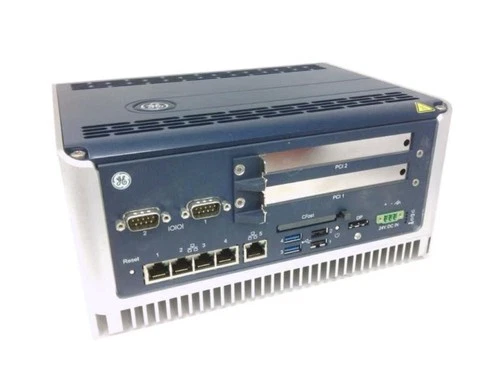
📋 Product Datasheet
| Parameter | Specification |
|---|---|
| Brand | General Electric (GE) |
| Model | 04220FL11232A |
| Series | GE Intelligent Platforms RXi / RXi-042 |
| Product Name | RXi-042 Industrial Controller |
| Product Type | Embedded Industrial Computer / IPC |
| Place of Manufacture | USA (reported) |
| Product Status | Legacy Industrial Spare Part |
| Dimensions | Approximately 280 × 80 × 40 mm (supplier-listed; verify revision) |
| Weight | Approximately 0.5–0.69 kg (supplier-listed) |
| Power Requirements | 24 VDC, maximum current approximately 3.4 A (reported) |
⚙️ Operating Procedures and Usage Instructions
1. Installation Preparation
- Verify the complete part number 04220FL11232A.
- Inspect the controller housing, connectors, and mounting points.
- Check the hardware revision and product label.
- Confirm the 24 VDC power supply rating and polarity.
- Verify Ethernet and other communication connections.
- Check the installed storage device and operating system.
- Confirm that the original application software and licenses are available.
- Back up configuration files and network settings before replacement.
- Ensure adequate cabinet ventilation and grounding.
2. Power-On Sequence
- Confirm that installation and wiring are complete.
- Verify that the 24 VDC supply is within the approved operating range.
- Check power polarity and protective grounding.
- Confirm that Ethernet and peripheral connections are secure.
- Energize the controller power supply.
- Allow the RXi system to complete its startup sequence.
- Check power and diagnostic indicators.
- Verify operating system initialization.
- Confirm that the required industrial applications and services start correctly.
- Check network communication with connected PLCs, HMIs, and supervisory systems.
- Confirm normal application operation before releasing the equipment for production.
3. Normal Operating Procedure
- Confirm that the controller has completed startup.
- Check operating system and application status.
- Verify Ethernet connectivity.
- Monitor communication with connected automation devices.
- Check CPU utilization and available memory.
- Monitor storage health and available disk space.
- Review system logs and application alarms.
- Confirm that data exchange and control applications are operating normally.
- Record abnormal events and diagnostic information.
4. Power-Off Sequence
- Stop active industrial applications using their approved shutdown procedures.
- Save configuration changes and application data.
- Shut down the operating system normally.
- Wait until the system has completed shutdown.
- Switch off the 24 VDC supply.
- Isolate external power sources if maintenance is required.
- Verify electrical isolation before disconnecting cables.
- Label and protect all disconnected interfaces.
5. Parameter Configuration and Modification
Configuration depends on the installed operating system and industrial application environment.
- Verify the installed operating system version.
- Record the existing IP address and subnet configuration.
- Check Ethernet interface assignments.
- Confirm application startup settings.
- Verify communication drivers and protocols.
- Check storage configuration and backup status.
- Preserve existing software licenses and activation information.
- Make configuration changes using authorized engineering or system administration tools.
- Test communication and application functionality after modifications.
Avoid replacing the storage device or reinstalling the operating system without first securing the original application image and configuration.


