
Product Description
The GE DS200SSBAG1AAA is a Snubber Board designed for use in GE Mark V turbine control systems. It is a printed circuit board assembly associated with turbine control and multi-input/output applications. The board incorporates onboard RAM and supports the snubber-related circuitry within its designated control-system configuration. It is intended for industrial turbine control maintenance and replacement applications where the original board has been identified as DS200SSBAG1AAA. Correct installation requires verification of the complete part number, board revision, connector arrangement, and compatibility with the existing Mark V assembly. Before replacement, compare the original board and the available GE documentation to confirm the correct mounting position, wiring, and system configuration.
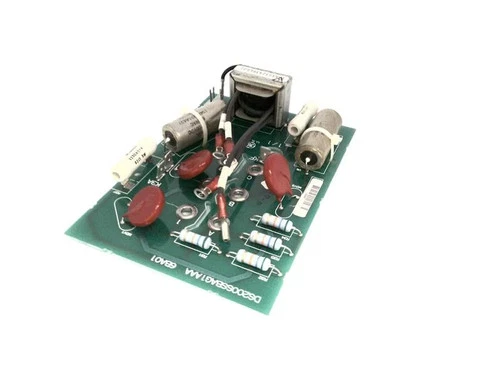
📋 Technical Specifications
| Parameter | Specification |
|---|---|
| Brand | General Electric (GE) |
| Model | DS200SSBAG1AAA |
| Product Series | Mark V |
| Product Name | Snubber Board |
| Product Type | Turbine Control Circuit Board |
| Functional Category | Snubber Circuit Board |
| System Application | GE Mark V turbine control |
| I/O Classification | Multi-input / multi-output system application, as supplier-listed |
| Memory | Onboard RAM |
| Board Assembly | Printed Circuit Board |
| Power Requirements | Not confirmed; verify from the Mark V rack and board documentation |
| Interface Connections | Verify connector layout against the original board |
| Place of Manufacture | Not confirmed |
| Country of Origin | Not confirmed; check the product nameplate or packaging |
| Dimensions | Not confirmed |
| Weight | Approx. 0.23 kg (0.50 lb), supplier-listed |
| Product Status | Legacy industrial control spare |
| Discontinued | Listed as discontinued by manufacturer by industrial parts supplier |
| Condition | Refer to the seller’s actual item condition and inspection record |
⚙️ Operating Instructions
1. Installation and Connection
- Confirm that the board label reads DS200SSBAG1AAA.
- Compare the board revision, component layout, mounting points, and connectors with the installed unit.
- Review the applicable Mark V documentation to identify the board’s exact installation position and associated circuitry.
- Shut down and electrically isolate the turbine control equipment according to the approved maintenance procedure.
- Allow stored energy to discharge and verify the absence of hazardous voltage before handling the board.
- Label all cables and connectors before removing the original assembly.
- Use appropriate electrostatic discharge protection when handling the replacement board.
- Install the board in the designated position and reconnect all wiring according to the original configuration.
2. Power-On Sequence
- Confirm that the board is correctly seated and mechanically secured.
- Inspect connectors, wiring, and nearby circuit boards for damage or loose connections.
- Verify that the control cabinet is free of tools, loose hardware, and foreign materials.
- Confirm that all required system checks have been completed.
- Restore control-system power according to the approved Mark V startup procedure.
- Review available system diagnostics and alarm indications.
- Confirm normal controller operation before returning the turbine equipment to service.
3. Normal Operation
- The DS200SSBAG1AAA operates as part of the Mark V turbine control hardware.
- Its snubber-related circuitry performs its designated function within the installed board configuration.
- The board works with associated control-system components and connected circuitry.
- The system should be monitored through the approved Mark V diagnostic and operator interfaces.
- Any abnormal alarm, unexpected control response, or suspected board fault should be investigated before continued operation.
4. Parameter Setting and Modification
The DS200SSBAG1AAA is a circuit board rather than a standalone operator-configured controller. Do not assume that it has user-adjustable parameters or configuration software without checking the applicable GE documentation.
- Record the existing Mark V hardware and software configuration before maintenance.
- Confirm the board identity and its role in the installed control assembly.
- Review the relevant wiring diagrams and maintenance documentation.
- Do not modify onboard components, jumpers, or memory devices unless specifically authorized by GE procedures.
- After replacement, complete the required hardware and system functional checks.
- Record the replacement part number, revision, test results, and maintenance details.
5. Power-Off Sequence
- Place the turbine and associated control equipment in an approved safe condition.
- Follow the plant shutdown procedure for the relevant control system.
- Isolate the applicable control-system power sources.
- Allow stored energy to discharge according to the manufacturer’s instructions.
- Verify the absence of hazardous voltage before disconnecting or removing the board.
- Apply ESD precautions during removal, inspection, and storage.
🔧 Daily Maintenance and Troubleshooting
Routine Maintenance
- Inspect the PCB for discoloration, cracked components, corrosion, or damaged solder joints.
- Check connectors and terminals for looseness, contamination, or oxidation.
- Keep the control cabinet clean and within the specified temperature and humidity limits.
- Check cabinet ventilation and cooling equipment.
- Review Mark V system diagnostics and alarm records for recurring faults.
- Maintain records of board part numbers, revisions, installation dates, and replacement history.
Common Troubleshooting Checks
| Symptom | Possible Cause | Recommended Check |
|---|---|---|
| Control system reports a board-related fault | Board connection or hardware problem | Check board seating, connectors, and system diagnostics |
| Intermittent system behavior | Loose connector or damaged circuit | Inspect connectors, wiring, and solder joints |
| Visible PCB discoloration | Overheating or electrical stress | Isolate the equipment and inspect the board |
| Fault remains after replacement | Related board or wiring issue | Check associated circuitry and system configuration |
| Unexpected control-system alarm | Hardware, configuration, or external signal issue | Review alarm history and applicable Mark V diagnostic procedures |
| Board does not appear to operate normally | Incorrect part or revision | Verify the full catalog number and compatibility |
🛡️ Safety Precautions
- Installation and maintenance must be performed by qualified industrial control technicians.
- Isolate all relevant power sources before removing or installing the circuit board.
- Verify that stored energy has discharged before touching internal circuitry.
- Use an ESD wrist strap and suitable antistatic handling procedures.
- Never force connectors or alter wiring to accommodate a different board revision.
- Do not modify onboard components or memory without approved technical instructions.
- Confirm the complete part number and system compatibility before installation.
- Follow GE Mark V maintenance documentation and site-specific turbine safety procedures.
🔗 Recommended Related GE Models
The following GE boards and components are associated with Mark V turbine control systems and may be useful for maintenance planning. They are related products, not confirmed direct replacements for the DS200SSBAG1AAA.
- DS200SSBAG1A – Snubber Board
- DS200SBCAG1A – Control Board
- DS200SBCBG1ADC – Control Board
- DS200SDCCG1A – Drive Control Card
- DS200SDCCG3A – Drive Control Card
- DS200SDCCG4A – Drive Control Card
- DS200SDCCG5A – Drive Control Card
- DS200SLCCG1A – LAN Communications Board
- DS200SLCCG3A – LAN Communications Board
- DS200SPCBG1A – Signal Processor Board
- DS200TBCAG1A – Contact Input Terminal Board
- DS200TBCBG1AAA – Contact Input Terminal Board
- DS200TBQAG1A – Termination Board
- DS200TCCAG1A – Core Analog I/O Board
- DS200TCPAG1A – Power Distribution Board
Compatibility Note: The related models serve different functions within GE control and drive systems. Confirm the exact board revision, connector arrangement, hardware configuration, and application compatibility before ordering or installing any replacement.


