
Product Description
The CISCO WS-SUP32-GE-3B is a Supervisor Engine 32 designed for Cisco Catalyst 6500 Series switches and Cisco 7600 Series routers. It combines a PFC3B Policy Feature Card and an MSFC2A Multilayer Switch Feature Card to provide hardware-based Layer 2 and Layer 3 switching, routing, packet classification, traffic management, and policy enforcement. The module provides eight Gigabit Ethernet SFP uplink ports and one 10/100/1000BASE-T RJ-45 uplink port. It also includes console access, a CompactFlash Type II slot, and USB ports. The WS-SUP32-GE-3B occupies one chassis slot and is intended for enterprise campus networks, aggregation environments, and service-provider infrastructure. Compatibility depends on the chassis, fan tray, power supply, software release, and installed line cards.
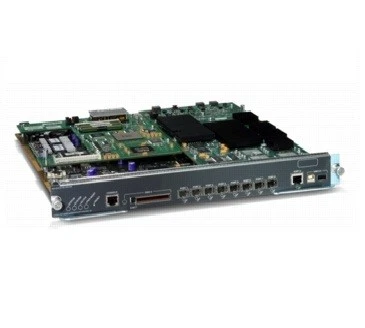
Product Datasheet
- Brand: Cisco
- Model: WS-SUP32-GE-3B
- Product Series: Catalyst 6500 / Supervisor Engine 32
- Product Name: Supervisor Engine 32
- Module Type: Switch Supervisor / Route Processor
- Forwarding Engine: PFC3B
- Routing Processor: MSFC2A
- Gigabit Ethernet Uplinks: 8 × 1000BASE-X SFP
- Additional Uplink: 1 × 10/100/1000BASE-T RJ-45
- Expansion Interface: CompactFlash Type II
- USB Ports: 2 × USB 2.0 (not enabled in the documented platform configuration)
- Console Interface: Console port
- Network Protocols: IEEE 802.3, 802.1Q, 802.1D, 802.1p, 802.1s, 802.1w, and related Ethernet standards
- Chassis Compatibility: Cisco Catalyst 6500 Series and Cisco 7600 Series
- Slot Requirement: 1 chassis slot
- Minimum Software: Cisco IOS 12.2(18)SXF
- Dimensions (H × W × D): 4.0 × 37.9 × 40.3 cm
- Weight: Approximately 4.45 kg
- Operating Temperature: 0 to 40 °C
- Storage Temperature: -40 to 75 °C
- Relative Humidity: 10% to 90%, non-condensing
- Power Requirements: Chassis-supplied power; approximately 42 V DC internal power architecture. Actual consumption depends on chassis and configuration.
- Place of Manufacture: Not verified
- Country of Origin: Not verified
- Product Status: Legacy Cisco platform component
- Discontinued: Cisco lifecycle status should be checked for the exact hardware revision
- Condition: Subject to seller confirmation
Operating Guidelines and Usage
1. Chassis Compatibility
- Install only in a supported Catalyst 6500 Series or Cisco 7600 Series chassis.
- Confirm that the chassis supports Supervisor Engine 32.
- Ensure that the required high-speed fan tray is installed.
- Verify that the chassis power supply has sufficient capacity. Cisco documentation specifies a 2500 W or higher power supply for the high-speed fan-tray requirement.
- Confirm that the installed line cards and redundant supervisor configuration are supported.
2. Network Connections
- The eight Gigabit Ethernet uplinks require compatible 1-Gigabit SFP transceivers.
- Select SFP modules according to fiber type, wavelength, connector, and transmission distance.
- Use the RJ-45 uplink for compatible 10/100/1000BASE-T connections.
- Check fiber polarity, optical power levels, and cable condition before commissioning.
- Connect the console port for initial configuration and troubleshooting.
3. Software and Configuration
- Verify the installed Cisco IOS release against the Supervisor Engine 32 compatibility requirements.
- The documented minimum software release is 12.2(18)SXF.
- Check the PFC3B and MSFC2A hardware identification during system inventory.
- Confirm VLAN, trunk, routing, spanning-tree, and uplink configurations before placing the module into production.
- Back up the existing configuration before replacing a supervisor engine.
Power-On and Power-Off Sequence
Power-On
- Confirm that the chassis, fan tray, and power supplies meet the platform requirements.
- Inspect the supervisor module and its connectors for damage.
- Verify that all SFP transceivers are compatible with the connected network.
- Install the supervisor engine in the designated chassis slot according to Cisco’s hardware procedure.
- Restore chassis power using the approved startup sequence.
- Observe the module status LEDs during boot.
- Connect through the console interface and verify the IOS startup process.
- Use
show module,show version, andshow environmentto check hardware recognition and chassis status. - Verify uplink connectivity, routing, VLANs, and redundancy before returning the switch to service.
Power-Off
- Notify network operations personnel and schedule an approved maintenance window.
- Back up the running configuration and record the supervisor and chassis status.
- Shut down or isolate the chassis according to the Cisco hardware maintenance procedure.
- Verify that the module is safe to remove.
- Disconnect network and console cables as required.
- Release the module retention mechanism and remove the board using the designated handles.
- Install a replacement or an approved blanking panel to maintain proper chassis airflow.
Normal Operating Procedure
- Monitor supervisor status and chassis environmental conditions.
- Check CPU utilization, memory utilization, and switching performance.
- Verify that all required Gigabit Ethernet uplinks are operational.
- Monitor interface errors, packet drops, and optical transceiver diagnostics.
- Review VLAN, trunk, routing, and spanning-tree status.
- Confirm that the PFC3B forwarding engine and MSFC2A routing processor are recognized.
- Check fan-tray and power-supply status.
- Review system logs for module resets, hardware faults, or software exceptions.
- Maintain configuration backups and change records.
Parameter Settings and Modification
The WS-SUP32-GE-3B is configured through Cisco IOS and the Catalyst 6500 software environment.
- VLAN Configuration: Define VLANs and assign access or trunk interfaces according to the network design.
- Layer 2 Switching: Configure spanning tree, EtherChannel, and switching policies.
- Layer 3 Routing: Configure supported routing protocols and IP interfaces through the MSFC2A.
- QoS: Configure classification, marking, policing, and scheduling according to the PFC3B capabilities.
- SFP Uplinks: Verify speed, duplex, transceiver type, and interface status.
- Redundancy: Confirm active and standby supervisor behavior where dual-supervisor operation is installed.
- Software Image: Use a Cisco IOS image supported by the Supervisor Engine 32 and the installed daughter cards.
Useful diagnostic commands include:
show versionshow moduleshow interfaces statusshow interfaces counters errorsshow environmentshow redundancyshow logging
Do not upgrade IOS or modify the supervisor configuration without checking the target image, configuration backup, and chassis compatibility.
Maintenance and Troubleshooting
Routine Maintenance
- Inspect the module faceplate, ejector levers, and chassis connectors.
- Check fan-tray operation and chassis airflow.
- Inspect SFP transceivers and fiber-optic connectors.
- Monitor environmental alarms and power-supply status.
- Review system logs and interface error counters.
- Maintain a backup of the startup and running configurations.
- Keep spare compatible SFPs and supervisor hardware available for planned maintenance.
Common Troubleshooting
Problem: Supervisor module does not boot
Check chassis power, fan-tray compatibility, module seating, boot image, and console output.
Problem: Module is not recognized
Inspect the chassis slot, connector condition, hardware revision, and supervisor compatibility.
Problem: Gigabit Ethernet uplink is down
Check SFP compatibility, fiber polarity, optical signal levels, cable condition, and interface configuration.
Problem: High CPU utilization
Review process utilization, control-plane traffic, routing updates, and abnormal broadcast or multicast traffic.
Problem: Redundancy does not operate correctly
Verify supervisor compatibility, software versions, redundancy configuration, and synchronization status.
Problem: Chassis reports an environmental alarm
Inspect fan-tray status, power-supply capacity, airflow obstruction, and operating temperature.
Safety Precautions
- Installation and maintenance must be performed by qualified network or hardware technicians.
- Follow Cisco’s chassis installation and electrostatic-discharge procedures.
- Use an ESD wrist strap when handling the supervisor module.
- Do not remove or insert the module unless the chassis and hardware documentation explicitly support the intended procedure.
- Confirm that the high-speed fan tray and required power supply are installed.
- Never look directly into the end of an active fiber-optic cable or SFP transmitter.
- Back up the network configuration before replacing the supervisor engine.
- Verify network routing, switching, and redundancy after maintenance.
Recommended Cisco Models
The following models are related Catalyst 6500 supervisor engines, daughter cards, and chassis modules. They are not all direct replacements for WS-SUP32-GE-3B. Verify chassis support, software compatibility, forwarding-engine type, and uplink requirements before substitution.
- WS-SUP32-10GE-3B – Supervisor Engine 32 with 10-Gigabit Ethernet uplinks
- WS-SUP720-3B – Catalyst 6500 Supervisor Engine 720 with PFC3B
- WS-SUP720-3BXL – Catalyst 6500 Supervisor Engine 720 with PFC3BXL
- WS-SUP720-10G – Supervisor Engine 720 with 10-Gigabit interfaces
- WS-S32-GE-PISA – Supervisor Engine 32 PISA with Gigabit Ethernet uplinks
- WS-S32-10GE-PISA – Supervisor Engine 32 PISA with 10-Gigabit Ethernet uplinks
- WS-F6K-PFC3B – Policy Feature Card 3B
- WS-F6K-MSFC2A – Multilayer Switch Feature Card 2A
- WS-X6K-S2-PFC2 – Catalyst 6500 Supervisor Engine 2 with PFC2
- WS-X6K-S2-MSFC2 – Catalyst 6500 Supervisor Engine 2 with MSFC2
- WS-X6K-S2U-MSFC2 – Catalyst 6500 Supervisor Engine 2U with MSFC2
- WS-X6708-10G-3C – Catalyst 6500 8-Port 10-Gigabit Ethernet Module
- WS-X6748-GE-TX – Catalyst 6500 48-Port Gigabit Ethernet Module
- WS-X6724-SFP – Catalyst 6500 24-Port Gigabit Ethernet SFP Module
- WS-C6509-E – Catalyst 6500-E 9-Slot Switch Chassis


