
Product Introduction
The GENERAL ELECTRIC DS215DMCBG1AZZ02A is a legacy GE Mark V turbine-control circuit board associated with the DMCB hardware family. Equipment inventories identify this part number as an IOS main control board, while other industrial parts catalogs describe the DS215DMCB assembly as an IOS/DUP processor board with associated firmware. It is used within GE turbine and gas-control equipment and is supplied as a board-level assembly with onboard memory and multiple input/output functions. The exact role of the ZZ02A firmware and hardware configuration should be confirmed against the installed control-system documentation before replacement. This board is intended for maintenance and lifecycle support of existing GE Mark V installations, not as a general-purpose standalone controller.
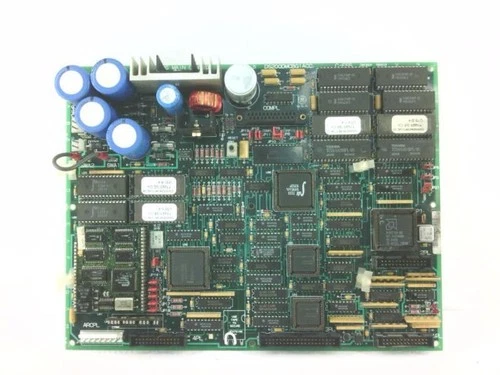
Product Parameters
- Brand: General Electric (GE)
- Model: DS215DMCBG1AZZ02A
- Series: GE Mark V / DS215DMCB
- Product Name: IOS Control Processor Board
- Product Type: Industrial Turbine Control PCB Assembly
- Board Family: DMCB
- System Application: GE Mark V turbine and gas control
- Functional Identification: IOS main control / IOS-DUP processor assembly; confirm exact role from system documentation
- Hardware Configuration: G1A board family with ZZ02A assembly designation
- Memory: Onboard memory, as described in supplier catalog listings
- I/O Function: Multiple input/output functions; exact channel allocation requires OEM documentation
- Firmware: Associated firmware configuration; verify the installed version
- Place of Manufacture: Not independently verified; check the product label
- Country of Origin: Not reliably published; confirm from the unit nameplate
- Dimensions: Not reliably published; verify against the physical board or OEM drawings
- Weight: Not reliably published; confirm before shipment
- Power Requirements: Supplied through the compatible Mark V control-system architecture; exact electrical requirements require OEM documentation
- Installation: Control-system rack or assembly installation; verify the designated position
- Product Status: Legacy GE Mark V hardware
- Discontinued: Listed as discontinued by industrial suppliers; confirm current OEM lifecycle status
- Condition: Confirm the actual unit’s condition, firmware, revision, and test status before purchase
Technical Features
- Mark V Control-System Integration
Designed for use in GE Mark V turbine-control equipment. - DMCB Board Family
Belongs to the DS215DMCB hardware family, with related assemblies available in different firmware and revision configurations. - Processor-Related Functions
Industrial inventory records associate this assembly with IOS control and processor functions. Confirm the precise functional assignment for the installed system. - Onboard Memory
Supplier descriptions identify onboard memory as part of the board assembly. - Multiple I/O Functions
Catalog descriptions identify multi-input/output functionality. Exact signal types, channel counts, and terminal assignments must be checked against GE documentation. - Firmware-Specific Assembly
The ZZ02A suffix is important for identifying the assembly configuration. Do not assume that other suffix variants contain identical firmware. - Legacy Turbine Maintenance
Supports maintenance and spare-part planning for existing GE Mark V installations. - System-Level Compatibility
Proper operation depends on the surrounding controller hardware, firmware, wiring, and system configuration.
Operating Procedures
⚠️ The following procedures are general maintenance guidance. Exact installation, diagnostic, and operating instructions must follow the GE Mark V documentation for the specific turbine and cabinet configuration.
1. Pre-Installation Inspection
- Confirm the complete part number DS215DMCBG1AZZ02A.
- Record the board revision, serial number, firmware identification, and any PROM labels.
- Compare the replacement board with the original installed assembly.
- Inspect the PCB for cracks, corrosion, contamination, damaged components, and bent connector contacts.
- Check all board connectors and mounting points.
- Verify that the ZZ02A assembly configuration matches the required system configuration.
- Confirm the designated rack position and related board compatibility.
- Back up or record the existing control-system configuration before replacement.
2. Startup and Power-On Sequence
- Confirm that the turbine and control system are in the approved maintenance or startup condition.
- Verify that the replacement board is installed in the designated position.
- Check all connectors, cables, and retaining hardware.
- Confirm that the associated power supply and control-system hardware are ready.
- Restore cabinet power according to the approved GE procedure.
- Allow the Mark V system to complete its initialization and board-recognition process.
- Review diagnostic indications and system fault messages.
- Confirm that the expected board status and communication functions are available.
- Validate relevant input/output indications before returning the turbine to service.
3. Normal Operation
- Monitor the control system through the approved Mark V operator interface.
- Review board status and diagnostic information.
- Check for recurring processor, communication, or I/O-related alarms.
- Compare relevant signal values with the approved operating records.
- Monitor system behavior for unexpected changes after maintenance.
- Record abnormal events and diagnostic messages.
- Do not make unauthorized changes to turbine control logic or protection settings.
4. Parameter Configuration and Modification
The exact configuration method and adjustable parameters for DS215DMCBG1AZZ02A depend on its installed IOS role, associated firmware, and Mark V system configuration.
- Identify the installed board revision and firmware version.
- Review the approved Mark V configuration and system drawings.
- Record existing settings and configuration data before making changes.
- Confirm the correct board assignment and I/O mapping.
- Use only approved GE engineering tools and procedures.
- Verify any firmware or PROM requirements before replacement.
- Apply authorized changes under an approved engineering work order.
- Review system diagnostics and validate the affected functions after modification.
⚠️ Do not copy firmware, PROMs, or configuration data from another DMCB assembly without confirming compatibility.
5. Shutdown Sequence
- Place the turbine and control system in the approved shutdown or maintenance condition.
- Confirm that the board can be isolated without compromising active protection or control functions.
- Follow the site’s lockout/tagout procedure.
- Verify the required electrical safe condition before handling the PCB.
- Label and document all associated connections.
- Remove the board using the specified extraction procedure.
- Protect the assembly with ESD-safe packaging.
- Record the removed board’s part number, revision, firmware identification, and replacement details.
Daily Maintenance
- Review Mark V diagnostic messages and board status.
- Check for recurring processor, I/O, or communication alarms.
- Inspect accessible connectors for looseness or contamination.
- Keep the control cabinet clean and free from excessive dust and moisture.
- Monitor cabinet ventilation and operating temperature.
- Check for visible signs of overheating or component deterioration.
- Maintain records of board revisions and firmware configurations.
- Verify that spare boards are stored in antistatic packaging.
- Document all board replacements and configuration changes.
Troubleshooting
Problem 1: Board Not Recognized by the Control System
Possible causes:
- Incorrect board position
- Hardware or firmware mismatch
- Poor connector contact
- Board identification or hardware fault
Recommended checks:
- Verify the full part number and ZZ02A suffix.
- Inspect the board connectors and rack position.
- Check the firmware and PROM identification.
- Review Mark V diagnostic messages.
Problem 2: Processor or IOS Diagnostic Alarm
Possible causes:
- Board hardware fault
- Firmware or configuration mismatch
- Related controller hardware problem
- Power-supply instability
Recommended checks:
- Record the exact diagnostic code and message.
- Verify the installed board revision.
- Check the associated power supply and related hardware.
- Compare the configuration with approved system records.
Problem 3: Abnormal I/O Indications
Possible causes:
- Incorrect I/O mapping
- Field wiring problem
- Related I/O board fault
- Configuration mismatch
Recommended checks:
- Compare channel assignments with the wiring drawings.
- Inspect the associated terminal and I/O hardware.
- Check signal values using approved diagnostic procedures.
- Do not alter protection logic to suppress an unexplained alarm.
Problem 4: Intermittent Control-System Faults
Possible causes:
- Loose connections
- Aging electronic components
- Cabinet temperature problems
- Firmware or hardware compatibility issues
Recommended checks:
- Review fault history and event timing.
- Inspect connectors and cabinet environmental conditions.
- Verify the board revision and firmware.
- Arrange qualified board-level testing if the problem persists.
Frequently Asked Questions
Q1: What is the GE DS215DMCBG1AZZ02A?
It is a GE Mark V control-system board in the DMCB family, identified in industrial equipment inventories as an IOS main control or IOS/DUP processor assembly.
Q2: Which system is it used in?
It is associated with GE Mark V turbine and gas-control equipment.
Q3: Does it include onboard memory?
Supplier descriptions identify onboard memory as a feature of this board assembly. The exact memory configuration should be verified from the hardware documentation.
Q4: Is the DS215DMCBG1AZZ02A interchangeable with DS215DMCBG1AZZ01A?
Do not assume interchangeability. The suffix may identify a different firmware or assembly configuration. Confirm the approved replacement relationship with GE documentation.
Q5: What does the ZZ02A suffix mean?
It identifies a specific assembly configuration. Its exact firmware and revision significance should be confirmed using the board label and OEM records.
Q6: Is this a Mark VI board?
No. The part is listed as a GE Mark V series board.
Q7: What should be checked before purchasing?
Verify the complete part number, board revision, firmware identification, physical condition, and compatibility with the installed Mark V system.
Safety Precautions
⚠️ Follow site lockout/tagout procedures before removing or installing the board.
⚠️ Only qualified turbine-control technicians should perform installation and testing.
⚠️ Use ESD protection when handling the PCB.
⚠️ Never assume that DMCB assemblies with different suffixes have identical firmware or functions.
⚠️ Do not modify turbine logic, I/O assignments, or protection parameters without engineering authorization.
⚠️ Complete the required diagnostic and functional checks before returning the control system to service.
Recommended Related GE Models
The following GE models are associated with Mark V, DMCB, or related turbine-control hardware. They are related spare-part references, not confirmed direct replacements for DS215DMCBG1AZZ02A.
- GE DS215DMCBG1AZZ01A – DMCB Main Control Board Assembly
- GE DS215DMCBG1AZZ03A – DMCB Board Assembly with Firmware
- GE DS215DMCBG1AZZ03B – DMCB Board Assembly Variant
- GE DS215DMCAG1AZZ02A – DMCA Processor Board Assembly
- GE DS215SDCCG1AZZ01A – SDCC Drive Control Board Assembly
- GE DS215SDCCG1AZZ01B – SDCC Drive Control Board Variant
- GE DS215SLCCG1AZZ01A – SLCC LAN Communication Board Assembly
- GE DS215SLCCG1AZZ01B – SLCC Board Assembly with Firmware
- GE DS215SLCCG2AZZ01A – SLCCG2 Communication Board Assembly
- GE DS215KLDCG1AZZ03A – KLDC Board Assembly with Firmware
- GE DS215KLDCG1AZZ03B – KLDC Board Assembly Variant
- GE DS215UDSAG1AZZ01A – UDSA Board Assembly with Firmware
- GE DS215UPLAG1BZZ01A – UPLA Board Assembly
- GE DS215UCIBG3AZZ01A – UCIB Control Board Assembly
- GE DS215GASCG4AZZ01A – GASC Control Board Assembly
Compatibility Note: These models belong to related GE Mark V and legacy control hardware families, but their functions and firmware configurations differ. Confirm the system application, complete part number, revision, firmware, and approved replacement documentation before ordering or installation.


