
Product Description
The HEIDENHAIN LE426M 324990-39 (ID 324990-39) is an industrial CNC logic unit designed for the HEIDENHAIN TNC 426M numerical control system. It serves as the central processing and control component for CNC machine tools, coordinating axis positioning, spindle operation, encoder feedback, and machine PLC functions. The LE426M architecture supports up to six position encoder inputs and six motor speed encoder inputs, with switchable 11 µAPP / 1 VPP position encoder interfaces and 1 VPP motor encoder inputs. This particular hardware identification belongs to the LE426M configuration designed for spindle speeds up to 12,000 rpm and BC 120 display compatibility. The controller provides digital and analog interfaces to compatible servo amplifier systems and supports communication with HEIDENHAIN operating panels, display units, and machine I/O components. Typical applications include CNC milling machines, machining centers, precision metalworking equipment, and automated machine tools. Before replacement, verify the complete identification number, hardware revision, NC software version, encoder interface, display compatibility, and existing machine configuration.
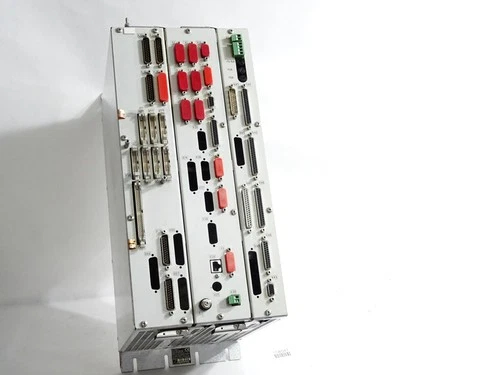
📋 Product Datasheet
| Parameter | Specification |
|---|---|
| Brand | HEIDENHAIN |
| Model | LE426M |
| Identification Number | 324990-39 |
| Series | TNC 426M |
| Product Name | CNC Logic Unit / Numerical Control Module |
| Controller Type | Digital CNC Control |
| Supported Axes | Up to 5 controlled axes plus spindle |
| Position Encoder Inputs | 6 |
| Motor Speed Encoder Inputs | 6 |
| Position Feedback | 11 µAPP / 1 VPP switchable |
| Motor Encoder Interface | 1 VPP |
| Spindle Speed Configuration | Up to 12,000 rpm |
| Display Compatibility | BC 120 |
| Operating Panel Compatibility | TE 420 / compatible TNC 426M panels |
| Drive Interface | Digital and analog servo amplifier interface |
| Software | HEIDENHAIN TNC 426M NC and PLC software |
| Hardware Revision | Variant 39 |
| Dimensions | Refer to original LE426M mechanical drawing |
| Weight | Not independently verified |
| Power Requirements | Depends on the complete control-system configuration |
| Place of Manufacture | Not independently verified |
| Country of Origin | Verify individual nameplate |
| Product Status | Used / condition subject to seller confirmation |
| Discontinued | Legacy TNC 426M platform; no longer a current-generation control |
⚙️ Operating Procedures and Usage Instructions
1. Installation and Preparation
- Inspect the logic unit housing, circuit boards, connectors, and mounting points.
- Confirm the identification number 324990-39.
- Verify compatibility with the existing TNC 426M machine configuration.
- Check the BC 120 display unit and TE 420 operating panel connections.
- Verify the servo amplifier interface and encoder signal types.
- Inspect encoder cables, feedback connectors, and grounding connections.
- Confirm that the machine PLC and NC software versions are compatible.
- Back up existing machine parameters and PLC programs before replacement.
- Install the logic unit in its designated control cabinet position.
- Reconnect all cables according to the original wiring documentation.
2. Power-On Sequence
- Confirm that the machine is mechanically secured.
- Verify the control cabinet wiring and protective grounding.
- Check the control power supply and associated auxiliary circuits.
- Ensure the emergency-stop circuit is functioning.
- Switch on the machine control power.
- Allow the HEIDENHAIN TNC 426M to initialize.
- Check the display and operating panel startup.
- Verify that NC and PLC software versions are recognized.
- Check encoder feedback and servo amplifier communication.
- Confirm that no critical system alarms remain before enabling machine operation.
3. Normal Operating Procedure
- Switch the CNC control to the appropriate operating mode.
- Check the machine reference and axis feedback signals.
- Perform the required reference-return procedure.
- Verify the position of each controlled axis.
- Check spindle feedback and speed monitoring.
- Load the approved CNC machining program.
- Verify tool data, work offsets, and machining parameters.
- Perform a dry run or single-block test.
- Start machining after confirming machine readiness.
- Monitor axis positioning, spindle operation, and diagnostic messages during production.
4. Parameter Configuration and Modification
- Access the appropriate HEIDENHAIN machine parameter interface.
- Record the existing machine parameter configuration before modification.
- Verify the NC software identification and PLC software version.
- Check encoder signal types and input assignments.
- Verify axis scaling, reference positions, and feedback direction.
- Review spindle encoder and speed configuration.
- Confirm servo amplifier interface settings.
- Check PLC input/output assignments and machine-specific functions.
- Save approved parameter changes using the correct backup procedure.
- Restart the control only when required by the relevant parameter changes.
- Perform axis reference and functional checks after configuration updates.
Important: Machine parameters are machine-builder specific. Do not copy parameter files from another TNC 426M machine without verifying the mechanical, electrical, and encoder configurations.
5. Shutdown Sequence
- Stop the active machining program.
- Move all axes to an approved safe position.
- Stop spindle rotation and auxiliary machine functions.
- Confirm that all controlled movements have stopped.
- Save programs and relevant machine data.
- Exit active operating modes according to the machine procedure.
- Switch off machine control power using the designated shutdown control.
- Isolate the electrical supply before servicing.
- Follow the machine manufacturer’s electrical discharge and safety procedures before removing the logic unit.
🔧 Daily Maintenance and Troubleshooting
- Inspect connectors and ribbon cables for looseness or damage.
- Check the control cabinet ventilation and operating temperature.
- Monitor NC and PLC startup messages.
- Investigate encoder errors by checking signal type, cable condition, and connector assignments.
- Check axis positioning errors against the machine’s reference and calibration data.
- Investigate spindle feedback faults by checking encoder wiring and configuration.
- Check display communication if the BC 120 screen does not initialize.
- Back up NC programs, PLC programs, and machine parameters regularly.
- Avoid unnecessary removal of EPROMs or internal electronic components.
- Use qualified service personnel for board-level inspection and repair.
⚠️ Safety Precautions
- Installation and maintenance must be performed by qualified CNC service technicians.
- Isolate the machine power supply before removing or installing the logic unit.
- Never connect or disconnect encoder and control cables while energized.
- Protect circuit boards against electrostatic discharge.
- Back up machine parameters and software before replacing hardware.
- Verify servo amplifier and encoder compatibility before commissioning.
- Do not modify machine safety logic without authorization.
- Confirm emergency-stop and axis limit functions before returning the machine to production.
- Follow the original HEIDENHAIN and machine-builder service documentation.
🔗 Product Keywords and Information
HEIDENHAIN LE426M, 324990-39, TNC 426M, CNC Logic Unit, HEIDENHAIN CNC Controller, Numerical Control Module, CNC Machine Control, Position Encoder Interface, Servo Amplifier Interface, BC 120 Display, TE 420 Operating Panel, Industrial CNC Spare Parts.
For HEIDENHAIN CNC controllers and industrial automation spare parts, visit:


