
Product Description
The Makino UP-MF12-B is an industrial display control panel designed for Makino MGH III CNC and electrical discharge machining (EDM) equipment. It serves as an operator interface for machine programming, machining condition selection, operational control, and process monitoring. The panel allows operators and programmers to enter machining commands, select cutting conditions, manage machine functions, and monitor operating information during production. Its dedicated keypad, display interface, and machine-specific control layout support precision machining operations and unattended or semi-unattended production workflows. The UP-MF12-B is intended for integration with compatible Makino machine control systems and is suitable for CNC machining facilities, precision engineering workshops, mold manufacturing, and EDM applications. When replacing an existing panel, verify the complete part number, connector arrangement, electrical supply, machine model, and controller compatibility to ensure correct integration.
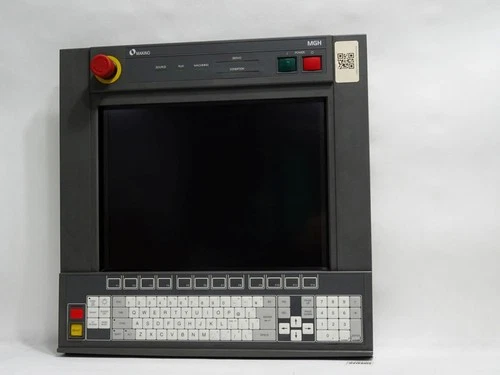
Product Datasheet
| Parameter | Specification |
|---|---|
| Brand | Makino |
| Model | UP-MF12-B |
| Series | MGH III |
| Product Name | Display Control Panel |
| Product Type | CNC Machine Operator Interface |
| Application | CNC / EDM Machine Control |
| Place of Manufacture | Japan (manufacturer origin; individual unit unverified) |
| Product Status | Used – Mint Condition (seller-listed) |
| Display | Integrated Operator Display |
| Interface | Dedicated Keypad and Control Panel |
| Communication | Machine-specific interface; verify connector documentation |
| Power Requirements | Machine-specific; verify nameplate |
| Dimensions | Not independently verified |
| Weight | Approx. 6.17 kg (third-party listing reference) |
| Country of Origin | Japan (reported; verify unit label) |
| Mounting | Machine Operator Console |
| Discontinued | Current lifecycle status not confirmed |
⚙️ Operating Procedures and Usage Instructions
1. Installation and Preparation
- Verify the UP-MF12-B model number and physical identification label.
- Inspect the display, keypad, buttons, connectors, and enclosure.
- Check for cracked screens, damaged keys, and loose terminals.
- Confirm compatibility with the Makino MGH III machine configuration.
- Verify the original wiring diagram and connector pin assignments.
- Disconnect machine power before connecting or removing the panel.
- Install the panel in its designated operator console.
- Secure all mounting points and cable connections.
- Verify grounding and electrical insulation.
- Confirm that the machine controller recognizes the operator interface.
2. Power-On Sequence
- Ensure that the machine is in a safe operating condition.
- Check the panel power and communication connections.
- Verify the machine’s electrical supply.
- Switch on the main machine power.
- Start the CNC control system according to the machine manufacturer’s sequence.
- Allow the controller and display panel to initialize.
- Check the display for normal startup information.
- Verify keypad and function-button response.
- Check communication with the machine controller.
- Confirm that emergency-stop and safety functions are operational before machining.
3. Normal Operating Procedure
- Access the machine’s authorized operating interface.
- Select the required machining or operating mode.
- Enter or select the appropriate machining program.
- Review machining conditions and process settings.
- Verify workpiece positioning and machine coordinates.
- Check tool or electrode conditions where applicable.
- Confirm the selected cutting parameters.
- Execute a controlled test operation.
- Monitor machining progress and machine status.
- Use the designated stop command when the operation is complete.
4. Parameter Configuration and Modification
- Access the machine’s authorized programming or setup mode.
- Select the appropriate machining program.
- Review the existing parameter configuration before modification.
- Configure the required machining conditions using the dedicated keypad.
- Verify coordinate settings and machine operating modes.
- Check the selected cutting or EDM conditions against the approved process specifications.
- Save the modified settings using the machine’s designated procedure.
- Perform a controlled test before returning to production.
Parameter availability and editing permissions depend on the connected Makino CNC controller and machine configuration. Do not modify protected machine parameters without approved service documentation.
5. Shutdown Sequence
- Stop the active machining operation.
- Confirm that the machine axes and moving components have stopped.
- Exit the machining program according to the machine procedure.
- Save required program and configuration changes.
- Return the machine to its approved standby condition.
- Switch off the CNC control system according to the manufacturer’s shutdown procedure.
- Switch off the main machine power if required.
- Wait for the system to shut down completely.
- Isolate electrical power before disconnecting the display panel.
- Follow the machine manufacturer’s lockout/tagout procedure before maintenance.
🔧 Daily Maintenance and Troubleshooting
- Clean the display with a soft, lint-free cloth.
- Check keypad buttons for sticking or unresponsive operation.
- Inspect cable connectors for loose contacts.
- Check display brightness and readability.
- Monitor communication errors between the panel and CNC controller.
- Inspect the enclosure for dust and contamination.
- Check for intermittent button response or display flickering.
- Verify panel mounting and cable strain relief.
- Back up machine programs and settings regularly.
- Replace defective components only with compatible parts.
⚠️ Safety Precautions
- Installation and servicing must be performed by qualified CNC technicians.
- Disconnect electrical power before handling panel connections.
- Do not operate the machine with damaged emergency-stop or safety circuits.
- Never assume that the operator panel itself provides machine safety protection.
- Verify compatibility before replacing the original panel.
- Do not change machining parameters without authorization.
- Keep liquids and conductive contaminants away from the panel.
- Follow Makino machine-specific operating and maintenance documentation.
🔗 Product Keywords
Makino UP-MF12-B, MGH III, Makino Display Control Panel, CNC Operator Interface, EDM Control Panel, Machine Control Panel, Makino CNC Spare Parts, Industrial Display Panel, CNC Machine HMI.
For industrial automation and CNC replacement parts, visit:
Recommended Makino Models and Related Parts
- Makino UP-MF12-A – Display Control Panel
- Makino UP-MF12-B – Display Control Panel
- Makino UP-MF13-A – Machine Control Panel
- Makino MGH III – Machine Control System
- Makino A-60194-109 – Control Board
- Makino UP-MF Series – Operator Interface Components
- Makino MGH Series – CNC Control Components
- Makino Pro 3 – CNC Control System
- Makino Pro 5 – CNC Control System
- Makino Pro 6 – CNC Control System
- Makino EDAC Series – EDM Control Components
- Makino EDAF Series – EDM Control Components
- Makino D-Series – CNC Machine Control Components
- Makino F-Series – CNC Machine Control Components
- Makino MF-Series – CNC Machine Control Components


