
Product Description
The Bosch Rexroth 1070074077-101 IPC300 is an industrial computer assembly associated with the Rexroth IPC300 automation platform. The 1070074077 CPU is identified in industrial parts references as a 400 MHz processor module with 128 MB RAM and a 24 V DC power configuration. The supplied listing also includes part number 1070080236-401 and specifies a 24 V, 6.5 A electrical rating. The IPC300 platform was designed for industrial machine control and supports integration with compatible operator panels, expansion cards, and automation interfaces. Its documented hardware options include serial communication, Ethernet, parallel, VGA, and PCI/ISA expansion, depending on the installed configuration. This assembly is relevant to legacy machine-tool, CNC, and industrial automation maintenance where the original hardware and software environment must be preserved. Before installation, verify the function of each included assembly, the exact power-input requirements, installed memory, expansion hardware, operating system, and application software against the original equipment documentation.
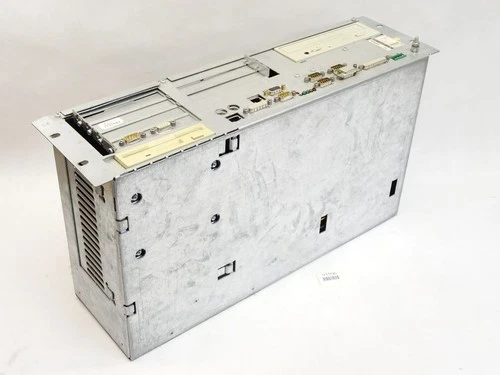
Technical Specifications
- Brand: Bosch Rexroth
- Model: 1070074077-101
- Additional Part Number: 1070080236-401
- Series: Rexroth IPC / IPC300 Industrial PC
- Product Name: IPC300 Industrial Computer Assembly
- Product Type: Industrial PC / automation computer
- CPU: 400 MHz processor, according to the 1070074077 part reference
- Memory: 128 MB RAM, according to the 1070074077 part reference
- Place of Manufacture: Not independently verified
- Product Status: Used, according to the seller’s listing
- Dimensions: Not verified; refer to the IPC300 mechanical drawing
- Weight: Not verified; depends on the installed configuration
- Country of Origin: Germany is indicated in a related seller catalog; confirm the individual unit nameplate
- Power Requirements: Seller listing states 24 V DC, 6.5 A; verify the rating label and power-input configuration before connection
- Rated Power: 156 W based on the seller-stated 24 V DC and 6.5 A figures; this is a calculated value, not an independently verified manufacturer rating
- Operating System: Configuration-dependent; historical IPC300 documentation references Windows NT 4.0 and other legacy software configurations
- Expansion: PCI and ISA expansion options, depending on hardware version
- Communication Interfaces: Serial interfaces, Ethernet, parallel, VGA, keyboard, and mouse connections are documented for the IPC300 family; actual installed interfaces must be checked
- Discontinued: Legacy platform; current production and support status for the exact assembly should be confirmed with Bosch Rexroth
Operating Procedures
1. Preparation
- Check the identification labels on both 1070074077-101 and 1070080236-401.
- Confirm that the CPU assembly and additional module match the original machine configuration.
- Verify the power-input voltage, polarity, and current rating from the hardware label.
- Inspect the enclosure, connectors, cooling fan, expansion slots, and mounting points.
- Confirm the installed operating system, application software, and storage-device condition.
- Back up available system data and configuration files before maintenance.
2. Installation
- Install the IPC300 assembly in the designated industrial cabinet or mounting frame.
- Secure the unit using the specified mounting hardware.
- Maintain the ventilation clearance required by the equipment documentation.
- Check that the cabinet is free from excessive dust, moisture, and conductive contamination.
- Confirm protective earth connections and cabinet bonding.
3. Electrical Connection
- Verify whether the unit is configured for 24 V DC or another documented supply arrangement.
- Connect the power supply using the correct connector and polarity.
- Confirm the required protective separation and grounding arrangement.
- Connect operator panels and peripherals using the specified interface cables.
- Check serial, Ethernet, VGA, and expansion-card connections against the original wiring diagram.
- Do not apply the seller-stated 6.5 A rating to an individual input without confirming the corresponding nameplate.
4. Power-On
- Confirm that all internal modules and external cables are securely installed.
- Energize the unit using the machine manufacturer’s startup procedure.
- Observe the power and diagnostic indicators.
- Check whether the computer completes its startup sequence.
- Verify that the operating system and machine-control application load correctly.
- Investigate startup errors before enabling machine operation.
5. Normal Operation
- Monitor system status, processor operation, and available diagnostic indicators.
- Check communication with connected PLCs, drives, operator panels, and peripheral devices.
- Confirm that the machine-control software responds correctly.
- Monitor cooling fan operation and cabinet temperature.
- Record unexpected shutdowns, communication errors, and system alarms.
6. Configuration
- Preserve the original operating system and application environment whenever possible.
- Verify BIOS settings, boot-device configuration, and installed memory.
- Check serial-port assignments and communication parameters.
- Confirm Ethernet settings, network addressing, and connected-device compatibility.
- Verify installed PCI or ISA cards and their driver requirements.
- Do not replace system software or load a new operating system without confirming application compatibility and licensing.
7. Shutdown
- Close machine-control applications using the prescribed shutdown procedure.
- Allow the operating system to complete its shutdown sequence.
- Isolate the power supply before removing modules or connecting internal hardware.
- Wait for stored energy to discharge as specified in the equipment documentation.
- Label cables and record module positions before disassembly.
Daily Maintenance
- Check the IPC300 for abnormal noise, overheating, or unusual operating behavior.
- Confirm that cooling fans and ventilation openings are unobstructed.
- Inspect power and communication cables for wear or loose connections.
- Keep the cabinet clean and free from conductive dust.
- Monitor startup behavior and operating-system error messages.
- Check storage-device status and maintain regular system backups.
- Verify that connected operator panels and communication interfaces remain operational.
- Record system faults and maintenance actions.
- Use appropriate procedures when handling legacy storage media and backup batteries.
Troubleshooting
1. IPC300 does not power on
- Check the external power supply and protective devices.
- Verify the actual input voltage and polarity against the unit label.
- Inspect power connectors and internal supply connections.
- Check the power supply module and fuses.
2. Computer fails to complete startup
- Check the installed memory and expansion cards.
- Verify the boot-device configuration.
- Inspect the storage device and operating-system files.
- Review diagnostic indicators and any startup error messages.
3. Operator panel does not communicate
- Check the panel cable and connector condition.
- Verify the correct panel interface and cable type.
- Inspect communication settings and the relevant port configuration.
- Confirm that the connected panel is compatible with the installed IPC300 hardware version.
4. Ethernet or serial communication failure
- Check cable continuity and connector pin assignments.
- Verify port configuration, communication speed, and network settings.
- Inspect expansion cards and their drivers.
- Check for address conflicts or incorrect communication parameters.
5. Unexpected shutdown or restart
- Check the power supply for voltage fluctuations.
- Inspect cooling fan operation and cabinet temperature.
- Review system event logs and diagnostic messages.
- Check the condition of the internal backup or UPS components, if fitted.
6. Expansion card is not recognized
- Confirm that the card is compatible with the IPC300 hardware version.
- Check PCI or ISA slot installation.
- Verify driver and operating-system compatibility.
- Inspect the card and slot for contamination or physical damage.
Safety Precautions
- Installation and servicing must be performed by qualified industrial electrical and automation personnel.
- Isolate the power supply before opening the enclosure or removing internal modules.
- Verify the exact supply voltage and polarity before energizing the equipment.
- Use a power supply with the required protective separation.
- Follow the specified grounding and electromagnetic compatibility requirements.
- Do not insert or remove expansion cards while the equipment is energized.
- Protect electronic assemblies from electrostatic discharge.
- Preserve original software, firmware, and configuration data before changing hardware.
- Do not assume that modules with similar part numbers or connector layouts are interchangeable.
- Confirm compatibility with the existing machine controller and operator panel before replacement.
Product Keywords
Bosch Rexroth 1070074077-101, 1070080236-401, Bosch IPC300, Rexroth Industrial PC, Bosch Rexroth IPC, 400 MHz industrial computer, 128 MB RAM, 24 V DC industrial PC, CNC control computer, industrial automation computer, machine control PC, legacy automation spare parts, Rexroth control system.
For industrial automation products and spare parts, visit https://www.newplcdcs.com.
Related Bosch Rexroth Models and Product Families
The following are related Bosch Rexroth industrial computer and automation product families for sourcing research. They are not confirmed direct replacements for the listed IPC300 assembly.
- Bosch Rexroth IPC – Industrial PC family
- Bosch Rexroth IPC300 – Industrial PC platform
- Bosch Rexroth rho4.1 – Robot and motion-control platform
- Bosch Rexroth rho4.1/IPC300 – Industrial PC-based control platform
- Bosch Rexroth CL200 – PLC control family
- Bosch Rexroth CL300 – PLC control family
- Bosch Rexroth CL400 – PLC control family
- Bosch Rexroth CL500 – PLC control family
- Bosch Rexroth PC400 – Industrial PC and control platform
- Bosch Rexroth PC600 – Industrial PC and control platform
- Bosch Rexroth BF2xxT – Operator panel family
- Bosch Rexroth BF3xxT – Operator panel family
- Bosch Rexroth BT155 – Operator terminal family
- Bosch Rexroth BT205 – Operator terminal family
- Bosch Rexroth PNC – Numerical control and machine-control platform


