
The B&R Automation X20IF1041-1 is a communication interface module designed for the X20 modular PLC system. It provides one electrically isolated CANopen master interface, allowing the B&R controller to exchange data with compatible third-party CANopen devices and distributed automation equipment. The module uses a netX100 communication controller, supports transmission rates up to 1 Mbit/s, and provides an integrated terminating resistor. Diagnostic indicators report module status, network status, data transfer, and termination status. It can be installed in compatible X20 PLC systems and the X20BC1083 expandable POWERLINK bus controller. The module consumes 1.1 W and requires a separate five-pin TB2105 terminal block, available in push-in or screw-clamp versions. It is suitable for machine automation, distributed control, and fieldbus integration where CANopen communication is required. Before replacement, verify the controller hardware, Automation Studio hardware configuration, CANopen device profiles, network topology, and terminal-block arrangement.
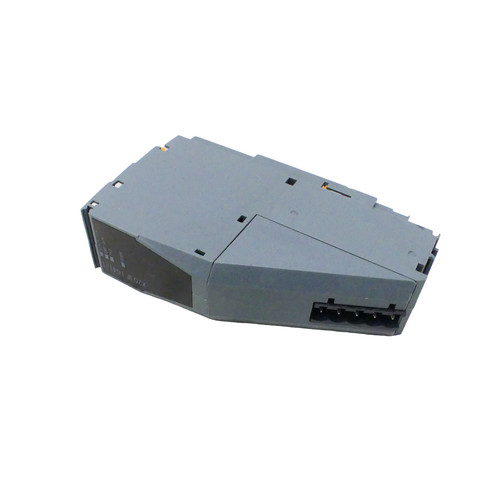
📋 Product Specifications
| Parameter | Description |
|---|---|
| Brand | B&R Automation |
| Model | X20IF1041-1 |
| Product Type | Communication Interface Module |
| Product Name | CANopen Master Interface |
| Series | B&R X20 |
| B&R ID Code | 0xA709 |
| Communication Protocol | CANopen |
| Interface Configuration | 1 CANopen master interface |
| Communication Controller | netX100 |
| Controller Memory | 8 MB SDRAM |
| Connector | 5-pin male multipoint connector |
| Maximum Transmission Rate | 1 Mbit/s |
| Maximum Communication Distance | 1,000 m, dependent on baud rate and network conditions |
| Terminating Resistor | Integrated |
| Electrical Isolation | PLC isolated from CANopen interface |
| Status Indicators | Module, network, data transfer, and termination |
| Power Consumption | 1.1 W |
| Mounting Compatibility | X20 PLC and X20BC1083 |
| Protection Rating | IP20 |
| Operating Temperature | -25 to 60°C horizontal; -25 to 50°C vertical |
| Storage Temperature | -40 to 85°C |
| Relative Humidity | 5–95%, non-condensing |
| Dimensions | Verify against the official mechanical drawing |
| Weight | Not confirmed |
| Required Accessory | TB2105 five-pin terminal block |
| Place of Manufacture | Not confirmed |
| Country of Origin | Verify product nameplate |
| Product Status | Current product documentation available; verify sales availability |
| Discontinued | Not confirmed |
⚙️ Installation and Operation
- Installation: Disconnect system power before mounting the module. Install the X20IF1041-1 in a supported X20 PLC or X20BC1083 slot. Order the required TB2105 five-pin terminal block separately. Check the CANopen cable, connector, grounding, and bus topology.
- Power-On: Restore system power after checking the module seating and wiring. Confirm that the module status indicator is normal and that the controller recognizes the interface.
- Normal Operation: Monitor CANopen network status, data transfer, and terminating-resistor indicators. Confirm communication with connected nodes and check for bus errors or missing devices.
- Parameter Configuration: Configure the CANopen master, baud rate, node addresses, device profiles, process data, and communication monitoring in the compatible B&R Automation Studio environment. Confirm that the hardware upgrade and project configuration support the installed module.
- Power-Off: Stop the controlled process according to the machine shutdown procedure, place outputs in a safe state, and isolate power before removing the module or changing fieldbus wiring.
🔧 Maintenance and Troubleshooting
- Module not recognized: Check the X20 slot, module seating, controller compatibility, and Automation Studio hardware configuration.
- CANopen communication failure: Check bus wiring, node IDs, baud-rate settings, network termination, and connected-device power.
- Intermittent communication: Inspect cable shielding, grounding, connector contacts, cable length, and electromagnetic interference.
- No data transfer: Check the master configuration, device profiles, node availability, and process-data mapping.
- Termination warning: Verify the integrated terminating resistor status and the physical termination arrangement at the two ends of the CANopen network.
- Unexpected module status: Review the controller diagnostics and B&R software status messages before replacing hardware.
🛡️ Safety Precautions
- Installation and maintenance should be performed by qualified automation personnel.
- Isolate power before removing the module or changing terminal wiring.
- Use the correct TB2105 terminal block and follow the official pin assignment.
- Do not add unnecessary terminating resistors; incorrect bus termination can cause communication faults.
- Verify CANopen baud rate, node configuration, and device compatibility before commissioning.
- Observe the applicable temperature, humidity, and IP20 installation requirements.
- Test communication and machine functions before returning the system to production.
🔗 Related B&R Models
The following models are related B&R X20 communication and interface modules. Their protocols and functions differ, so they should not be treated as automatic replacements for X20IF1041-1.
- B&R X20IF1020
- B&R X20IF1030
- B&R X20IF1043-1
- B&R X20IF1051-1
- B&R X20IF1053-1
- B&R X20IF1061-1
- B&R X20IF1072
- B&R X20IF2772
- B&R X20IF2792
- B&R X20cIF1041-1
- B&R X20cIF1072
- B&R X20BC1083
- B&R X20CP1484
- B&R X20CP3484
- B&R X20CP3584


