
Product Description
The FANUC A02B-0238-B611 is a Series 18i CNC operator interface basic unit designed for machine-tool control and operator interaction. It is identified with a 10.4-inch high-intensity color display and a single-path CNC configuration. The panel provides machine status visualization, CNC program operation, parameter access, alarm monitoring, and operator command input through its integrated display and soft-key interface. It is intended for compatible FANUC Series 18i control systems and should be selected according to the machine’s existing CNC hardware, software version, and panel configuration. This is a legacy FANUC control component, making it relevant for maintenance, repair, and continued operation of existing CNC equipment.
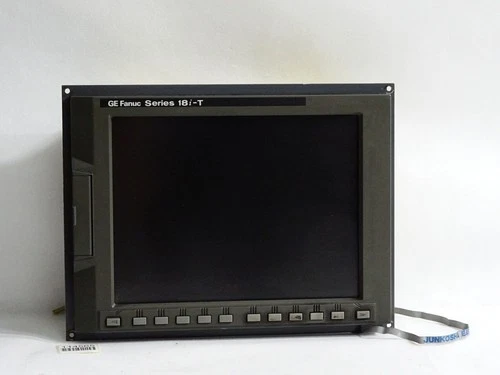
Key Technical Specifications
- Brand: FANUC
- Model: A02B-0238-B611
- Product Series: FANUC Series 18i
- Product Name: CNC Operator Interface Basic Unit
- CNC Configuration: Series 18i single-path control
- Display Size: 10.4 inches
- Display Type: High-intensity color LCD
- Operator Input: Integrated soft-key interface
- Soft-Key Configuration: 10 + 2
- Control Type: CNC basic unit
- Slot Configuration: No expansion slots, according to the documented B611 configuration
- Application: CNC machine-tool operation and monitoring
- Product Status: Legacy model; reported discontinued by manufacturer
- Country of Origin: Japan (verify against the product label)
- Dimensions: Confirm using the applicable FANUC mechanical drawing
- Weight: Approximately 7.65 lb (3.47 kg), based on a distributor listing
Installation and Operating Instructions
- Verify the complete part number A02B-0238-B611 and inspect the unit label before installation.
- Confirm that the machine uses a compatible FANUC Series 18i control architecture and the correct single-path configuration.
- Back up CNC parameters, PMC data, programs, offsets, and other machine-specific settings before replacing the existing control unit.
- Switch off the machine and isolate the electrical supply before disconnecting or installing the panel.
- Record connector positions and cable routing, then connect the replacement unit using the original machine wiring and approved connection documentation.
- Inspect connectors, grounding, mounting points, and cable condition before restoring power.
- After startup, check display operation, soft-key response, alarm status, and communication with the CNC system.
- Restore machine-specific data only from verified backups and confirm parameter compatibility before enabling automatic operation.
- Perform controlled manual and machine-function tests before returning the equipment to production.
Daily Maintenance
- Keep the LCD surface clean using a suitable lint-free cloth.
- Check the display for flickering, abnormal brightness, missing characters, or color distortion.
- Inspect soft keys for sticking, delayed response, or physical damage.
- Check panel connectors and cables for looseness, corrosion, or wear.
- Maintain proper cabinet ventilation and prevent excessive heat, dust, and moisture.
- Review CNC alarm history and investigate recurring operator-interface faults.
- Back up CNC parameters and machine programs according to the site’s maintenance schedule.
Troubleshooting and FAQ
Q1: The display does not turn on.
Check the CNC control power supply, panel connections, internal control status, and associated fuses. Confirm that the fault is not originating from the main CNC unit.
Q2: The display works, but the soft keys do not respond.
Inspect the key interface, cable connections, and control hardware. A fault in the operator interface or the main control unit may cause this symptom.
Q3: Can this unit replace another FANUC 18i operator panel?
Not automatically. Display size, soft-key arrangement, slot configuration, CNC model, and machine-builder wiring must all be checked before substitution.
Q4: Will the machine retain its original parameters after replacement?
Do not assume that machine data is stored entirely in the replacement panel. Back up and verify CNC parameters, PMC data, programs, and option information before carrying out the replacement.
Q5: Is A02B-0238-B611 the same as A02B-0238-B612 or B618?
These are related Series 18i basic-unit configurations, but their hardware and slot arrangements differ. They should not be treated as interchangeable without checking the machine documentation.
Q6: Can the unit be used with a FANUC Series 21i system?
Series 21i uses related FANUC hardware families, but compatibility must be confirmed against the exact control configuration and machine-builder documentation.
Safety Precautions
- Disconnect all electrical power before installation, removal, or connector inspection.
- Use appropriate electrostatic discharge protection when handling CNC electronics.
- Never connect or disconnect control cables while the system is energized unless the applicable FANUC procedure explicitly permits it.
- Verify supply requirements and connector pin assignments using the correct hardware manual.
- Do not modify internal circuits or install unapproved components.
- Keep emergency-stop and machine safety circuits independent of operator-panel replacement work.
- Complete functional and safety checks before releasing the machine for production.
Related FANUC Models and Components
The following are related FANUC Series 18i and neighboring i-series control configurations. They are reference models, not guaranteed direct replacements:
- A02B-0238-B501 – Series 18i 8.4-inch Color Basic Unit
- A02B-0238-B502 – Series 18i Basic Unit, 2-Slot Configuration
- A02B-0238-B503 – Series 18i Basic Unit, 4-Slot Configuration
- A02B-0238-B508 – Series 18i Basic Unit, 3-Slot Configuration
- A02B-0238-B612 – Series 18i 10.4-inch Color Basic Unit, 2-Slot Configuration
- A02B-0238-B613 – Series 18i 10.4-inch Color Basic Unit, 4-Slot Configuration
- A02B-0238-B618 – Series 18i 10.4-inch Color Basic Unit, 3-Slot Configuration
- A02B-0238-B621 – Series 18i 10.4-inch Color Touch-Panel Basic Unit
- A02B-0238-B622 – Series 18i Touch-Panel Basic Unit, 2-Slot Configuration
- A02B-0238-B623 – Series 18i Touch-Panel Basic Unit, 4-Slot Configuration
- A02B-0238-B628 – Series 18i Touch-Panel Basic Unit, 3-Slot Configuration
- A02B-0238-B531 – Series 18i 7.2-inch Monochrome Basic Unit
- A02B-0238-B541 – Series 18i 9.5-inch Monochrome Basic Unit
- A02B-0236-B611 – Related FANUC Series 16i 10.4-inch Color Basic Unit
- A02B-0247-B611 – Related FANUC Series 21i 10.4-inch Color Basic Unit
Please verify the complete part number, display type, slot arrangement, CNC software, and machine-builder configuration before ordering a related model as a replacement.
Product Keywords
FANUC A02B-0238-B611, FANUC Series 18i, FANUC 18i-TA, CNC Operator Interface, FANUC CNC Panel, 10.4-Inch Color LCD, CNC Basic Unit, FANUC Control Unit, CNC Machine Parts, FANUC Replacement Parts, Machine Tool Control, CNC Maintenance, Industrial Automation.
For product information and industrial automation spare parts, visit https://www.newplcdcs.com.


