
Product Description
The FANUC A02B-0333-C263 iPendant is an industrial CNC operator pendant designed for machine operation, manual control, and setup applications in compatible FANUC CNC systems. This configuration combines a touchscreen interface with an integrated Manual Pulse Generator (MPG), allowing operators to navigate control screens, monitor machine status, and perform precise manual axis movements. The pendant provides an operator interface for CNC programming, machine setup, diagnostics, and maintenance operations. Its touchscreen and physical controls support convenient interaction with compatible FANUC Series 30i, 31i, and 32i control configurations, subject to the machine’s hardware and software specifications. The A02B-0333-C263 is identified as the version with both MPG and touchscreen functionality. Supplied in new original packaging according to the listing, it is suitable for replacement inventory, CNC maintenance, and compatible machine-tool applications.
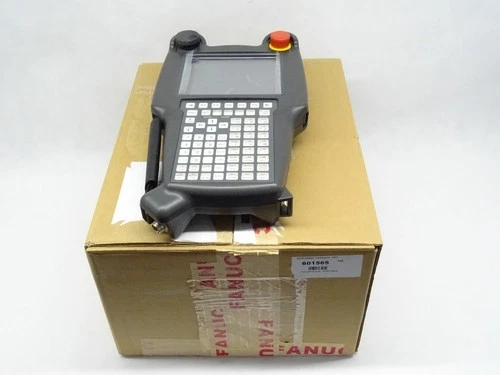
Key Product Parameters
- Brand: FANUC
- Model: A02B-0333-C263
- Product Series: A02B-0333
- Product Name: iPendant Teach Pendant
- Product Type: CNC Operator Interface / Handheld Pendant
- Touchscreen: Included
- Manual Pulse Generator (MPG): Included
- Operator Interface: Touchscreen and physical controls
- Keyboard Configuration: English keyboard, subject to supplied configuration
- Compatible CNC Families: FANUC Series 30i / 31i / 32i Model A/B configurations; verify the specific control system
- Connection: Dedicated FANUC pendant interface
- Emergency Stop: Confirm the supplied pendant configuration and safety circuit
- Dimensions: Not independently verified for this exact part number
- Weight: Approximately 1.81 kg (4 lb), reference listing specification
- Place of Manufacture: Not confirmed; check the product label
- Country of Origin: Not confirmed
- Product Status: New Original Packaging, as stated in the supplied listing
- Power Requirements: Supplied through the compatible FANUC control connection; exact electrical specifications require the applicable manual
- Discontinued Status: Not confirmed
Operating Procedures and Usage Instructions
1. Installation Preparation
- Confirm the pendant part number A02B-0333-C263.
- Verify that the installed FANUC CNC control supports this iPendant configuration.
- Inspect the housing, touchscreen, MPG handwheel, physical keys, and connector.
- Check that the supplied accessories and connecting cable match the machine requirements.
- Review the machine’s electrical diagrams and FANUC connection documentation.
- Back up CNC parameters and relevant machine data before replacement.
2. Connection and Installation
- Place the machine in a safe condition before connecting the pendant.
- Follow the manufacturer’s procedure for connecting the iPendant.
- Inspect the connector for damaged pins or contamination.
- Connect the pendant to the designated CNC interface.
- Secure the cable and ensure it cannot become trapped or damaged during operation.
- Confirm that the CNC control recognizes the pendant.
3. Power-On and Initial Checks
- Start the CNC system using the approved machine startup sequence.
- Allow the pendant interface to initialize.
- Check touchscreen response and physical key operation.
- Test the MPG handwheel according to the machine’s approved commissioning procedure.
- Verify display information, axis status, alarms, and communication.
- Confirm that the emergency-stop and enabling functions operate correctly where fitted and configured.
4. Normal Operation
- Select the authorized CNC operating mode.
- Navigate the CNC interface using the touchscreen and physical controls.
- Monitor machine status, axis coordinates, spindle information, and alarms.
- Use the MPG for controlled manual axis movement when permitted.
- Select the appropriate axis and increment before manual movement.
- Follow the machine’s safety procedures when performing setup or maintenance operations.
5. Parameter Configuration and Modification
- Back up the existing CNC parameters and machine configuration.
- Confirm the CNC control generation and software version.
- Use the approved FANUC programming and maintenance functions.
- Configure operator-interface settings only when supported by the installed CNC system.
- Check MPG axis selection and increment settings before manual operation.
- Record approved parameter changes and verify the machine functions afterward.
6. Shutdown Procedure
- Stop machining operations and place the machine in a safe condition.
- Return the axes to an appropriate position according to the machine procedure.
- Close active programming and maintenance operations.
- Shut down the CNC system using the manufacturer’s approved sequence.
- Disconnect the pendant only when permitted by the machine documentation.
- Store the pendant securely to protect its touchscreen, handwheel, and connector.
Daily Maintenance
- Clean the touchscreen with a soft, lint-free cloth.
- Avoid abrasive materials and aggressive cleaning chemicals.
- Inspect the MPG handwheel for smooth mechanical operation.
- Check physical keys for sticking or inconsistent response.
- Inspect the pendant cable and connector for damage.
- Keep the housing clean and free from oil, coolant, and excessive dust.
- Monitor the CNC system for pendant communication errors.
- Check the display for dead pixels, abnormal brightness, or touch-response problems.
- Store the pendant in its designated holder when not in use.
Troubleshooting
1. iPendant Does Not Power On
Check the CNC control status, connecting cable, connector seating, and pendant interface supply.
2. Touchscreen Does Not Respond
Inspect the display for contamination or damage. Check touchscreen configuration and controller diagnostics.
3. MPG Handwheel Does Not Work
Check the selected axis, movement increment, operating mode, and machine safety conditions. Inspect the handwheel and pendant connection.
4. Pendant Communication Error
Inspect the cable and connector. Confirm that the CNC control supports the A02B-0333-C263 configuration.
5. Physical Keys Do Not Respond
Check for damaged or stuck keys and review the CNC diagnostic messages.
6. Axis Does Not Move During Manual Operation
Verify the operating mode, axis selection, movement increment, safety interlocks, and machine enable conditions. Never bypass safety functions to restore movement.
Safety Precautions
- Only qualified CNC operators and maintenance personnel should use the pendant.
- Follow the machine manufacturer’s safety procedures during manual axis movement.
- Keep personnel clear of moving machine components.
- Never bypass emergency-stop or machine safety circuits.
- Confirm the correct axis and movement increment before using the MPG.
- Do not connect or disconnect the pendant while energized unless expressly permitted by the machine documentation.
- Protect the touchscreen and handwheel from impact.
- Verify the pendant’s compatibility before installation.
- Test all safety-related functions after replacement.
- Perform initial operation at reduced speed where the machine procedure requires it.
Product Keywords
FANUC A02B-0333-C263, FANUC iPendant, FANUC teach pendant, CNC operator pendant, FANUC MPG pendant, touchscreen teach pendant, manual pulse generator, FANUC Series 30i, FANUC Series 31i, FANUC Series 32i, CNC machine operator interface, industrial CNC control panel, FANUC CNC spare parts, new original packaging FANUC pendant.
Product information: https://www.newplcdcs.com
15 Related FANUC Models and Components
The following part numbers and product families are related iPendant configurations and FANUC CNC operator-interface components. They are not all direct replacements for A02B-0333-C263.
- A02B-0333-C260 – iPendant Without Touchscreen
- A02B-0333-C261 – iPendant With Touchscreen
- A02B-0333-C262 – iPendant With MPG, Without Touchscreen
- A02B-0333-C263 – iPendant With MPG and Touchscreen
- A02B-0333-C250 – I/O Link Connection Unit
- A02B-0333-C229 – I/O Link i-Type A Interface Unit
- A05B-2490-C295 – FANUC iPendant With Touchscreen
- A05B-2518-C004 – FANUC iPendant With Touchscreen
- A05B-2255-C100 – FANUC Robot Teach Pendant Family Reference
- A05B-2301-C300 – FANUC Robot Operator Pendant Family Reference
- Series 30i-A – FANUC CNC Control Family
- Series 31i-A – FANUC CNC Control Family
- Series 32i-A – FANUC CNC Control Family
- Series 30i-B – FANUC CNC Control Family
- Series 31i-B / 32i-B – FANUC CNC Control Families
Before ordering a replacement, verify the CNC control generation, pendant interface, MPG functionality, touchscreen configuration, and machine-specific software compatibility.


