
Product Description
The ABB PM875 AC 870P Multifunction Unit, order number 3BDH000507R3M500, is a process controller designed for ABB Symphony Melody and AC 870P automation systems. It provides centralized control execution, communication with distributed I/O subsystems, and integration with plant-level automation networks. The PM875 uses a 32-bit Intel Pentium Mobile processor with a 333 MHz clock frequency, 64 MB SDRAM, 32 MB flash memory, and 6 KB battery-buffered SRAM. Its communication interfaces include Ethernet, a controller redundancy link, Cnet, Fnet, and two PROFIBUS DP interfaces supporting redundant configurations. The controller supports up to 16 application tasks and is designed for industrial process-control installations, including power generation and other continuous-process applications. This unit is offered in New Original Packaging condition. Before installation, verify the complete order number, firmware revision, system compatibility, rack or housing configuration, and controller redundancy requirements.
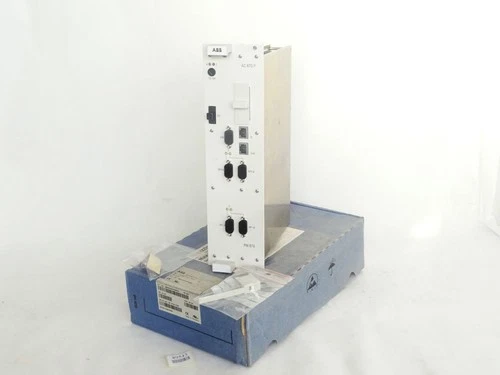
📋 Technical Specifications
- Brand: ABB
- Model: PM875
- Order Number: 3BDH000507R3M500
- Product Series: AC 870P / Symphony Melody
- Product Name: Multifunction Controller
- Product Type: Process Controller / CPU Module
- Processor: 32-bit Intel Pentium Mobile with floating-point unit
- Clock Frequency: 333 MHz
- SDRAM: 64 MB
- Flash Memory: 32 MB
- EEPROM: 1 Mbit, boot BIOS
- Battery-Backed SRAM: 6 KB
- Application Tasks: 16
- Minimum Application Cycle Time: 16 ms
- Ethernet Interface: Onet, 10/100 Mbit/s, RJ45
- Redundancy Link: RL, 10 Mbit/s, RJ45
- Cnet Interface: 1 MBd, redundant implementation through rear system connector
- Fnet Interface: 2 MBd, redundant implementation through rear system connector
- Fnet Capacity: Up to 2,000 I/O
- PROFIBUS DP Interfaces: 2 × DPnet, 9,600 bit/s to 12 Mbit/s
- PROFIBUS Capacity: Up to 6,000 I/O in total, according to system configuration
- Service Interface: Plastic optical fiber interface
- Front Panel Service Interface: RS422 interface for radio-clock connection
- Rear System Connector: 64-pin multipoint connector, DIN 41612 C64 pattern
- Supply Voltage: 20–33 V DC
- Nominal Current Consumption: 1.3 A at 24 V DC
- Maximum Current Consumption: 1.51 A at 20 V DC
- Maximum Power Dissipation: 31 W
- Module Dimensions: 7 HU height, 16 TE width
- Operating Temperature: 0–50 °C module intake temperature
- Product Status: Legacy / discontinued product family; verify current ABB support
- Condition: New Original Packaging
- Place of Manufacture: ABB manufacturing origin; verify individual unit label
- Country of Origin: Verify the product nameplate
- Weight: Not confirmed for the individual controller
🔧 Installation and Operating Procedures
- Preparation and inspection
- Verify the complete order number: 3BDH000507R3M500.
- Inspect the original packaging, product label, serial number, and hardware revision.
- Check the module housing, front-panel connectors, rear 64-pin system connector, and status indicators.
- Confirm the AC 870P housing and system configuration are compatible with the PM875.
- Back up the existing controller application, firmware information, and system configuration before replacement.
- Mechanical installation
- Isolate the controller power supply before installing the module.
- Follow the AC 870P housing installation instructions and observe electrostatic discharge precautions.
- Insert the controller into its designated position and ensure the rear system connector is correctly engaged.
- Secure the module using the specified retaining arrangement.
- Confirm that cabinet ventilation and module clearances meet the system requirements.
- Electrical and communication connections
- Connect the 24 V DC supply through the designated AC 870P system connection.
- Verify supply polarity and ensure that the voltage remains within the 20–33 V DC range.
- Connect the Onet Ethernet network using the appropriate RJ45 cable.
- Connect the redundancy link when operating in a redundant controller configuration.
- Connect PROFIBUS DP devices to the designated front-panel interfaces.
- Confirm Cnet and Fnet connections through the rear system connector and associated system wiring.
- Check cable shielding, grounding, connector seating, and network termination.
- Power-on and commissioning
- Inspect all connections before restoring power.
- Energize the AC 870P system according to the manufacturer’s prescribed sequence.
- Check the front-panel indicators: green A indicates module active, while red S indicates malfunction.
- Verify controller startup, firmware recognition, and communication with connected I/O subsystems.
- Check Ethernet and PROFIBUS communication status.
- Confirm that the controller application starts correctly and that no configuration or hardware mismatch alarms remain.
- Normal operation
- Monitor controller status and application execution.
- Check communication with remote I/O, field devices, and plant-level systems.
- Verify application task execution and controller cycle behavior.
- Monitor redundancy status and confirm synchronization where a redundant controller pair is installed.
- Review system diagnostics and process alarms during normal operation.
- Parameter and application configuration
- Use the approved ABB Symphony Composer or applicable engineering environment for the installed AC 870P system version.
- Confirm firmware compatibility before downloading an application.
- Verify Onet network settings, PROFIBUS node addresses, bus configuration, and I/O mapping.
- Check controller redundancy configuration and associated redundancy-link connections.
- Do not mix PM875 and PM875-2 units in a redundant pair unless ABB documentation explicitly confirms the configuration.
- Save a complete application and configuration backup after commissioning.
- Shutdown
- Place the controlled process in its approved maintenance or shutdown state.
- Stop controller application execution according to the plant operating procedure.
- Isolate the 24 V DC supply before removing the controller.
- Disconnect communication cables only after the system has been safely shut down.
- Label all connections before removal to support accurate reinstallation.
🛠️ Daily Maintenance
- Check the green active and red malfunction indicators.
- Inspect the front-panel connectors and rear system connection for looseness or contamination.
- Monitor the controller’s operating temperature and cabinet ventilation.
- Review communication diagnostics for Ethernet, PROFIBUS, Cnet, and Fnet faults.
- Check redundancy status and investigate any controller synchronization alarms.
- Maintain regular backups of application programs and system configuration.
- Inspect the 24 V DC supply and verify that it remains within the permitted range.
- Record recurring hardware, communication, and application alarms.
- Keep the module and surrounding cabinet free from dust, moisture, and conductive contamination.
⚠️ Troubleshooting and FAQ
Q1: The PM875 does not start. What should be checked?
A: Verify the 24 V DC supply, voltage polarity, rear system connector, fuse arrangement, and controller seating. Check the front-panel status indicators and system diagnostics.
Q2: The red malfunction indicator is illuminated. What does this mean?
A: The red S indicator identifies a malfunction condition. Review the controller diagnostics and system event records to identify the cause before replacing the module.
Q3: PROFIBUS communication is unavailable. What should be checked?
A: Check the PROFIBUS cable, connector, bus termination, baud rate, node addresses, and configured DP network. Verify that the connected I/O devices and controller configuration match.
Q4: Can the PM875 be used in a redundant controller system?
A: Yes. The PM875 supports controller redundancy using the designated redundancy link and compatible system configuration. Confirm the required firmware, cabling, and matching controller hardware before commissioning.
Q5: Can the PM875 replace a PM875-2?
A: Do not assume direct interchangeability. The PM875 and PM875-2 have different hardware and system configurations. Check the controller generation, firmware, network interfaces, and ABB compatibility documentation.
Q6: What is the controller’s power requirement?
A: The documented supply range is 20–33 V DC. Typical current consumption is 1.3 A at 24 V DC, with a maximum of 1.51 A at 20 V DC.
Q7: What should be checked when purchasing a New Original Packaging unit?
A: Verify the full order number, packaging condition, serial number, hardware revision, storage history, and any available original documentation. Packaging condition alone does not establish operational test status.
🔒 Safety Precautions
- Installation and maintenance must be performed by qualified industrial automation personnel.
- Isolate the 24 V DC supply before removing or installing the controller.
- Use electrostatic discharge protection when handling the module.
- Never force the rear system connector into position.
- Verify the pin assignments before connecting external wiring.
- Do not disconnect communication or system cables during operation unless the system procedure explicitly permits it.
- Maintain proper cabinet ventilation and grounding.
- Do not modify controller firmware or application parameters without an approved backup and change-control procedure.
- Follow the plant’s process-safety and shutdown procedures before replacing a controller.
🔑 Product Keywords
ABB PM875, 3BDH000507R3M500, AC 870P Controller, ABB Multifunction Unit, Symphony Melody Controller, ABB Process Controller, ABB DCS CPU, 24 V DC Controller, PROFIBUS DP Controller, Redundant Process Controller, ABB Power Plant Automation, Industrial Automation CPU, New Original Packaging ABB.
For industrial automation products and ABB replacement components, visit: https://www.newplcdcs.com
🔄 15 Related ABB Models and Controller Products
- ABB PM875 – AC 870P multifunction controller
- ABB PM875-2 – Updated AC 870P controller generation
- ABB PM876 – AC 870P controller with enhanced communication configuration
- ABB CMC 70-2 – AC 870P controller
- ABB PM861A – AC 800M controller
- ABB PM864A – AC 800M controller
- ABB PM865 – AC 800M high-integrity controller
- ABB PM866 – AC 800M controller
- ABB PM867 – AC 800M high-integrity controller
- ABB PM891 – AC 800M high-performance controller
- ABB PM902F – Freelance controller family
- ABB PM803F – Freelance controller family
- ABB PM554 – Freelance controller
- ABB PM564 – Freelance controller
- ABB PM595 – AC 500 controller family
Note: These are related ABB controller products and automation platforms, not guaranteed direct replacements. The AC 870P, AC 800M, Freelance, and AC 500 families use different hardware architectures and engineering environments. Verify the exact system generation, firmware, I/O architecture, communication interfaces, and redundancy requirements before selecting a replacement.


