
Product Description
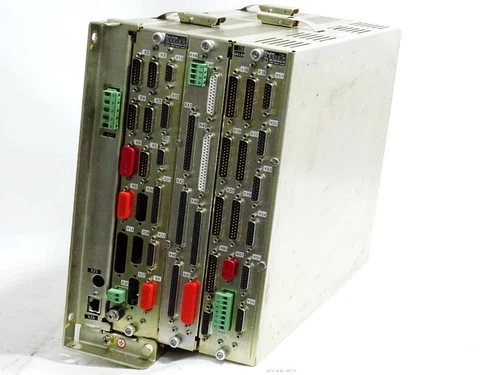
The HEIDENHAIN LE430PA is an electronic logic unit intended for use in compatible HEIDENHAIN CNC control systems. It is identified in the supplied listing by part numbers 32571659, 325716-59, 31676707, and 31518202. As a control-system component, the LE430PA is associated with the processing and coordination functions of the machine’s CNC electronics. It is intended for maintenance, repair, and replacement applications where the installed control configuration specifically requires this unit. Before ordering or installation, verify the complete model designation, hardware revision, connector layout, and machine compatibility against the original unit and the machine’s electrical documentation. The additional part numbers in the listing should be treated as identification or cross-reference numbers, not assumed to be interchangeable without confirmation.
Key Product Parameters
- Brand: HEIDENHAIN
- Model: LE430PA
- Product Name: CNC Logic Unit
- Series: HEIDENHAIN CNC Control Electronics
- Part Numbers: 32571659, 325716-59, 31676707, 31518202
- Product Type: Electronic logic/control unit
- Main Function: CNC control-system logic processing; exact function and system assignment require confirmation from the unit label and machine documentation
- Compatible System: Exact CNC control family not verified
- Interfaces: Not confirmed; inspect the unit’s connectors and technical documentation
- Dimensions: Not verified
- Weight: Not verified
- Place of Manufacture: Not confirmed
- Country of Origin: Not confirmed; check the product label
- Product Status: Not specified in the supplied listing; confirm actual condition and packaging
- Power Requirements: Not verified; use only the voltage and supply arrangement specified for the matching control system
- Discontinued Status: Not confirmed
Installation and Operating Procedures
1. Preparation and Compatibility Checks
- Record the complete part number, including all suffixes and revision markings, from the original unit.
- Compare the replacement unit’s label, connectors, board layout, and mounting points with the installed component.
- Confirm the correct CNC control model and machine configuration using the electrical drawings and parts documentation.
- Back up the CNC parameters, machine data, PLC data, and relevant configuration files before replacing the unit, where the system permits.
- Shut down the machine and isolate all electrical supplies before removing the existing component.
2. Installation
- Follow the machine manufacturer’s approved maintenance procedure to access the control cabinet.
- Use appropriate electrostatic-discharge protection when handling the electronic assembly.
- Photograph and label all connected cables before disconnection.
- Remove the original unit carefully, avoiding stress on connectors and adjacent circuit boards.
- Install the replacement in the specified position and secure it using the original mounting hardware.
- Reconnect cables according to the machine wiring diagram. Do not rely on connector appearance alone.
3. Power-On and Functional Checks
- Confirm that the unit is correctly seated and all connections are secure.
- Check the control cabinet for loose hardware, foreign objects, or wiring damage.
- Restore power following the machine manufacturer’s startup sequence.
- Observe the CNC control’s startup indicators and diagnostic messages.
- Confirm that the control system recognizes the installed hardware and that no new hardware-related alarms appear.
- Perform the machine manufacturer’s approved functional checks before returning the equipment to production.
4. Parameter Configuration and Modification
- Use the correct HEIDENHAIN control documentation for the specific machine and control generation.
- Compare the installed machine parameters and configuration data with the saved backup.
- Restore or transfer data only when the replacement procedure and hardware compatibility have been confirmed.
- Do not modify PLC, machine, or axis parameters based on assumptions about the LE430PA.
- Record all approved changes and verify machine functions after configuration.
5. Shutdown Procedure
- Stop machining operations and place the machine in a safe state.
- Save relevant machine data and diagnostic information.
- Shut down the CNC control using the machine manufacturer’s prescribed sequence.
- Isolate the electrical supply before servicing or removing the unit.
- Allow the equipment to discharge as specified by the machine documentation before handling internal electronics.
Daily Maintenance
- Keep the CNC control cabinet clean, dry, and within the specified temperature range.
- Check cabinet cooling fans and filters for blockage.
- Inspect connectors, cables, and mounting hardware for looseness or deterioration.
- Monitor the CNC diagnostic log for recurring hardware or communication alarms.
- Avoid touching exposed circuit-board contacts.
- Maintain current backups of machine parameters and control configuration.
- Record replacement dates, part numbers, revisions, and maintenance findings.
Troubleshooting
1. CNC Control Does Not Complete Startup
Check the control’s diagnostic messages, power supply status, connector seating, and hardware compatibility. Compare the installed part number and revision with the machine documentation.
2. Hardware Recognition Error
Verify that the unit is installed in the correct position and that all required connections are present. Confirm that the control system supports the exact LE430PA variant.
3. Intermittent Control Faults
Inspect connectors and cabinet conditions. Check for vibration, contamination, overheating, or unstable supply conditions. Review the machine’s diagnostic history.
4. Machine Parameters or Functions Are Incorrect After Replacement
Stop operation and verify that the correct machine data and configuration have been restored. Do not continue production until the machine builder’s commissioning checks are complete.
5. Unit Appears Inoperative
Have qualified personnel verify the specified supply, wiring, and control-system status. Do not apply an assumed voltage or attempt component-level repairs without the correct service documentation.
Safety Precautions
- Installation and servicing must be performed by qualified CNC maintenance personnel.
- Disconnect and isolate electrical power before handling the unit.
- Follow electrostatic-discharge precautions when removing or installing electronic assemblies.
- Never connect or disconnect the unit while the control system is energized unless the machine documentation explicitly permits it.
- Confirm exact part-number and revision compatibility before installation.
- Do not apply power until wiring and connector assignments have been verified.
- Back up machine data before replacement or configuration work.
- Complete all safety and functional checks before returning the machine to production.
Product Keywords
HEIDENHAIN LE430PA, 32571659, 325716-59, 31676707, 31518202, HEIDENHAIN logic unit, CNC logic control unit, CNC electronic module, machine tool control spare part, CNC control system repair, HEIDENHAIN replacement electronics, industrial CNC maintenance.
Product information: https://www.newplcdcs.com
15 Related HEIDENHAIN Models and Product Families
The following are related HEIDENHAIN CNC control and electronics references for product research. They are not confirmed direct replacements for the LE430PA; verify the control generation and machine-specific compatibility before ordering.
- LE 410 – HEIDENHAIN Logic Unit Family
- LE (Logic Unit Series) – Verify exact model designation
- MC (Main Computer Series) – CNC Main Computer Family
- CC (Controller Unit Series) – CNC Controller Family
- PL (PLC Module Series) – Programmable Logic Control Family
- TE (Keyboard Unit Series) – CNC Operator Keyboard Family
- BE (Operating Panel Series) – CNC Operator Panel Family
- BF (Display Unit Series) – CNC Display Family
- MB (Machine Operating Panel Series) – Machine Operator Interface Family
- TNC 320 – HEIDENHAIN CNC Control
- TNC 620 – HEIDENHAIN CNC Control
- TNC 640 – HEIDENHAIN CNC Control
- iTNC 530 – HEIDENHAIN CNC Control
- MANUALplus 620 – HEIDENHAIN Turning Control
- CNC PILOT 640 – HEIDENHAIN Turning Control
Confirm the exact LE430PA application and compatible control family from the machine’s original parts list before treating any related model as a substitute.


