
Product Description
The Johnson Controls MS-NAE5520-2ICE Metasys Network Automation Engine is a supervisory controller designed for building automation and facility management systems. It serves as a central integration platform for monitoring, coordinating, and managing HVAC equipment, building control networks, and distributed automation devices. The NAE5520 model supports LonWorks communication together with two N2 Bus or BACnet MS/TP (RS-485) trunks, allowing integration of multiple field controllers and third-party devices. It supports Ethernet connectivity, RS-232 serial communication, RS-485 interfaces, and USB connections for system integration and commissioning. The controller provides centralized alarm management, scheduling, trend collection, energy monitoring, and supervisory control through the Metasys building automation platform. It is suitable for commercial buildings, hospitals, industrial facilities, office complexes, and campus-wide HVAC control applications. Before replacement or installation, verify the exact MS-NAE5520-2ICE hardware configuration, firmware release, network protocol compatibility, power requirements, and existing Metasys site registration.
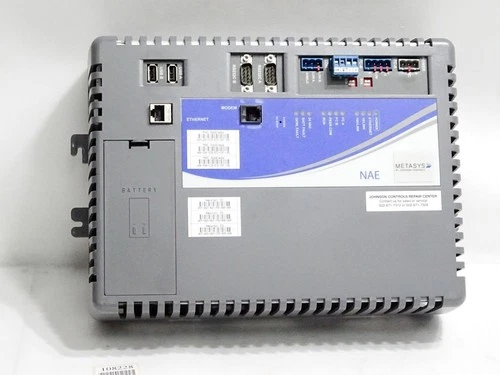
Product Datasheet
| Parameter | Specification |
|---|---|
| Brand | Johnson Controls |
| Model | MS-NAE5520-2ICE |
| Series | Metasys NAE55 |
| Product Name | Network Automation Engine |
| Product Type | Building Automation Supervisory Controller |
| Place of Manufacture | Not independently verified |
| Product Status | Not specified; confirm physical condition |
| Processor | Model-generation dependent; verify hardware revision |
| Memory | Model-generation dependent |
| Communication | Ethernet, 2 × RS-485, 2 × RS-232, 2 × USB |
| Network Protocols | LonWorks, N2 Bus, BACnet MS/TP |
| Power Requirements | Nominal 24 VAC, 50/60 Hz |
| Power Consumption | 50 VA maximum (NAE55 family specification) |
| Dimensions | Approx. 226 × 332 × 96.5 mm (H × W × D), NAE55 reference |
| Weight | Approx. 2.9 kg shipping weight, NAE55 reference |
| Protection Rating | IP20 |
| Mounting | 35 mm DIN rail or flat-surface mounting |
| Operating Temperature | 0 to 50°C |
| Country of Origin | Not independently verified |
| Discontinued | Legacy generation; check exact model lifecycle |
Note: MS-NAE5520-2ICE is an extended ordering code. The suffix ICE should be checked against the physical nameplate and original product documentation before confirming encryption or hardware options. NAE55 family specifications are reference values, not confirmation of every hardware revision.
⚙️ Operating Procedures and Usage Instructions
1. Installation and Preparation
- Verify the complete model number and product identification label.
- Inspect the enclosure, terminal blocks, communication ports, and status LEDs.
- Install the controller on a suitable 35 mm DIN rail or flat mounting surface.
- Provide adequate ventilation and protect the unit from moisture and conductive contamination.
- Connect a dedicated nominal 24 VAC power supply.
- Verify transformer capacity and polarity requirements against the installation documentation.
- Connect the Ethernet port to the building automation network.
- Connect RS-485 field buses to the appropriate terminals.
- Connect LonWorks and N2/BACnet MS/TP networks according to the selected configuration.
- Verify end-of-line termination, shielding, and network topology.
- Confirm that the existing Metasys server and field controllers support the intended NAE software release.
2. Power-On Sequence
- Confirm that all field wiring and network connections are secure.
- Check the 24 VAC supply voltage.
- Verify protective grounding and electrical cabinet safety.
- Energize the dedicated controller power supply.
- Allow the NAE to complete its boot sequence.
- Observe the power, fault, and communication LEDs.
- Connect to the Metasys network.
- Verify controller communication and site registration.
- Confirm that LonWorks and RS-485 field devices are online.
- Check alarms and controller status before enabling automatic building control.
3. Normal Operating Procedure
- Log in to the authorized Metasys operator workstation.
- Open the appropriate building or equipment dashboard.
- Check the NAE communication status.
- Review active alarms and system notifications.
- Monitor HVAC temperatures, pressures, and operating states.
- Review schedules and equipment operating modes.
- Verify communication with connected field controllers.
- Execute approved supervisory commands.
- Monitor trend data and energy consumption.
- Confirm that all control sequences operate within approved limits.
4. Parameter Configuration and Modification
- Use the compatible Johnson Controls Metasys configuration and commissioning tools.
- Verify the installed NAE firmware and Metasys software release.
- Back up the existing site database and controller configuration.
- Configure the Ethernet IP address, subnet mask, and gateway.
- Set the controller network identity and site registration parameters.
- Configure N2 or BACnet MS/TP communication settings.
- Configure the LonWorks network and device bindings where applicable.
- Set baud rates, device addresses, and network termination according to the field bus design.
- Configure schedules, alarms, trends, and supervisory control logic.
- Verify device discovery and communication.
- Save the configuration and perform a complete system communication test.
Important: When replacing an existing NAE, update the Metasys site registration and verify that the replacement controller is recognized by the system.
5. Shutdown Sequence
- Notify the building operator before shutting down supervisory control.
- Confirm that critical HVAC and safety functions have an approved alternative operating mode.
- Save current configuration changes.
- Back up the controller database and important historical data.
- Place affected systems in the approved maintenance condition.
- Disconnect the dedicated 24 VAC supply.
- Verify that the controller power indicators are off.
- Disconnect communication wiring only when required for maintenance.
- Restore the controller configuration and network registration after replacement.
Do not disconnect the NAE during critical building operations without an approved maintenance plan.
🔧 Daily Maintenance and Troubleshooting
- Check the power and fault LEDs regularly.
- Monitor Ethernet and field bus communication status.
- Inspect 24 VAC terminals for loose connections.
- Check RS-485 network wiring and termination.
- Investigate offline BACnet, N2, or LonWorks devices.
- Monitor controller memory and operating performance.
- Inspect the data protection battery and replace it according to manufacturer recommendations.
- Back up Metasys site data and controller configurations.
- Check the real-time clock after power interruptions.
- Investigate recurring communication failures before replacing hardware.
⚠️ Safety Precautions
- Installation and commissioning must be performed by qualified building automation technicians.
- Disconnect power before modifying electrical connections.
- Use the specified 24 VAC supply.
- Do not apply mains voltage directly to low-voltage controller terminals.
- Observe RS-485 and LonWorks wiring requirements.
- Protect the controller from moisture, dust, and excessive temperature.
- Back up configuration data before firmware updates or controller replacement.
- Verify critical HVAC and life-safety system operation independently.
- Do not assume that supervisory controller availability replaces dedicated fire or emergency safety controls.
🔗 Product Keywords
Johnson Controls MS-NAE5520-2ICE, Metasys NAE55, Network Automation Engine, Building Automation Controller, HVAC Supervisory Controller, BACnet MS/TP, LonWorks, N2 Bus, 24 VAC, Building Management System, BMS Controller.
For Johnson Controls building automation products and industrial control spare parts, visit:
Recommended Johnson Controls Metasys Models
- Johnson Controls MS-NAE5510-2 – Network Automation Engine
- Johnson Controls MS-NAE5511-2 – Network Automation Engine with Modem
- Johnson Controls MS-NAE5520-2 – Network Automation Engine with LonWorks
- Johnson Controls MS-NAE5521-2 – Network Automation Engine with Modem and LonWorks
- Johnson Controls MS-NAE5510-3 – Metasys Network Automation Engine
- Johnson Controls MS-NAE5511-3 – Metasys Network Automation Engine
- Johnson Controls MS-NAE5520-3 – Metasys Network Automation Engine
- Johnson Controls MS-NAE5521-3 – Metasys Network Automation Engine
- Johnson Controls MS-NAE3510-2 – Network Automation Engine
- Johnson Controls MS-NAE4510-2 – Network Automation Engine
- Johnson Controls MS-NAE4511-2 – Network Automation Engine
- Johnson Controls MS-NCE2560-0 – Network Control Engine
- Johnson Controls MS-NCE2510-0 – Network Control Engine
- Johnson Controls MS-NAE85 – Network Automation Engine
- Johnson Controls MS-BAT1010-0 – NAE Data Protection Battery


