
Product Description
The Bosch Rexroth Indramat HDS04.1-W200N-HS32-01-FW, material number R911272233, is a high-current servo drive controller from the DIAX04 HDS series. Designed for industrial motion-control systems, it provides the power-stage control required for compatible servo motor applications in CNC machinery, machine tools, and automated production equipment. This version features a 200 A rated current, an HS32 function identification code, and a modular design that supports compatible plug-in configuration modules. The controller operates as part of a coordinated Rexroth drive system with the appropriate power supply, motor feedback, firmware, and control interfaces. It is suitable for industrial maintenance and replacement projects where the complete type code and system configuration match. This listing identifies the unit as refurbished; buyers should confirm the refurbishment scope, firmware version, included modules, and test documentation before installation.
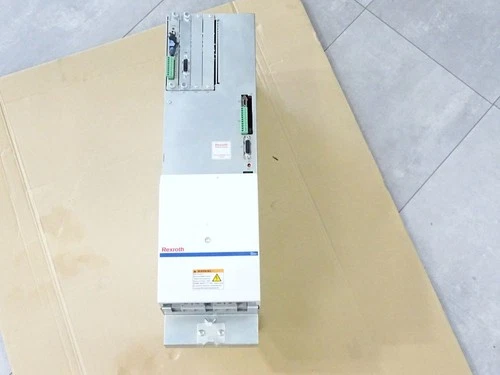
Key Product Parameters
- Brand: Bosch Rexroth / Indramat
- Model: HDS04.1-W200N-HS32-01-FW
- Material Number: R911272233
- Series: DIAX04 HDS Drive Controllers
- Product Name: Servo Drive Controller
- Function ID: HS32
- Version: 01
- Rated Current: 200 A
- Peak Current: 200 A
- Continuous Current: 85 A at 4 kHz / 50 A at 8 kHz
- Power Loss at Continuous Current: Approximately 530 W
- Signal Processing Supply: 24 V DC
- Signal Processing Power Consumption: Approximately 20 W for the basic unit
- Cooling: Internal air blower; verify fan condition during refurbishment inspection
- Protection Category: IP10
- Permissible Ambient Temperature at Rated Data: +5 to +45 °C
- Maximum Ambient Temperature with Derating: +55 °C
- Storage and Transport Temperature: -30 to +85 °C
- Installation Altitude Without Output Derating: Up to 1,000 m
- Dimensions: Verify from the installation drawing
- Weight: Approximately 14.5 kg
- Place of Manufacture: Germany (manufacturer origin; verify the individual unit label)
- Country of Origin: Germany, subject to unit marking
- Product Status: Refurbished, as stated in the supplied listing
- Power Requirements: Compatible DIAX04 drive-system power supply and 24 V DC control supply; confirm the complete electrical configuration from the system documentation
- Discontinued Status: Legacy product; current manufacturer support and availability should be confirmed
Installation and Operating Procedures
1. Preparation and Compatibility Verification
- Confirm the full type code HDS04.1-W200N-HS32-01-FW and material number R911272233.
- Compare the HS32 function ID, version, firmware designation, and installed plug-in modules with the original controller.
- Verify compatibility with the DIAX04 power supply, motor, feedback device, and machine control system.
- Inspect the refurbished unit for physical damage, contamination, loose connectors, and cooling-fan condition.
- Review the refurbishment report and confirm that the unit has passed the required electrical and functional tests.
- Back up the existing drive parameters and machine configuration before replacement.
- Isolate the power supply and follow the machine manufacturer’s DC-bus discharge procedure.
2. Installation
- Install the controller in the designated DIAX04 cabinet position.
- Secure the unit using the specified mounting hardware.
- Check the cabinet ventilation path and required installation clearances.
- Connect the power, control, motor, and feedback interfaces according to the original wiring diagrams.
- Verify plug-in module positions and connector assignments.
- Check protective grounding and cable shielding.
- Confirm that all connections are secure before restoring power.
3. Power-On and Commissioning
- Confirm that the power supply and control voltage match the drive-system specifications.
- Restore power using the approved system startup sequence.
- Check the controller’s status indicators and diagnostic messages.
- Verify communication with the machine control system.
- Confirm motor identification, feedback recognition, and drive parameter consistency.
- Perform a controlled test at low speed and reduced load.
- Verify direction of rotation, motor current, feedback signals, and fault monitoring before normal operation.
4. Normal Operation
- Enable the drive through the approved machine-control sequence.
- Monitor motor speed, current, torque demand, and drive status.
- Check the system for abnormal vibration, noise, or overheating.
- Review diagnostic messages and fault history during operation.
- Keep the controller within its specified current and temperature limits.
- Do not exceed the motor, power supply, or machine-specific operating limits.
5. Parameter Configuration and Modification
- Use the correct Rexroth Indramat DIAX04 commissioning documentation and supported configuration tools.
- Back up the original drive parameters before making changes.
- Confirm the firmware and plug-in module configuration.
- Check motor data, feedback settings, current limits, control modes, and machine interface parameters.
- Modify parameters only when supported by the motor and machine specifications.
- Record all changes and verify operation under controlled conditions.
6. Shutdown Procedure
- Stop machine movement and disable the servo drive through the control system.
- Wait for the motor and mechanical axis to reach a safe stationary condition.
- Switch off the drive power supply according to the machine procedure.
- Isolate the electrical supply and allow the DC bus to discharge for the specified period.
- Verify the absence of hazardous voltage before disconnecting cables or servicing the controller.
Daily Maintenance
- Check cooling-fan operation and cabinet airflow.
- Inspect air inlets and outlets for dust accumulation.
- Monitor drive temperature and current during normal operation.
- Inspect power and feedback connectors for looseness or damage.
- Check cable shielding and protective grounding.
- Review drive fault logs and investigate recurring alarms.
- Keep the control cabinet clean and dry.
- Maintain current backups of drive parameters and firmware information.
- Record maintenance work and operating abnormalities.
Troubleshooting
1. Drive Controller Does Not Start
Check the power supply, 24 V DC control voltage, system connections, and status indicators. Verify that the DIAX04 power supply is compatible and operating normally.
2. Overcurrent or Drive Fault
Check motor wiring, motor insulation, feedback connections, mechanical load, and configured current limits. Compare the fault code with the applicable DIAX04 documentation.
3. Motor Does Not Respond to Commands
Verify the control interface, enable signal, drive status, motor feedback, and parameter configuration. Confirm that the machine safety circuit permits operation.
4. Controller Overheats
Inspect the internal blower, cabinet ventilation, air filters, and ambient temperature. Check whether the controller is operating within the specified current and duty limits.
5. Feedback or Communication Error
Inspect encoder cables, connector seating, shielding, and grounding. Confirm that the feedback device and control interface match the configured drive system.
6. Repeated Faults After Replacement
Compare the replacement controller’s complete type code, firmware, function ID, and plug-in module configuration with the original unit. Verify that the correct machine parameters have been restored.
Safety Precautions
- Installation and commissioning must be performed by qualified industrial drive technicians.
- Isolate all electrical supplies before handling the controller.
- Observe the specified DC-bus discharge time and verify safe voltage levels before servicing.
- Use electrostatic-discharge protection when handling electronic modules.
- Never disconnect motor or power cables while the drive is energized.
- Ensure correct grounding, shielding, and cabinet ventilation.
- Confirm firmware, function ID, and plug-in module compatibility before startup.
- Use appropriate protective equipment and follow the machine manufacturer’s safety procedures.
- Perform initial testing under controlled conditions before returning the machine to production.
Product Keywords
Rexroth HDS04.1-W200N-HS32-01-FW, R911272233, Indramat DIAX04, HDS04 servo drive controller, Bosch Rexroth drive module, 200 A servo controller, industrial motion control, CNC servo drive, machine tool drive controller, refurbished Rexroth drive, Indramat HDS series, industrial automation spare parts.
Product information: https://www.newplcdcs.com
15 Related Rexroth Indramat Models
The following models are related DIAX04 HDS drive-controller variants. They are useful for system identification and spare-parts research, but are not automatically interchangeable with R911272233.
- HDS02.1-W040N – 40 A HDS Drive Controller
- HDS03.1-W075N – 75 A HDS Drive Controller
- HDS03.1-W100N – 100 A HDS Drive Controller
- HDS04.1-W200N-HS24-01-FW – 200 A HDS Variant
- HDS04.1-W200N-HS25-01-FW – 200 A HDS Variant
- HDS04.1-W200N-HS26-01-FW – 200 A HDS Variant
- HDS04.1-W200N-HS27-01-FW – 200 A HDS Variant
- HDS04.1-W200N-HS28-01-FW – 200 A HDS Variant
- HDS04.1-W200N-HS30-01-FW – 200 A HDS Variant
- HDS04.1-W200N-HS32-01-FW – Exact Model, R911272233
- HDS04.1-W200N-HS37-01-FW – 200 A HDS Variant
- HDS04.1-W200N-HS42-03-FW – 200 A HDS Variant
- HDS04.1-W200N-HS45-01-FW – 200 A HDS Variant
- HDS04.2-W200N – Second-Generation HDS Drive Controller
- HDS05.2-W300N – 300 A HDS Drive Controller
Always compare the complete type code, firmware, function ID, current rating, and plug-in module configuration before selecting a replacement.


