
Product Description
The YASKAWA ELECTRIC CACR-SR10BE12G-E is a 1.0 kW AC servo amplifier from the CACR-SR SERVOPACK series, designed for industrial motion control, CNC machine tools, and robotics applications. It provides three-phase motor power conversion and precise servo speed control for compatible Yaskawa AC servo motors. The unit operates with a 200–230 VAC three-phase input at 50/60 Hz, delivering a rated output current of 7.6 A and an output voltage of 0–230 VAC. It supports compatible motor and encoder configurations within the Yaskawa G-series servo system, with an 8192-pulse-per-revolution standard encoder configuration. The drive is suitable for machine tool axis control, automated machinery, positioning equipment, and maintenance of legacy servo installations. Before installation, verify motor compatibility, encoder specifications, power connections, feedback wiring, control signals, and parameter settings. The CACR-SR10BE12G-E is discontinued by the manufacturer and is primarily used for servicing existing equipment.
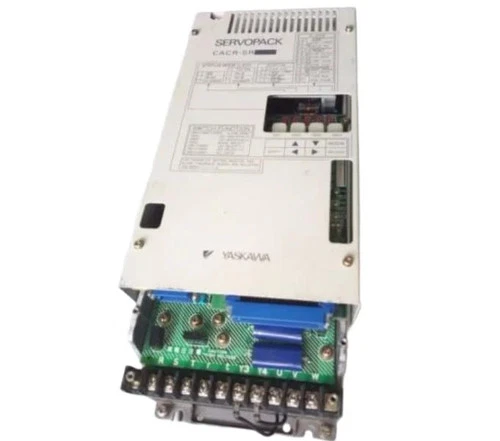
📋 Product Datasheet
| Parameter | Specification |
|---|---|
| Brand | Yaskawa Electric |
| Model | CACR-SR10BE12G-E |
| Series | CACR-SR SERVOPACK / G Series |
| Product Name | AC Servo Drive / Servo Amplifier |
| Product Type | Three-Phase Servo Amplifier |
| Place of Manufacture | Japan |
| Product Status | Discontinued |
| Dimensions | Not officially verified |
| Weight | 11.68 lb (approximately 5.3 kg) |
| Power Requirements | 200–230 VAC, 3-phase, 50/60 Hz, 8 A input |
⚙️ Operating Procedures and Usage Instructions
1. Installation Preparation
- Verify the complete model number and hardware revision.
- Confirm compatibility with the connected Yaskawa servo motor.
- Check motor rated power and current requirements.
- Verify encoder type and feedback cable compatibility.
- Inspect power terminals and motor output connections.
- Check the servo amplifier grounding arrangement.
- Confirm the circuit breaker and protective fuse ratings.
- Verify that the installation has suitable ventilation.
- Inspect control and feedback connectors for damage.
2. Power-On Sequence
- Ensure the machine is in a safe condition.
- Switch off and isolate the main power supply.
- Complete motor, encoder, and control wiring.
- Verify protective grounding.
- Check input voltage and phase connections.
- Confirm that the motor shaft and mechanical load are safe.
- Restore the three-phase 200–230 VAC supply.
- Allow the servo amplifier to complete initialization.
- Check the front-panel display for alarms.
- Verify the controller enable signal.
- Release the servo only after confirming the correct motor configuration.
- Perform a low-speed test before normal operation.
3. Normal Operating Procedure
- Confirm that the servo amplifier displays normal status.
- Verify communication with the CNC or motion controller.
- Check motor feedback and encoder signals.
- Confirm the correct speed and direction commands.
- Enable the servo according to the machine sequence.
- Monitor motor speed, current, and positioning response.
- Check for abnormal vibration or noise.
- Review alarm indications during operation.
- Confirm that the motor operates within its rated specifications.
4. Power-Off Sequence
- Stop the machine using its normal operating procedure.
- Reduce the motor speed to zero.
- Remove the servo enable command.
- Confirm that the motor has stopped.
- Switch off the main power supply.
- Isolate the electrical supply before maintenance.
- Wait for the DC bus capacitors to discharge.
- Verify the absence of hazardous voltage before disconnecting wiring.
5. Parameter Configuration and Modification
The CACR-SR10BE12G-E requires correct motor and feedback configuration before operation.
- Verify the applicable motor model.
- Confirm the encoder specification.
- Check speed-control and command-interface settings.
- Verify motor direction and feedback polarity.
- Check acceleration and deceleration settings.
- Confirm current and speed limits.
- Verify protection and regenerative braking settings.
- Record the original parameter configuration before modifications.
- Perform a low-speed functional test after adjustments.
Use the Yaskawa-compatible configuration and adjustment procedures specified for the CACR-SR series. Do not copy parameters from a different motor or amplifier without checking compatibility.
🔧 Maintenance and Troubleshooting
Routine Maintenance
- Inspect the amplifier for dust and contamination.
- Check cooling fans and ventilation openings.
- Inspect power and motor terminals.
- Check encoder and feedback cables.
- Verify grounding and shielding.
- Inspect for overheating or unusual odors.
- Review alarm history.
- Check motor operation and mechanical coupling.
- Keep a backup of the original parameter settings.
Common Troubleshooting
1. Servo Amplifier Fails to Start
Check the three-phase input voltage, circuit breaker, fuses, and power connections.
2. Overcurrent Alarm
Inspect motor wiring, phase-to-phase shorts, motor insulation, and mechanical load conditions.
3. Overvoltage Alarm
Check regenerative braking conditions, deceleration settings, and DC bus voltage.
4. Encoder Feedback Error
Inspect encoder cables, connectors, feedback polarity, and motor compatibility.
5. Motor Overspeed
Check feedback signals, speed commands, and controller configuration.
6. Servo Does Not Enable
Check the controller enable signal, interlocks, limit switches, and amplifier alarm status.
⚠️ Safety Precautions
- Installation must be performed by qualified servo-drive technicians.
- Never connect or disconnect motor cables while the amplifier is energized.
- Always isolate the three-phase power supply before maintenance.
- Wait for DC bus capacitors to discharge.
- Verify grounding before startup.
- Do not exceed rated motor current or amplifier capacity.
- Confirm motor and encoder compatibility.
- Secure the motor and mechanical load before testing.
- Never bypass emergency stops or machine safety interlocks.
🔩 Recommended 15 Yaskawa Electric Spare Part Models
The following models are related Yaskawa servo drives, amplifiers, and motion-control components. They are complementary products, not confirmed direct replacements for CACR-SR10BE12G-E.
- Yaskawa CACR-SR02BE12G – SERVOPACK Servo Drive
- Yaskawa CACR-SR03BE12G – SERVOPACK Servo Drive
- Yaskawa CACR-SR05BE12G – SERVOPACK Servo Drive
- Yaskawa CACR-SR15BE12G – SERVOPACK Servo Drive
- Yaskawa CACR-SR20BE12G – SERVOPACK Servo Drive
- Yaskawa CACR-SR30BE12G – SERVOPACK Servo Drive
- Yaskawa CACR-SR44BE12G – SERVOPACK Servo Drive
- Yaskawa CACR-SR10BE12M – SERVOPACK Servo Drive
- Yaskawa CACR-SR10BE12MS – SERVOPACK Servo Drive
- Yaskawa SGDA-01AS – Sigma Series Servo Drive
- Yaskawa SGDA-02AS – Sigma Series Servo Drive
- Yaskawa SGDM-10ADA – Sigma II Servo Drive
- Yaskawa SGDH-10AE – Sigma II Servo Amplifier
- Yaskawa SGDV-5R5A01A – Sigma-5 Servo Drive
- Yaskawa SGDV-7R6A01A – Sigma-5 Servo Drive
Compatibility Notice: Different SERVOPACK models may have different motor ratings, feedback interfaces, power requirements, and control configurations. Verify the complete model suffix, motor type, encoder specification, and machine wiring before selecting a replacement.


