
Product Description
The Bosch Rexroth R911328080 CDB01.1C-S3-ENS is an IndraDrive BASIC UNIVERSAL double-axis control unit designed for industrial servo motion-control applications. It provides SERCOS III master communication and supports coordinated control of two drive axes in compatible IndraDrive systems. The ENS encoder interface configuration supports feedback devices such as IndraDyn, Hiperface, 1 Vpp, and TTL, subject to the exact installed interface configuration. This listing includes firmware R911334730, identified as FWA-INDRV*-MPD-08VRS-D5-1-NNN-NN, and memory card R911296958 as stated by the seller. The package is intended for compatible Rexroth drive installations requiring a control-section replacement or spare. Before installation, verify the complete control-unit type code, firmware version, memory-card contents, safety configuration, and existing machine parameters.
Key Product Parameters
- Brand: Bosch Rexroth / Indramat
- Control Unit Model: CDB01.1C-S3-ENS
- Material Number: R911328080
- Product Series: IndraDrive CDB Control Units
- Product Name: BASIC UNIVERSAL Double-Axis Control Unit
- Control Architecture: Double-axis drive control
- Master Communication: SERCOS III
- Encoder Interface: ENS configuration
- Supported Feedback Types: IndraDyn, Hiperface, 1 Vpp, and TTL, depending on interface configuration
- Control Supply: 24 V DC
- Firmware Included: R911334730
- Firmware Type: FWA-INDRV*-MPD-08VRS-D5-1-NNN-NN
- Firmware Platform: MPD, BASIC double-axis
- Firmware Version: 08VRS
- Firmware Operating Mode: Closed-loop
- Memory Card: R911296958, included as stated by seller
- Safety Configuration: Verify the exact S2 safety option on the unit nameplate
- Dimensions: Approximately 103 × 322.6 × 49.5 mm; verify against the installed hardware revision
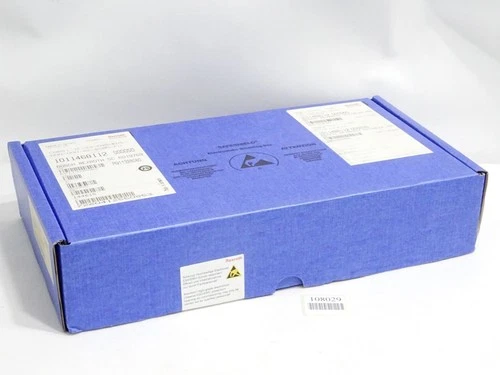
- Product Status: New Sealed
- Country of Origin: Not confirmed; check the product label
- Power Requirements: 24 V DC control supply; drive power is provided by the compatible IndraDrive power section
- Discontinued Status: Legacy product family; confirm current manufacturer support
Installation and Operating Procedures
- Preparation
- Confirm the control-unit material number R911328080 and the complete type code on the nameplate.
- Verify that the drive system supports a CDB01.1C double-axis control section with SERCOS III communication.
- Confirm the firmware R911334730 and its compatibility with the installed drive hardware.
- Check that the memory card R911296958 is included and inspect its label and condition.
- Back up the existing drive parameters, axis configuration, safety settings, and controller project before replacement.
- Installation
- Isolate the drive system and follow the machine lockout procedure.
- Wait for the DC bus to discharge and verify that hazardous voltage is absent.
- Install the control unit in the designated compatible IndraDrive slot.
- Check the mechanical seating and secure the module according to the manufacturer instructions.
- Connect the 24 V DC control supply, SERCOS III communication, encoder feedback, and required I/O connections.
- Verify cable shielding, grounding, connector orientation, and terminal assignments.
- Power-On Checks
- Confirm the correct 24 V DC control supply and polarity.
- Check that the drive power section and control unit are properly connected.
- Inspect the SERCOS III fiber-optic connections and network topology.
- Verify that the controller recognizes the control section and both configured axes.
- Review diagnostic messages before enabling the drive.
- Firmware and Configuration
- Confirm the installed firmware identification against R911334730.
- Verify the MPD double-axis firmware configuration and required function packages.
- Check the memory card identification and ensure that its contents match the intended machine application.
- Configure both axes, feedback interfaces, motor data, and communication parameters.
- Verify the safety technology configuration and associated machine safety validation.
- Restore machine parameters only after confirming compatibility with the replacement hardware.
- Normal Operation
- Establish SERCOS III communication with the higher-level motion controller.
- Verify feedback signals and axis status independently for both drive channels.
- Perform low-speed movement tests with reduced operating limits.
- Check motor direction, position feedback, current, and fault responses.
- Test interlocks, emergency-stop functions, and communication-loss responses before production operation.
- Shutdown
- Stop both axes using the approved machine shutdown sequence.
- Disable the drives and isolate the power supply.
- Wait for the DC bus to discharge and verify the absence of hazardous voltage.
- Remove the control unit or memory card only according to the manufacturer’s service instructions.
Daily Maintenance
- Check module status and diagnostic messages during machine operation.
- Inspect SERCOS III fiber-optic cables and connectors.
- Check the 24 V DC control supply for stability.
- Monitor communication status and feedback signals for both axes.
- Keep the control cabinet clean and within the specified environmental limits.
- Inspect connectors for looseness, contamination, or physical damage.
- Maintain backups of firmware identification, memory-card data, and drive parameters.
- Record recurring faults and configuration changes for maintenance traceability.
Troubleshooting
- Control unit not recognized: Check module seating, control supply, drive compatibility, and hardware configuration.
- SERCOS III communication failure: Inspect fiber-optic connections, network topology, controller settings, and communication diagnostics.
- Encoder feedback error: Verify the encoder type, interface configuration, cable wiring, and feedback compatibility.
- One axis fails to operate: Check the individual axis configuration, enable conditions, motor data, and drive power section.
- Firmware mismatch: Verify the firmware material number, MPD platform, version, and supported control-unit hardware.
- Memory-card error: Check card identification, seating, contents, and compatibility with the machine configuration.
- Safety function fault: Review the installed safety option, configuration, wiring, and required validation procedure.
- Unexpected positioning behavior: Check encoder scaling, motor parameters, axis assignment, and restored machine data.
Safety Precautions
- Installation and commissioning must be performed by qualified industrial automation personnel.
- Disconnect and lock out the power supply before servicing the control unit.
- Wait for DC bus capacitors to discharge and verify the absence of hazardous voltage.
- Do not insert or remove modules or memory cards while energized unless the manufacturer explicitly permits the procedure.
- Use the correct 24 V DC control supply and approved wiring.
- Verify SERCOS III connections and encoder interface compatibility before enabling motion.
- Do not assume that firmware or memory-card contents are interchangeable between different machine configurations.
- Validate all safety functions before returning the machine to service.
- Follow the official Bosch Rexroth IndraDrive installation and commissioning documentation.
Product Keywords
Bosch Rexroth R911328080, CDB01.1C-S3-ENS, IndraDrive control unit, Indramat double-axis controller, SERCOS III control section, R911334730 firmware, FWA-INDRV MPD 08VRS, R911296958 memory card, Rexroth servo control module, industrial motion control, CNC drive controller, Bosch Rexroth automation spare parts.
For more industrial automation products and replacement components, visit www.newplcdcs.com.
15 Related / Recommended Models
The following are related IndraDrive CDB control units and firmware references for system comparison and maintenance research. They are not confirmed direct replacements for R911328080.
- R911315255 – CDB01.1C-S3-ENS-ENS double-axis control unit
- R911319457 – CDB01.1C-S3 control unit
- R911329606 – CDB01.1C-S3 control unit
- R911320288 – CDB01.1C-S3 control unit
- R911336840 – CDB01.1C-S3 control unit
- R911333615 – CDB01.1C-S3 control unit
- R911330229 – CDB01.1C-S3 control unit
- R911321795 – CDB01.1C-S3 control unit
- R911329996 – CDB01.1C-S3 control unit
- R911328503 – CDB01.1C-S3 control unit with different encoder configuration
- R911334731 – IndraDrive MPD 08VRS synchronization firmware
- R911334732 – IndraDrive MPD 08VRS servo firmware
- R911334728 – IndraDrive MPD 08VRS firmware with all extension packages
- R911328716 – IndraDrive MPD 07VRS base firmware
- R911328717 – IndraDrive MPD 07VRS synchronization firmware


