
Product Description
The B&R 5PC910.SX05-00 is an APC910 industrial PC system unit designed for demanding industrial automation, machine control, and process visualization applications. It provides the hardware platform for an expandable Automation PC 910 system, supporting compatible CPU boards, PCI/PCIe bus units, memory modules, storage devices, interface cards, and monitor or panel connections. The system unit includes an MTCX controller, battery-backed real-time clock, CFast storage interface, Ethernet, USB, serial communication, and display connection options. Its modular design allows system configuration according to application requirements. This listing specifies Revision F7 and no operating system. A CPU board, memory, storage device, bus unit, operating system, and application software may need to be supplied or configured separately. Please verify the included hardware before ordering.
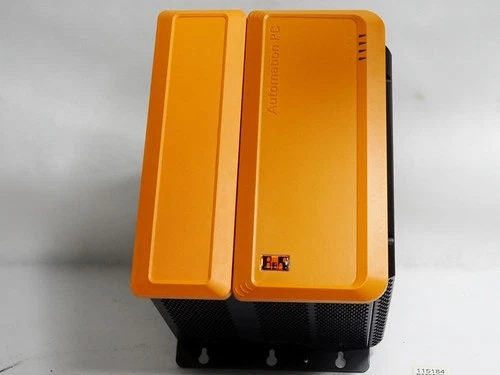
Key Technical Specifications
- Brand: B&R
- Model: 5PC910.SX05-00
- Hardware Revision: F7
- Product Series: Automation PC 910 (APC910)
- Product Name: Industrial PC System Unit
- System Configuration: 5-slot APC910 chassis
- Expansion Slots: Supports compatible PCI and PCIe bus-unit configurations
- Bus Unit Options: 5 PCI, 4 PCI + 1 PCIe, 2 PCI + 3 PCIe, or 5 PCIe
- CPU Board: Separate compatible CPU board required
- System Controller: MTCX
- Real-Time Clock: Battery-backed
- Battery: Removable 950 mAh lithium-ion battery
- COM Interface: 1 × RS232, 9-pin male D-Sub
- Ethernet: 2 × RJ45, 10/100/1000 Mbit/s
- USB: 4 × USB 3.0 and 1 × USB 2.0
- CFast Interface: 1 × SATA III, up to 6.0 Gbit/s
- Display Interfaces: DVI-I and DisplayPort options, depending on installed hardware
- Interface Options: Supports up to 2 compatible interface cards
- Storage Expansion: 1 compact drive slot and 2 slide-in drive positions
- Power Supply: 24 V DC ±25%
- Maximum Current: 5.5 A
- Maximum Inrush Current: 60 A for less than 300 μs
- Cooling: Passive heat sink; optional active fan kit
- Protection Rating: IP20
- Dimensions: 211 × 270 × 254.75 mm
- Weight: Approximately 2.85 kg
- Product Configuration: No operating system
- Country of Origin: Verify on the product label
Installation and Operating Instructions
- Verify the model number, Revision F7, and included accessories against the product label and packing list.
- Confirm that the APC910 chassis is compatible with the intended CPU board and bus-unit configuration.
- Select the appropriate PCI or PCIe bus unit according to the required expansion cards.
- Install a compatible CPU board, memory module, and heat sink following B&R installation instructions.
- Install the required storage device, such as a CFast card or supported slide-in drive.
- Mount the system unit securely in the electrical cabinet with adequate clearance for cooling.
- Connect the specified 24 V DC power supply using the correct terminal block and polarity.
- Connect Ethernet, USB, serial, and display interfaces as required by the application.
- Install a supported operating system and the required B&R drivers or Automation Runtime components. This listing does not include an operating system.
- Configure the BIOS, hardware resources, and system interfaces according to the installed CPU board.
- Test startup, storage access, network communication, display output, and installed expansion cards.
- Complete application software installation and system validation before commissioning.
Daily Maintenance
- Check the system status LEDs for power, HDD, link, and run indications.
- Keep cabinet ventilation openings and heat-sink surfaces clean.
- Inspect the power connector and grounding connections periodically.
- Check Ethernet and USB connectors for mechanical wear.
- Monitor CPU and system temperatures through supported diagnostic tools.
- Check storage-device health and back up important system data.
- Inspect the removable battery and replace it according to the manufacturer’s maintenance guidance.
- Review operating-system logs and application alarms.
- Confirm that optional fans, if installed, operate normally.
Troubleshooting and FAQ
Q1: The system does not start after power is connected.
Verify the 24 V DC supply, terminal polarity, power connector, and installed CPU board. Check the system status LEDs and power-failure diagnostics.
Q2: Does this unit include a CPU board?
The 5PC910.SX05-00 is the APC910 system-unit designation. CPU boards are separately specified components. Confirm the actual contents of the listing before purchase.
Q3: Does this product include Windows or another operating system?
No. The supplied listing explicitly states no operating system. The buyer must provide and install a compatible operating system and required software.
Q4: Can the system use PCI and PCIe expansion cards?
Yes, with the appropriate compatible bus unit. The available slot arrangement depends on the selected bus-unit model.
Q5: Can this unit communicate with industrial Ethernet devices?
It provides two Gigabit Ethernet interfaces. Actual industrial protocol support depends on the installed CPU board, operating system, drivers, and application software.
Q6: Can I use a different APC910 system unit as a replacement?
Not automatically. Compare chassis slot count, bus-unit type, CPU-board compatibility, installed interface options, and mechanical requirements.
Q7: What is the difference between SX02 and SX05?
They are different APC910 system-unit configurations. SX02 is the 2-slot system unit, while SX05 is the 5-slot system unit. Confirm the required expansion capacity before selecting a replacement.
Safety Precautions
- Installation and servicing must be performed by qualified personnel.
- Disconnect the 24 V DC supply before installing or removing internal components.
- Observe electrostatic discharge precautions when handling CPU boards, memory, and interface cards.
- Verify power polarity and grounding before startup.
- Use only compatible B&R bus units, CPU boards, and expansion modules.
- Maintain adequate cabinet ventilation and observe component temperature limits.
- Do not insert or remove internal hardware while the system is powered.
- Use supported operating systems, drivers, and firmware versions.
- Back up system configurations before hardware or software changes.
Related B&R Models and Components
The following are related APC910 system units, CPU boards, bus units, and accessories. They are not guaranteed direct replacements:
- 5PC910.SX01-00 – APC910 1-Slot System Unit
- 5PC910.SX02-00 – APC910 2-Slot System Unit
- 5PC910.SX03-00 – APC910 3-Slot System Unit
- 5AC901.BX05-00 – APC910 5-Slot PCI Bus Unit
- 5AC901.BX05-01 – APC910 Bus Unit, 4 PCI + 1 PCIe x8
- 5AC901.BX05-02 – APC910 Bus Unit, 2 PCI + 1 PCIe x8 + 2 PCIe x1
- 5AC901.BX05-03 – APC910 Bus Unit, 2 PCIe x4 + 3 PCIe x1
- 5PC900.TS17-00 – APC910 Intel Core i5 CPU Board
- 5PC900.TS17-01 – APC910 Intel Core i3 CPU Board
- 5PC900.TS17-02 – APC910 Intel Celeron CPU Board
- 5PC900.TS17-03 – APC910 Intel Xeon CPU Board
- 5PC900.TS17-04 – APC910 Intel Core i7 CPU Board
- 5AC901.HS00-00 – APC910 Active Heat Sink
- 5AC901.FA05-00 – APC910 Fan Kit
- 5AC901.CSSD-06 – APC910 512 GB SATA Slide-In SSD
Before ordering accessories or replacement parts, verify CPU chipset compatibility, bus-unit configuration, memory type, cooling requirements, and hardware revision.
Product Keywords
B&R 5PC910.SX05-00, B&R APC910, Automation PC 910, Industrial PC System Unit, B&R Industrial Computer, 5-Slot APC910, PCI PCIe Expansion, B&R CPU Board, Industrial Automation Computer, 24 V DC Industrial PC, APC910 System Chassis, B&R Replacement Parts, Machine Control Computer.
For industrial automation products and replacement components, visit https://www.newplcdcs.com.


