
Product Introduction
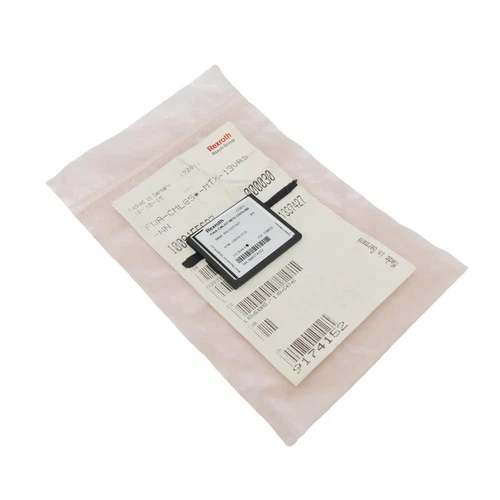
The Bosch Rexroth R911337427 is an IndraMotion MTX advanced CNC firmware package identified by the type code FWA-CML85*-MTX-13VRS-NN. It is designed for the CML85 controller platform and provides the firmware environment for advanced CNC machine control, coordinated motion functions, and industrial automation applications. As part of the Rexroth IndraMotion MTX control architecture, this firmware works with the appropriate controller hardware and the corresponding IndraWorks engineering environment. It is intended for machine commissioning, system maintenance, controller restoration, and firmware replacement in compatible CNC installations. Because firmware is hardware-specific, users should verify the exact CML85 controller version, installed software release, license requirements, and machine configuration before installation.
Technical Specifications
- Brand: Bosch Rexroth
- Product Manufacturer: Bosch Rexroth AG
- Model / Material Number: R911337427
- Firmware Type Code: FWA-CML85*-MTX-13VRS-NN
- Product Series: IndraMotion MTX
- Platform: IndraMotion MTX Advanced
- Product Name: MTX Advanced CNC Firmware 13VRS
- Product Type: Industrial CNC Controller Firmware
- Application: CNC machine control and coordinated motion automation
- Target Controller Family: IndraControl CML85
- Controller Architecture: CML85-based IndraMotion MTX advanced
- Firmware Version: 13VRS
- Software Engineering Environment: Bosch Rexroth IndraWorks MTX
- Associated Software: IndraWorks MTX 13VRS
- Installation Medium: Confirm supplied media or delivery format
- License Requirements: Verify firmware and associated software licensing
- Communication and Fieldbus Support: Dependent on the target controller hardware and configured system
- Motion Control Functions: Dependent on the installed MTX configuration and licensed technology functions
- Dimensions: Not applicable to firmware as a software product
- Weight: Not applicable to firmware; distributor records may show 0.00 lb
- Power Requirements: No independent power requirement; operates through compatible controller hardware
- Place of Manufacture: Not reliably published
- Country of Origin: Verify original packaging and supplier documentation
- Product Status: Confirm current availability with Bosch Rexroth
- Condition: New, unused, surplus, or previously installed depending on the supplied package
Key Technical Features
- IndraMotion MTX Advanced Platform: Firmware intended for the MTX advanced CNC control architecture based on the CML85 controller family.
- CML85 Hardware Association: The FWA-CML85* type code identifies the target controller family. Firmware selection must match the installed hardware.
- 13VRS Software Generation: Provides the firmware release associated with the IndraMotion MTX 13VRS environment.
- CNC Machine Control: Supports the control platform used in industrial CNC machine applications, subject to the machine configuration and enabled functions.
- IndraWorks Engineering Integration: Works within the Bosch Rexroth IndraWorks engineering environment for controller configuration, commissioning, and maintenance.
- System-Specific Configuration: Firmware operation depends on controller hardware, machine parameters, axis configuration, and the installed software environment.
- Legacy System Maintenance: Suitable for maintaining existing MTX installations that require the corresponding 13VRS firmware release.
- Controller Restoration: Can be used in approved firmware recovery or replacement procedures when the original firmware package is unavailable or damaged.
Typical Application Scenarios
- CNC machining centers
- Industrial milling and turning machines
- Automated production machinery
- Multi-axis CNC control systems
- Precision machine tool automation
- Bosch Rexroth IndraMotion MTX advanced installations
- CML85-based controller maintenance
- CNC controller firmware restoration
- Industrial machine commissioning and retrofit projects
Operating Procedures
1. Pre-Installation Verification
- Confirm the material number R911337427.
- Verify the complete firmware type code FWA-CML85*-MTX-13VRS-NN.
- Identify the installed controller hardware and confirm that it belongs to the supported CML85 family.
- Check the existing firmware version and machine software release.
- Confirm that the machine’s IndraWorks engineering environment supports the intended firmware version.
- Back up the existing controller project, machine parameters, axis configuration, and relevant system data.
- Confirm the availability of the required installation media and licenses.
- Review the machine manufacturer’s firmware installation instructions.
2. Firmware Installation and Startup
- Stop the CNC machine and place the equipment in a safe maintenance condition.
- Follow the controller manufacturer’s approved shutdown and firmware update procedure.
- Connect the engineering workstation using the supported service interface.
- Confirm that the controller is recognized by the engineering software.
- Verify the current firmware and hardware identification.
- Install or load the firmware using the documented Rexroth procedure.
- Do not interrupt the update process or remove power during firmware transfer.
- Restart the controller according to the approved sequence.
- Check startup diagnostics and verify that the firmware version is correctly recognized.
3. Normal Operation
- Confirm that the CNC controller completes its startup sequence.
- Check communication between the controller, drives, and configured fieldbus devices.
- Verify axis status and machine readiness.
- Review active diagnostic messages.
- Confirm that machine parameters and axis configurations are loaded correctly.
- Perform the machine manufacturer’s prescribed functional checks before production.
- Monitor controller diagnostics during normal operation.
4. Parameter Configuration and Modification
- Back up the existing machine configuration before making modifications.
- Use the appropriate IndraWorks MTX engineering environment.
- Confirm the correct controller target and firmware version.
- Review axis parameters, machine data, communication settings, and technology configurations.
- Modify parameters only with authorization from the machine manufacturer or responsible controls engineer.
- Verify that configured functions are supported by the installed hardware and licenses.
- Save the revised project and document all changes.
- Validate the machine using controlled commissioning procedures before returning it to production.
5. Shutdown
- Stop the machining program.
- Move the machine to a safe state.
- Follow the machine manufacturer’s controller shutdown procedure.
- Save relevant diagnostic information and configuration backups.
- Isolate power before performing hardware maintenance.
- Do not remove firmware media or interrupt an update while the controller is processing it.
Daily Maintenance
- Check controller diagnostic messages and system status.
- Monitor firmware and software version consistency.
- Maintain backups of machine parameters and engineering projects.
- Verify communication between the CNC controller and connected drive systems.
- Record recurring controller or axis alarms.
- Check the condition of controller storage media and installation files where applicable.
- Maintain a controlled archive of firmware packages and licenses.
- Restrict firmware changes to qualified engineering personnel.
- Confirm that replacement firmware matches the original controller hardware.
Troubleshooting Guide
Problem: Firmware package is rejected
- Verify the material number and firmware type code.
- Confirm the target controller belongs to the CML85 family.
- Check whether the firmware release supports the installed hardware revision.
- Review the installation software and package integrity.
Problem: Controller does not start after firmware installation
- Check the controller diagnostic indicators and available error messages.
- Verify that the correct firmware package was installed.
- Review the approved recovery procedure.
- Restore the previous firmware or configuration only when permitted by the machine documentation.
Problem: IndraWorks cannot communicate with the controller
- Check the engineering workstation connection.
- Verify the communication interface and network settings.
- Confirm that the correct controller target is selected.
- Check software version compatibility.
Problem: CNC axes are not ready
- Review controller and drive diagnostic messages.
- Check the axis configuration and machine parameters.
- Verify the communication links between the CNC controller and drive system.
- Confirm that the required drive and safety conditions are satisfied.
Problem: Machine functions are unavailable after an update
- Check whether the required technology options and licenses are present.
- Verify the machine-specific configuration.
- Compare the installed firmware and project versions.
- Consult the machine manufacturer before enabling or modifying advanced functions.
Problem: Firmware version cannot be identified
- Check the controller’s diagnostic or system information screen.
- Use the supported IndraWorks diagnostic tools.
- Compare the displayed version with the installed firmware package documentation.
Frequently Asked Questions
Q1: What is Bosch Rexroth R911337427?
It is an IndraMotion MTX advanced CNC firmware package with the type code FWA-CML85*-MTX-13VRS-NN.
Q2: Is R911337427 a physical controller?
No. It is a firmware product, not a standalone PLC, CNC controller, or I/O module.
Q3: Which controller is this firmware designed for?
The FWA-CML85* designation identifies the CML85 controller family used in the IndraMotion MTX advanced platform.
Q4: What does 13VRS mean?
13VRS identifies the firmware release generation. It should be matched with the target controller and the machine’s engineering software environment.
Q5: Is this firmware compatible with CML65 controllers?
Do not assume compatibility. Rexroth identifies CML65 and CML85 firmware as separate products. R911337426 is listed for FWA-CML65*-MTX-13VRS-NN, while R911337427 is listed for the CML85 firmware type.
Q6: Does the firmware include IndraWorks software?
The firmware and IndraWorks engineering software are separately identified products. Confirm whether the supplied package includes installation media, software licenses, or only the firmware item.
Q7: Can this firmware be used to upgrade an older MTX system?
An upgrade may require hardware compatibility checks, software licenses, project conversion, and machine-specific validation. It should not be treated as a universal firmware upgrade.
Q8: What should be checked before purchasing?
Verify the material number, complete firmware type code, version, target CML85 hardware, installation format, license status, and whether the package is unused or previously installed.
Safety Precautions
- ⚠️ Firmware installation must be performed by qualified CNC or automation personnel.
- ⚠️ Back up the machine project, parameters, and controller data before changing firmware.
- ⚠️ Never install firmware intended for a different controller family.
- ⚠️ Confirm software and license compatibility before commissioning.
- ⚠️ Do not interrupt power during firmware transfer or controller programming.
- ⚠️ Keep the machine in a safe maintenance state during installation.
- ⚠️ Validate axis movement, machine interlocks, and safety functions after firmware changes.
- ⚠️ Do not assume that successful firmware installation guarantees machine readiness.
- ⚠️ Follow the machine manufacturer’s commissioning and recovery instructions.
Related Bosch Rexroth Models and Software
The following are related firmware packages, engineering software products, and controller-platform components. They are useful for identifying the correct MTX configuration and sourcing compatible maintenance materials. They are not interchangeable firmware replacements unless the target hardware and system documentation explicitly confirm compatibility.
- R911337424 – FWA-CML45*-MTX-13VRS-NN Firmware
- R911337426 – FWA-CML65*-MTX-13VRS-NN Firmware
- R911337427 – FWA-CML85*-MTX-13VRS-NN Firmware
- R911337428 – FWA-CML25*-XLC-13VRS-D0 Firmware
- R911337429 – FWA-CML25*-MLC-13VRS-D0 Firmware
- R911337430 – FWA-CML45*-XLC-13VRS-D0 Firmware
- R911337431 – FWA-CML45*-MLC-13VRS-D0 Firmware
- R911337432 – FWA-CML65*-XLC-13VRS-D0 Firmware
- R911337433 – FWA-CML65*-MLC-13VRS-D0 Firmware
- R911337416 – SWA-IWORKS-MTX-13VRS-D0-DVD Installation Software
- R911337417 – SWA-IWORKS-MTX-13VRS-D0-INST Installation Software
- R911337418 – SWW-IWORKS-MTX-13VRS-D0-CD650 Software Package
- R911337419 – SWA-IWORKS-MTX-13VRS-D0-CD650-DEVKIT Development Kit
- R911337420 – SWS-MTX***-RUN-NNVRS-D0-FA Software Package
- R911337488 – FWA-MICRO*-MTX-13VRS-NN IndraMotion MTX Micro Firmware
Compatibility Note: The related products cover different MTX controller families and software functions. CML25, CML45, CML65, CML85, and MTX Micro firmware must not be substituted for one another without confirmation from the applicable Bosch Rexroth documentation.


