
Product Introduction
The B&R 5AP5120.1505-000 Automation Panel is a 15-inch industrial operator interface designed for machine visualization, process monitoring, and operator interaction in industrial automation systems. Part of the B&R Automation Panel 5000 family, it features an XGA TFT color display with 1024 × 768 resolution and an analog resistive single-touch screen. The panel supports flexible swing-arm or VESA mounting and is designed to work with compatible B&R Panel PC 2100, Panel PC 2200, and link-module configurations. Its aluminum housing, adjustable LED backlight, and configurable mounting protection make it suitable for industrial operator stations and control environments. It is commonly used in machine control cabinets, production equipment, and automation systems requiring a dedicated HMI display.
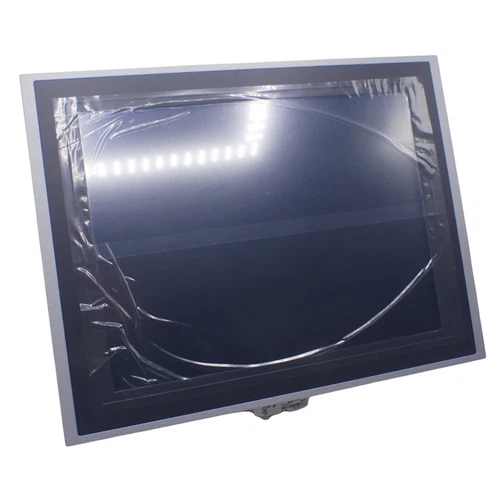
Technical Specifications
- Brand: B&R Automation
- Model: 5AP5120.1505-000
- Product Series: Automation Panel 5000
- Product Name: 15-Inch Automation Panel
- Product Type: Industrial HMI / Operator Interface Panel
- Display Technology: TFT Color LCD
- Display Size: 15.0 inches
- Display Resolution: 1024 × 768 pixels (XGA)
- Aspect Ratio: 4:3
- Display Colors: 16.7 million
- Contrast Ratio: 700:1
- Touch Technology: Analog resistive single-touch
- Touch Controller: B&R serial, 12-bit
- Backlight: LED
- Brightness: Typically 20–400 cd/m², dimmable
- Backlight Half-Brightness Life: 50,000 hours
- Viewing Angle: Horizontal ±80°; vertical +70° / -70°
- Communication Architecture: Compatible B&R Panel PC and link-module architecture
- Mounting Options: Swing-arm mounting or VESA mounting with appropriate mounting unit
- Housing Material: Coated aluminum
- Housing Finish: White aluminum
- Dimensions: 389 × 299 mm (width × height); depth depends on mounting configuration
- Weight: Approximately 5.2 kg
- Front Protection: IP65 with mounting unit 5ACCMA00.000x-000; IP54 with 5ACCMA00.010x-000
- Alternative Protection: IP20 with mounting unit 5ACCMA01.0100-000
- Certifications: CE, UKCA, cULus
- Pollution Degree: 2 according to EN 61131-2
- B&R Identification Code: 0xE9CB
- Compatible Platform: B&R PPC2100 / PPC2200 / supported link modules
- Power Requirements: Supplied through the compatible system configuration; verify the host and connection documentation
- Place of Manufacture: Not reliably published
- Country of Origin: Verify product nameplate and shipping documentation
- Product Status: Confirm current order availability with B&R; legacy stock may be supplied through industrial spare-parts channels
- Condition: New surplus, used, or refurbished depending on the supplied unit
Key Technical Features
- 15-Inch Industrial Display: Provides a 4:3 XGA display area for machine status, process values, alarm messages, and operator information.
- Analog Resistive Touchscreen: Supports single-point touch operation and is suitable for industrial environments where operators may use gloves or a stylus compatible with resistive screens.
- High-Resolution Visualization: The 1024 × 768 resolution supports detailed HMI screen layouts and machine monitoring graphics.
- Adjustable LED Backlight: Brightness can be adjusted within the specified 20–400 cd/m² range to accommodate different installation environments.
- B&R System Integration: Designed for use with compatible PPC2100, PPC2200, and B&R link-module configurations.
- Flexible Mechanical Installation: Supports swing-arm and VESA mounting through the corresponding mounting accessories.
- Configurable Protection Rating: The protection level depends on the selected mounting unit. IP65, IP54, and IP20 configurations are documented for different mounting arrangements.
- Aluminum Housing: The coated aluminum enclosure provides a solid mechanical structure for industrial operator stations.
- Industrial Certification: CE, UKCA, and cULus certifications are listed in B&R product documentation.
- Legacy Equipment Maintenance: Suitable for maintaining existing B&R automation installations where the original panel model and system architecture must be preserved.
Typical Application Scenarios
- Industrial machine operator stations
- Automated production and assembly lines
- Packaging and material-handling equipment
- Process monitoring and machine visualization
- CNC and manufacturing equipment interfaces
- Industrial control cabinets
- B&R Panel PC 2100 and PPC2200 installations
- Legacy automation system maintenance and HMI replacement
Operating Procedures
1. Installation
- Confirm the complete part number: 5AP5120.1505-000.
- Inspect the panel housing, display surface, touchscreen, and connectors.
- Confirm the intended host system is a compatible B&R Panel PC or link-module configuration.
- Select the appropriate swing-arm or VESA mounting unit.
- Check the mechanical dimensions and mounting clearances before installation.
- Verify that the selected mounting unit provides the required IP protection.
- Install the panel using the specified mounting hardware.
- Connect the display and touch interfaces according to the B&R system documentation.
- Check cable routing, grounding, and strain relief.
- Ensure the panel is securely mounted before applying power.
2. Startup and Power-On
- Verify the host system’s power supply and wiring.
- Confirm that all panel connections are properly seated.
- Start the connected Panel PC or compatible system according to the manufacturer’s procedure.
- Observe the display during system startup.
- Check whether the operating system and HMI application load correctly.
- Verify touchscreen response.
- Confirm that the display resolution and screen orientation are correct.
- Check communication between the HMI application and the controller.
3. Normal Operation
- Use the resistive touchscreen to navigate the configured HMI screens.
- Monitor process values, machine status, and alarm information.
- Confirm that displayed values correspond to the controller data.
- Operate machine functions only through authorized HMI controls.
- Adjust display brightness according to ambient lighting conditions.
- Report abnormal touch response, display flickering, or communication interruptions.
4. Parameter Configuration and Modification
- Back up the existing HMI project before making changes.
- Confirm the installed B&R Automation Studio version and hardware support package.
- Verify the host system and panel configuration.
- Check display resolution, orientation, brightness, and touchscreen settings.
- Review the HMI communication configuration and controller variable assignments.
- Modify screen layouts and alarm definitions only with authorized engineering access.
- Download the updated project using the approved procedure.
- Test all modified screens and operator commands before returning the equipment to production.
5. Shutdown
- Stop the machine using its approved operating sequence.
- Save or record relevant production information.
- Close the HMI application if required by the system procedure.
- Shut down the connected Panel PC or controller properly.
- Isolate power before removing the panel or disconnecting cables.
- Do not disconnect active system interfaces during machine operation.
Daily Maintenance
- Clean the touchscreen with a soft, lint-free cloth.
- Avoid abrasive materials and aggressive chemical cleaners.
- Do not apply excessive pressure to the resistive touchscreen.
- Inspect the display for scratches, cracks, dead pixels, and discoloration.
- Check the aluminum housing for damage or corrosion.
- Inspect the mounting unit and fasteners for looseness.
- Check cable connections and strain relief.
- Verify normal touchscreen response and display brightness.
- Keep the operator station free from excessive dust, oil, and moisture.
- Maintain a backup of the HMI application and system configuration.
Troubleshooting Guide
Problem: Panel does not display an image
- Check the connected Panel PC or host system.
- Inspect the display cable and interface connections.
- Verify that the host system has completed startup.
- Check display configuration and hardware compatibility.
- Investigate possible panel or host hardware faults.
Problem: Touchscreen does not respond
- Clean the display surface.
- Check the touchscreen connection.
- Verify that the touch controller is recognized by the host.
- Review touchscreen configuration and calibration.
- Inspect for physical damage to the touch layer.
Problem: Touch position is inaccurate
- Check whether touchscreen calibration is required.
- Verify the display resolution and orientation.
- Confirm that the correct touch driver or system configuration is installed.
- Recalibrate using the supported system procedure.
Problem: Display brightness is insufficient
- Check the brightness setting.
- Verify the LED backlight condition.
- Inspect the host system and panel power connections.
- If brightness remains low, investigate backlight aging or hardware failure.
Problem: HMI application does not start
- Check the host operating system and startup configuration.
- Verify the HMI runtime installation.
- Confirm compatibility between the project and the installed software version.
- Restore a verified project backup if necessary.
Problem: Incorrect protection level after installation
- Check the exact mounting-unit part number.
- Verify that the specified seals and cable grommets are installed correctly.
- Confirm that the selected mounting configuration supports the required IP rating.
- Do not assume the panel provides IP65 protection independently of its mounting assembly.
Frequently Asked Questions
Q1: What is the B&R 5AP5120.1505-000?
It is a 15-inch Automation Panel 5000 industrial HMI featuring an XGA TFT color display and analog resistive single-touch operation.
Q2: What is the display resolution?
The panel has a native resolution of 1024 × 768 pixels (XGA), with a 4:3 aspect ratio.
Q3: Is the touchscreen capacitive or resistive?
It uses analog resistive single-touch technology, not projected capacitive multitouch technology.
Q4: Which B&R systems are compatible with this panel?
B&R documentation identifies PPC2100, PPC2200, and supported link-module configurations. Confirm the exact host and interface combination before ordering.
Q5: Does the panel support IP65 protection?
Yes, when installed with the specified 5ACCMA00.000x-000 mounting unit. Other mounting arrangements have different protection ratings.
Q6: Can this panel replace another 15-inch B&R HMI?
Not automatically. Verify the display interface, touch interface, mounting dimensions, host compatibility, and software configuration before replacement.
Q7: What is the panel’s physical size and weight?
The documented width and height are 389 × 299 mm, and the listed weight is approximately 5.2 kg. Installation depth depends on the mounting arrangement.
Q8: What should be checked before purchasing?
Verify the complete model number, hardware condition, display operation, touchscreen response, connectors, mounting accessories, and compatibility with the existing B&R system.
Safety Precautions
- ⚠️ Disconnect power before installation, removal, or maintenance.
- ⚠️ Confirm the host system’s electrical specifications before connecting the panel.
- ⚠️ Use appropriate grounding and electrostatic-discharge protection.
- ⚠️ Do not expose the panel to liquids beyond the protection rating of the complete installed assembly.
- ⚠️ Do not use sharp tools or excessive pressure on the resistive touchscreen.
- ⚠️ Ensure that mounting hardware and cable connections are properly secured.
- ⚠️ Do not open or modify internal components without authorization.
- ⚠️ Verify machine safety interlocks independently of the HMI.
- ⚠️ The operator panel is not a substitute for a safety controller or emergency-stop circuit.
Related B&R Models and Components
The following models and accessories belong to related B&R Automation Panel 5000 and Panel PC product families. They are useful for system identification, maintenance planning, and replacement research. They are not confirmed direct replacements for the 5AP5120.1505-000.
- 5AP5120.1906-000 – 19-Inch SXGA Single-Touch Automation Panel
- 5AP5130.156B-000 – 15.6-Inch Multitouch Automation Panel
- 5AP5130.156C-000 – 15.6-Inch Multitouch Automation Panel
- 5AP5130.185B-000 – 18.5-Inch Multitouch Automation Panel
- 5AP5130.185C-000 – 18.5-Inch Multitouch Automation Panel
- 5AP5130.215C-000 – 21.5-Inch Multitouch Automation Panel
- 5AP5130.240C-000 – 24-Inch Multitouch Automation Panel
- 5ACCMA00.0000-000 – AP5000 Swing-Arm Mounting Unit
- 5ACCMA00.0001-000 – Swing-Arm Mounting Unit with One Rear USB Interface
- 5ACCMA00.0002-000 – Swing-Arm Mounting Unit with Two Rear USB Interfaces
- 5ACCMA00.0100-000 – VESA IP54 Mounting Unit
- 5ACCMA00.0101-000 – VESA IP54 Mounting Unit with USB
- 5ACCMA01.0100-000 – AP5000 VESA Mounting Unit
- 5ACCFL00.0000-000 – AP5000 Swing-Arm Rotary Flange
- 5ACCHD00.1505-000 – AP5000 Swing-Arm Handles for 15-Inch Panel
Replacement Note: The display panels and mounting accessories listed above have different functions and configurations. A replacement selection must account for host compatibility, display and touch interfaces, mechanical dimensions, mounting hardware, and the required protection rating.


