
Product Introduction
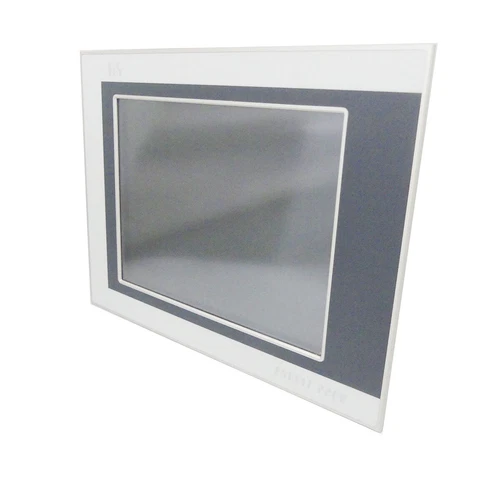
The B&R PROVIT 2200 5D2210.01 is a 10.4-inch industrial color TFT display unit with an integrated resistive touchscreen, designed for operator visualization and machine control applications. It features VGA resolution of 640 × 480 pixels, 262,144-color display capability, and a front-panel protection rating of IP65, making it suitable for installation in industrial operator panels and machine control cabinets. The display unit is designed to work with the compatible B&R IPC2001 controller architecture and supports legacy PROVIT 2000/2200 applications. Its analog resistive touchscreen provides direct operator interaction with machine screens, process values, alarms, and control functions. The 5D2210.01 is also documented as the replacement model for the earlier 5D2200.01 display unit. When sourcing a replacement, verify the controller version, display cable, touchscreen connection, driver software, mounting dimensions, and original application configuration.
Technical Parameters
- Brand: B&R Industrial Automation
- Model: 5D2210.01
- Product Series: PROVIT 2200 / PROVIT 2000
- Product Name: 10.4-Inch TFT Touchscreen Display Unit
- Product Type: Industrial HMI Display / Operator Interface
- Product ID: 5D2210.01
- Compatible Controller: IPC2001
- Display Technology: TFT Color LCD
- Display Size: 10.4 inches (264 mm diagonal)
- Resolution: VGA, 640 × 480 pixels
- Color Capability: 262,144 colors
- Touch Technology: Analog resistive (Accu Touch)
- Touchscreen Type: Integrated touchscreen
- Backlight Type: CFL (Cold Cathode Fluorescent Lamp)
- Typical Brightness: 200 cd/m²
- Backlight Service Life: Approximately 50,000 hours under specified test conditions; verify the applicable manual revision
- Front Protection Rating: IP65
- Rear Protection: IP20
- Operating Temperature: 0 to 50°C, subject to installation conditions
- Relative Humidity: 5–85%, non-condensing
- Dimensions (W × H × D): 310 × 236 × 45 mm
- Weight: Approximately 2 kg
- Front Frame: Aluminum with anodized finish
- Front Design: Light gray
- Display Connection: Ribbon cable to compatible controller
- Touchscreen Connection: Separate touchscreen cable to the controller’s supported serial interface
- Touchscreen Driver: B&R driver and utilities package; historically identified as 5S0000.01-090
- Replacement Model: Replacement type for 5D2200.01
- Place of Manufacture: Not independently verified
- Country of Origin: Verify from the product nameplate
- Product Status: Legacy / discontinued according to industrial spare-parts listings
- Discontinued: Reported discontinued; confirm current B&R lifecycle information
- Condition: Depends on seller inventory; verify whether supplied as new surplus, open-box, or used
Technical Features
- 10.4-Inch Color Display: Provides a large operator viewing area for machine status, process variables, alarms, and graphical interfaces.
- VGA Resolution: Supports 640 × 480 pixel display output for compatible PROVIT applications.
- Resistive Touch Operation: Allows operators to interact with screen controls using a finger or compatible pointing device.
- IP65 Front Protection: The front panel is protected against dust and water jets when correctly installed with the specified gasket and mounting arrangement.
- IPC2001 Controller Compatibility: Designed for integration with the compatible B&R controller architecture.
- CFL Backlighting: Uses fluorescent backlighting with a specified typical brightness of 200 cd/m².
- Industrial Panel Construction: Features an aluminum front frame and a flat gasket around the display opening.
- Legacy Application Support: Designed to support existing PROVIT application environments when the controller, software, and display configuration are compatible.
- Replacement Compatibility: Documented as the successor to the 5D2200.01 display unit.
Typical Application Areas
- Industrial machine operator stations
- Injection molding machine control panels
- Packaging and filling machinery
- Production-line visualization
- Process monitoring and alarm display
- Material handling equipment
- Automated assembly systems
- Legacy B&R PROVIT control installations
- Industrial equipment maintenance and restoration
Operating Procedures
1. Pre-Installation Inspection
- Confirm the product label identifies B&R 5D2210.01.
- Inspect the front glass, touchscreen surface, housing, and mounting edges.
- Check for scratches, cracks, discoloration, or backlight damage.
- Inspect the display ribbon connector and touchscreen cable connector.
- Verify that the controller is compatible with the 5D2210.01.
- Confirm the display cable and touchscreen cable are available.
- Check the mounting cutout and installation dimensions.
2. Installation
- Disconnect the controller and associated power supplies before installation.
- Prepare the panel opening according to the B&R mounting drawings.
- Install the display using the specified mounting hardware and gasket.
- Ensure the front sealing surface is clean and properly seated.
- Connect the display ribbon cable to the designated controller interface.
- Connect the touchscreen cable to the supported controller serial interface.
- Route cables away from high-voltage power wiring and sources of electrical interference.
- Verify that all connectors are fully seated before restoring power.
3. Startup and Power-On
- Confirm the display and controller connections.
- Verify that the controller’s power supply and hardware configuration are correct.
- Restore power according to the original machine startup procedure.
- Observe the display during the controller boot sequence.
- Check for normal image output and correct screen geometry.
- Verify touchscreen response across the active display area.
- Confirm that the original HMI application loads correctly.
- Check that operator controls, alarm displays, and process screens respond as expected.
4. Normal Operation
- Use the touchscreen to navigate machine screens and operator menus.
- Monitor process variables, alarms, and equipment status.
- Check touchscreen response during normal machine operation.
- Keep the display surface clean and free from oil, dust, and moisture.
- Avoid applying excessive pressure to the screen.
- Monitor brightness and image stability for signs of backlight deterioration.
5. Parameter Configuration and Modification
- Use the original B&R PROVIT engineering and software environment.
- Confirm the controller model and software version.
- Install the appropriate touchscreen driver where required.
- Verify touchscreen calibration and serial connection settings.
- Check display resolution and graphics driver configuration.
- Back up the original application and controller configuration before making changes.
- Do not assume that modern B&R Automation Studio versions directly support every legacy PROVIT installation.
- Validate all operator functions after software or driver modifications.
6. Shutdown and Removal
- Shut down the machine through the approved operating procedure.
- Close the HMI application where applicable.
- Switch off the controller and associated power supply.
- Disconnect display and touchscreen cables carefully.
- Remove mounting hardware without damaging the front gasket.
- Protect the touchscreen surface during removal and transportation.
- Store the display in suitable protective packaging.
Daily Maintenance
- Clean the touchscreen using a soft, non-abrasive cloth.
- Avoid aggressive solvents and abrasive cleaning materials.
- Check for scratches, cracks, or damage to the front sealing gasket.
- Inspect the display cable and touchscreen cable connections.
- Monitor screen brightness and image stability.
- Check touchscreen calibration and response during scheduled maintenance.
- Keep the rear of the display free from dust accumulation.
- Maintain suitable cabinet temperature and ventilation.
- Keep a backup of the original controller software and HMI configuration.
Troubleshooting
1. Display Remains Blank
- Check the controller power supply.
- Inspect the display ribbon cable.
- Verify the controller and display compatibility.
- Check the controller boot status and graphics configuration.
- Inspect the backlight and display assembly.
2. Touchscreen Does Not Respond
- Check the touchscreen cable connection.
- Verify the correct touchscreen driver is installed.
- Confirm that the controller’s serial interface is functioning.
- Check touchscreen calibration.
- Inspect the resistive touch surface for physical damage.
3. Touchscreen Response Is Inaccurate
- Perform the approved touchscreen calibration procedure.
- Check for incorrect driver configuration.
- Inspect the touchscreen surface for damage or pressure marks.
- Verify that the correct display resolution is configured.
4. Display Image Is Dim
- Check the backlight condition.
- Verify the controller’s display configuration.
- Inspect the display for signs of aging or uneven illumination.
- Consider professional backlight or display servicing if brightness has deteriorated.
5. Display Flickers or Shows Distorted Images
- Check the display ribbon cable.
- Inspect connector contacts.
- Verify controller graphics settings.
- Check for electrical interference or unstable power.
- Test with an approved compatible controller if available.
6. Replacement Display Does Not Work
- Compare the complete model number and hardware revision.
- Confirm controller compatibility.
- Verify display and touchscreen cable arrangements.
- Check driver and software requirements.
- Do not assume that all 10.4-inch PROVIT displays use identical interfaces.
Frequently Asked Questions
Q1: What is the B&R 5D2210.01?
It is a 10.4-inch color TFT industrial display unit with an integrated resistive touchscreen, belonging to the B&R PROVIT 2200 family.
Q2: What is the display resolution?
The display uses VGA resolution of 640 × 480 pixels.
Q3: Is the touchscreen capacitive or resistive?
It uses analog resistive touchscreen technology.
Q4: What is the front protection rating?
The front panel is rated IP65 when installed correctly. The rear side has a lower protection rating and requires suitable enclosure protection.
Q5: Which controller is compatible with this display?
B&R documentation identifies IPC2001 as the controller for the 5D2210.01. Verify the exact controller revision and system configuration before installation.
Q6: Can the 5D2210.01 replace the 5D2200.01?
Yes. B&R documentation identifies 5D2210.01 as the replacement type for 5D2200.01. However, verify the cable, driver, and installation requirements before replacement.
Q7: Does the display include touchscreen software?
The touchscreen driver and utilities are identified separately in B&R documentation as 5S0000.01-090. Confirm whether the required software and cables are included with the supplied unit.
Q8: Is the B&R 5D2210.01 still manufactured?
Industrial spare-parts distributors list it as discontinued. Confirm current lifecycle information and available service options with B&R.
Safety Precautions
- ⚠️ Installation and maintenance should be performed by qualified industrial automation technicians.
- ⚠️ Disconnect controller power before connecting or removing display cables.
- ⚠️ Do not apply excessive pressure to the resistive touchscreen.
- ⚠️ Use only compatible display and touchscreen cables.
- ⚠️ Confirm the controller and driver compatibility before startup.
- ⚠️ Protect the rear electronics from dust, moisture, and accidental contact.
- ⚠️ Maintain the front gasket to preserve the specified IP65 protection.
- ⚠️ Do not use abrasive cleaning materials or aggressive chemical solvents.
- ⚠️ Back up the original HMI application before modifying controller software.
15 Related B&R PROVIT Models
The following models belong to the B&R PROVIT display and industrial panel product family. They are useful references for spare-parts sourcing, but they are not all direct replacements for the 5D2210.01.
- 5D2200.01 – PROVIT 2000 10.4-inch color TFT touchscreen display; earlier model replaced by 5D2210.01.
- 5D2200.02 – PROVIT 2000 10.4-inch monochrome electro-luminescent touchscreen display.
- 5D2200.04 – PROVIT 2000 13.8-inch color TFT display.
- 5D2219.01 – PROVIT 2000 5.7-inch monochrome touchscreen display.
- 5D2219.02 – PROVIT 2000 5.7-inch color touchscreen display.
- 5D2300.01 – PROVIT 2000 10.4-inch color TFT display with pointing device.
- 5D2300.02 – PROVIT 2000 10.4-inch color LCD display.
- 5D2300.03 – PROVIT 2000 9.4-inch monochrome LCD display.
- 5D2500.01 – PROVIT 2000 9.4-inch monochrome display.
- 5D2500.02 – PROVIT 2000 9.4-inch color LCD display.
- 5D2500.10 – PROVIT 2000 10.4-inch color TFT display.
- 5D2500.22 – PROVIT 200


