
1. Product Description
The Phoenix Contact VMT 5017 (Order No. 2913700) is an industrial Panel PC designed for machine-level operation, monitoring, and visualization in demanding industrial environments. It features a 17-inch TFT active display with a 1440 × 900 resolution, adjustable 350 cd/m² brightness, and a resistive industrial touchscreen. The VMT series is designed for installation close to machinery, with an enclosed IP65 housing and options for wireless network operation. Its large widescreen display provides an operator interface for production monitoring, equipment status visualization, process supervision, and industrial HMI applications. The VMT 5017 is suitable for integration into existing automation systems after checking its computer hardware configuration, operating system, network interfaces, mounting accessories, and software requirements. Processor, memory, storage, and detailed interface specifications for this exact order number should be verified from the device label and original configuration documentation before replacement.
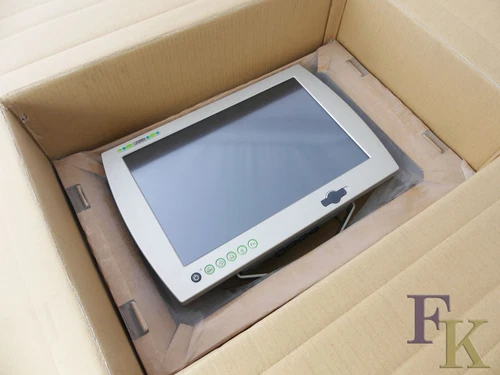
2. Key Technical Specifications
- Brand: Phoenix Contact
- Model: VMT 5017
- Order Number: 2913700
- Product Type: Industrial Panel PC
- Product Series: VMT Industrial Panel PC
- Display Type: 17-inch TFT active display
- Screen Resolution: 1440 × 900 pixels
- Display Brightness: 350 cd/m² typical, adjustable
- Touch Technology: Resistive industrial touchscreen
- Protection Rating: IP65, as identified for the VMT 5017 panel PC product family
- Wireless Communication: WLAN interface identified in the original product catalog
- Housing Design: Enclosed industrial housing
- Processor: Exact configuration not independently verified
- RAM and Storage: Exact configuration not independently verified
- Power Supply: Refer to the unit nameplate and applicable technical documentation
- Dimensions and Weight: Not officially confirmed for this exact order number
- Country of Origin: Not independently verified for the individual unit
- Product Status: Confirm condition and availability with the seller
3. Application Scenarios
- Machine Operation: Provides a local operator interface for machine status, operating commands, and production information.
- Factory Automation: Supports visualization and monitoring at production lines and automation stations.
- Material Handling: Can be used at operator stations for conveying systems, warehouse equipment, and logistics processes.
- Industrial HMI: Displays process variables, alarms, operating conditions, and machine diagnostics through compatible visualization software.
- Mobile Equipment Stations: The WLAN-equipped configuration can support wireless operator access where the network design permits.
- System Retrofitting: Can be considered for replacement of an existing VMT 5017 installation after checking mounting, hardware, software, and communication requirements.
4. Installation and Commissioning
- Record the complete model number, order number, serial number, and hardware configuration from the device label.
- Confirm the required panel cutout, mounting method, and accessory arrangement.
- Verify the power supply requirements from the unit nameplate before connecting power.
- Inspect the enclosure, touchscreen, connectors, and cables for transport or handling damage.
- Install the unit using the approved mounting accessories and maintain the specified environmental protection.
- Connect Ethernet or the configured WLAN interface according to the plant network design.
- Connect supported peripheral devices and verify interface compatibility.
- Install or restore the correct operating system, drivers, and HMI application if required.
- Configure network settings, operator permissions, display parameters, and application startup behavior.
- Test touchscreen response, display readability, network communication, alarm display, and operator functions before returning the equipment to service.
5. Configuration and Operating Guidelines
- Confirm the installed processor, memory, storage device, and operating system before migrating application software.
- Verify that the existing HMI project and runtime software support the computer’s operating system.
- Check Ethernet settings, IP addressing, and WLAN parameters against the plant network configuration.
- Confirm that the touchscreen calibration and display resolution match the application.
- Back up application files, configuration data, and system images before performing maintenance.
- Use approved network security settings when connecting the Panel PC to a plant network.
- Avoid installing unsupported software or operating-system upgrades on legacy industrial computers without compatibility testing.
6. Daily Maintenance
- Clean the display with a suitable non-abrasive material and an approved cleaning solution.
- Check the touchscreen for scratches, cracks, or reduced response.
- Inspect the enclosure and mounting hardware for damage or looseness.
- Check Ethernet connectors, WLAN antennas, and power connections.
- Keep ventilation and surrounding installation areas free from excessive dust accumulation.
- Monitor system startup, application performance, and available storage space.
- Back up HMI projects and configuration files at regular intervals.
- Record recurring system alarms and communication interruptions for maintenance review.
7. Troubleshooting and FAQ
Q1: The Panel PC does not power on.
A: Check the supply voltage against the unit nameplate, inspect the power cable and connector, and verify the upstream protection device. Do not apply an assumed supply voltage.
Q2: The touchscreen does not respond accurately.
A: Inspect the screen surface, check for physical damage, and verify touchscreen driver and calibration settings. Confirm that the installed operating system supports the touchscreen hardware.
Q3: The display resolution is incorrect.
A: Check the graphics driver, operating-system display configuration, and HMI application settings. The specified native resolution for the VMT 5017 is 1440 × 900 pixels.
Q4: The Panel PC cannot connect to the plant network.
A: Inspect the Ethernet cable, network port, IP configuration, and switch connection. For WLAN installations, also verify antenna connections, access-point settings, and wireless security configuration.
Q5: Can the VMT 5017 replace another VMT model?
A: Not automatically. Display size, resolution, mounting dimensions, computer hardware, power requirements, and software compatibility must all be checked before substitution.
Q6: Can a modern operating system be installed?
A: Do not assume compatibility. Confirm processor architecture, memory capacity, storage interface, driver availability, and application requirements before attempting an operating-system upgrade.
8. Safety Precautions
- Installation and servicing should be performed by qualified industrial electrical or automation personnel.
- Disconnect the power supply before opening or servicing the equipment.
- Follow the voltage and grounding requirements stated on the product label.
- Do not operate the Panel PC with a damaged enclosure, touchscreen, or power connector.
- Maintain the specified IP65 protection by using suitable mounting arrangements and correctly installed connections.
- Do not expose the unit to liquids or cleaning agents beyond the manufacturer’s permitted conditions.
- Back up system data before changing hardware, firmware, drivers, or operating-system settings.
- Follow the machine manufacturer’s procedures when connecting the Panel PC to control networks.
9. Related Phoenix Contact Models and Accessories
The following products are related VMT Panel PC models or accessories documented in the Phoenix Contact industrial automation portfolio. They are provided for identification and sourcing reference; they are not confirmed direct replacements for VMT 5017.
- VMT 5010 – 10-inch industrial Panel PC.
- VMT 5012 – 12.1-inch industrial Panel PC, Order No. 2887593.
- VMT 5015 – 15-inch industrial Panel PC, Order No. 2887603.
- VMT 5015 SM – 15-inch Panel PC, Order No. 2900632.
- VMT 5015 SM DE – German-language configuration, Order No. 2900645.
- VMT 5015 SM EN – English-language configuration, Order No. 2900658.
- VMT 5015 PM 1,1 – Pentium M configuration, Order No. 2900603.
- VMT 5015 PM 1,1 DE – German-language configuration, Order No. 2900616.
- VMT 5015 PM 1,1 EN – English-language configuration, Order No. 2900629.
- VMT 5015 DAF 01 – Industrial Panel PC configuration, Order No. 2913810.
- VMT VESA Mounting Bracket – Order No. 2900959.
- VMT Left/Right Mounting Bracket – Order No. 2900933.
- VMT Table Stand – Order No. 2900946.
- VMT Boom Connection Adapter – Order No. 2900962.
- VMT External Power Supply – Order No. 2900904.
Check the exact order number, hardware configuration, mounting accessories, and electrical specifications before selecting any related product for an existing VMT 5017 installation.


